
GPT Image 2AI 提示词
Dark Fantasy Double-Exposure Poster — Sora 2 Prompt
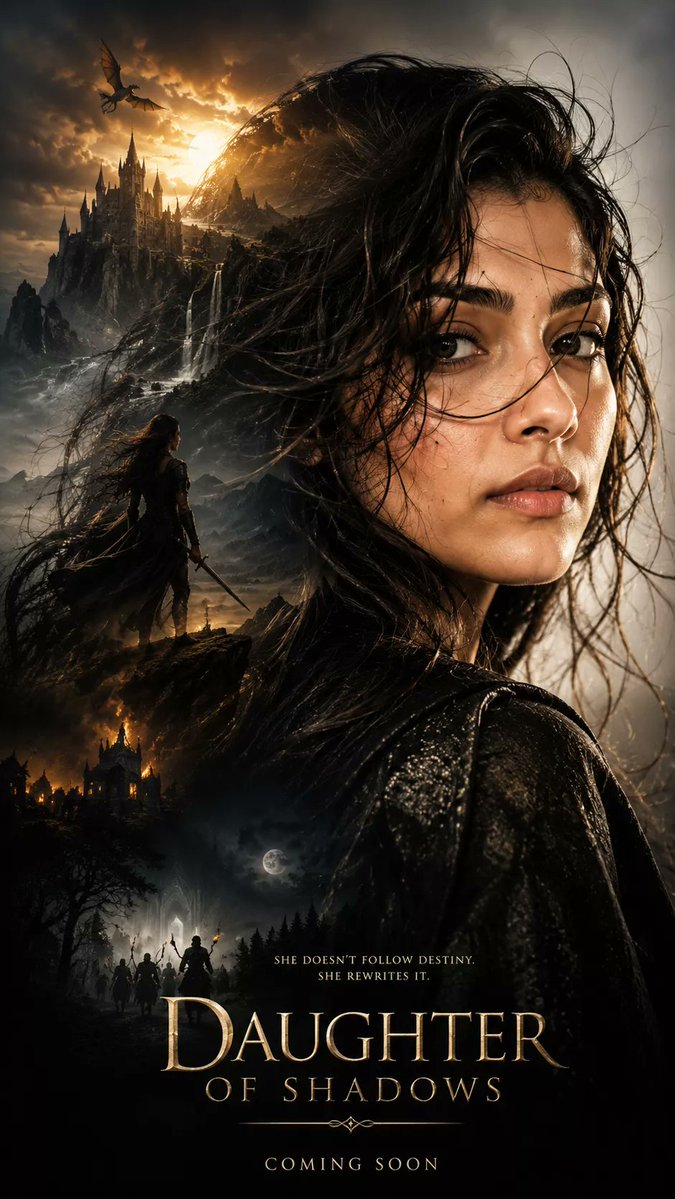
Create a cinematic, high-detail dark fantasy movie poster featuring double-exposure silhouettes, dramatic lighting, and epic storytelling aesthetics.
提示词 · EN
生成一张超电影感的暗黑奇幻海报,使用 argsubject profile: 上传参考照片中的面部和发型 作为轮廓,超写实肖像构图,主体侧面特写,细腻的皮肤纹理,略显凌乱的湿发在风中飘动,强烈而神秘的情绪表达,以及史诗般戏剧性的氛围。双重曝光构图,在写实的剪影中呈现多个场景:[ ] 写实风格,戏剧性深度,体积光,argatmosphere: 奢华、少女感、真人实拍、美学等 氛围,超细腻纹理,电影海报美学,史诗叙事构图,高对比度阴影,灵活的电影级调色,超写实,杰作,清晰对焦,HDR,8K 细节,Unreal Engine 品质,高度细腻的面部,照片级真实感,奇幻冒险氛围。垂直构图,紧凑布局,高级电影海报设计,9:16 纵横比,超高清
关于这个提示词
Create a cinematic, high-detail dark fantasy movie poster featuring double-exposure silhouettes, dramatic lighting, and epic storytelling aesthetics. 它更适合作为 GPT Image 2 的概念艺术起点:先保留画面结构、主体关系和风格约束,再替换成你的品牌、人物或场景。
使用时优先替换 subject profile、atmosphere 等占位符,并保持镜头、构图和材质描述的顺序不变。这样更容易获得稳定的画面结果,也方便继续做多版本对比。
如何使用这个提示词
- Copy the full prompt text from the page.
- Select a compatible image generation model (e.g., Sora 2, DALL·E, Midjourney).
- Customize the
{subject profile}and{atmosphere}variables with your preferred portrait and style. - Adjust the
[]section to describe the specific scenes you want within the silhouette. - Generate the image and iterate on the variables for your perfect result.


