
GPT Image 2AI 提示词
Cinematic Surreal Library Banner with Centered Title — Sora 2 Prompt
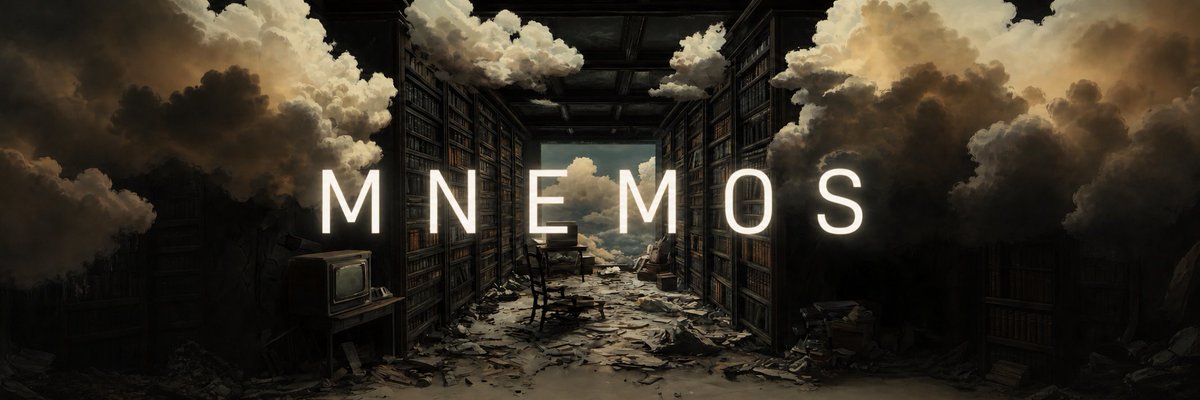
Transform reference art into a polished, wide-screen cinematic banner featuring a centered, floating title that naturally blends into a surreal, abandoned library scene.
提示词 · EN
以 REFERENCE_0 作为基础艺术作品,将其扩展为宽屏电影感横幅,同时保留相同的超现实废弃图书馆场景、构图、氛围和绘画感光影。在画面正中央添加一个居中标题:argheadline text: MNEMOS。文字采用高挑、简洁、字间距较宽的全大写无衬线字体,颜色为明亮的暖白色,大小需足以横跨大部分画面宽度。让文字看起来像是融入场景而非简单粘贴:添加非常柔和的微光、用于提高可读性的轻微阴影,以及略微暗淡的轮廓或边缘对比度,使其自然地置于深色书架和云雾背景之上。保持背景不变,仅进行必要的微小色调平衡,以提升文字易读性,并使整体图像看起来更加精致。
关于这个提示词
Transform reference art into a polished, wide-screen cinematic banner featuring a centered, floating title that naturally blends into a surreal, abandoned library scene. 它更适合作为 GPT Image 2 的概念艺术起点:先保留画面结构、主体关系和风格约束,再替换成你的品牌、人物或场景。
使用时优先替换 headline text 等占位符,并保持镜头、构图和材质描述的顺序不变。这样更容易获得稳定的画面结果,也方便继续做多版本对比。
如何使用这个提示词
- Copy the entire prompt text and paste it into your chosen AI image generation model.
- Replace the placeholder
{argument name="headline text" default="MNEMOS"}with your desired headline. - Optionally adjust the default text style or color keywords to match your brand aesthetic.
- Generate the image and refine the prompt with additional details if needed for better integration.


