
GPT Image 2AI 提示词
Banner Design Variations: 3 Styles — Sora 2 Prompt
Instantly generate multiple banner design variations in elegant, minimalist, and pop styles, with customizable copy for any campaign.
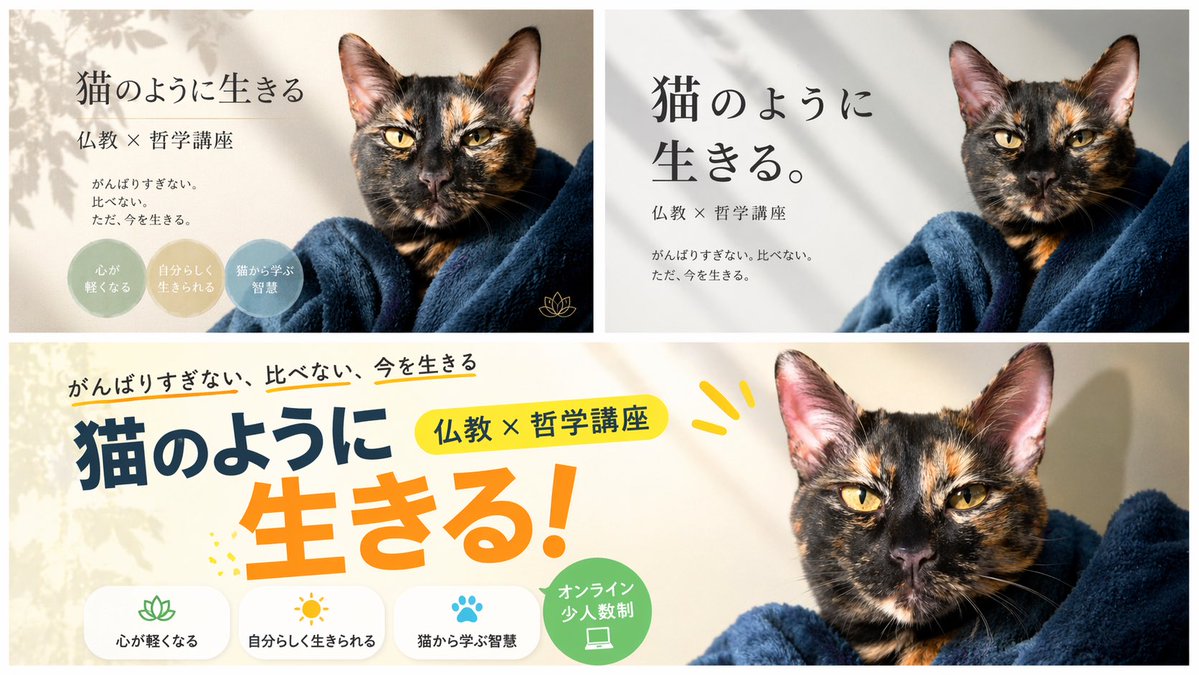
提示词 · EN
type
banner design variationssubject
{argument name="subject" default="裹在深蓝色毛毯里的玳瑁猫"}copywriting
headline
{argument name="main headline" default="像猫一样生活"}subheadline
{argument name="sub headline" default="佛教 × 哲学讲座"}body
{argument name="body text" default="不过度努力。不盲目比较。只活在当下。"}layout
sections
item 1
title
优雅变体position
top-leftstyle
宁静、柔和色调、叶影、衬线字体count
3labels
item 1
让心变轻盈item 2
活出真我item 3
从猫身上学习智慧badge_style
柔和色调圆圈item 2
title
极简变体position
top-rightstyle
简洁、现代、白色背景、柔和阴影、大号衬线字体count
0labels
item 3
title
流行变体position
bottomstyle
活力、多彩、粗体无衬线字体、黄色和橙色点缀count
4labels
item 1
让心变轻盈item 2
活出真我item 3
从猫身上学习智慧item 4
线上小班制badge_style
带有图标的白色圆角矩形及一个绿色圆圈关于这个提示词
Instantly generate multiple banner design variations in elegant, minimalist, and pop styles, with customizable copy for any campaign. 它更适合作为 GPT Image 2 的概念艺术起点:先保留画面结构、主体关系和风格约束,再替换成你的品牌、人物或场景。
这条提示词使用结构化 JSON 组织信息,包含 type、subject、copywriting、layout 等字段。保留这种层级能让模型更清楚地区分画面主题、布局、界面元素和细节约束。
使用时建议先小幅修改主体、场景、镜头和色调,再生成多个版本对比构图与细节。这样页面内容对用户有实际帮助,也避免把模型名或标签机械堆在正文里。
如何使用这个提示词
- Copy the prompt and paste it into your AI design tool (e.g., Sora 2, DALL·E, Midjourney).
- Choose a model that supports text-to-image generation with layout and typography controls.
- Adjust the subject, headlines, and copywriting variables to match your brand or message.
- Set the desired style (elegant, minimalist, or pop) or generate all three variations.
- Click generate and refine outputs by tweaking colour schemes or fonts as needed.


