
GPT Image 2AI 提示词
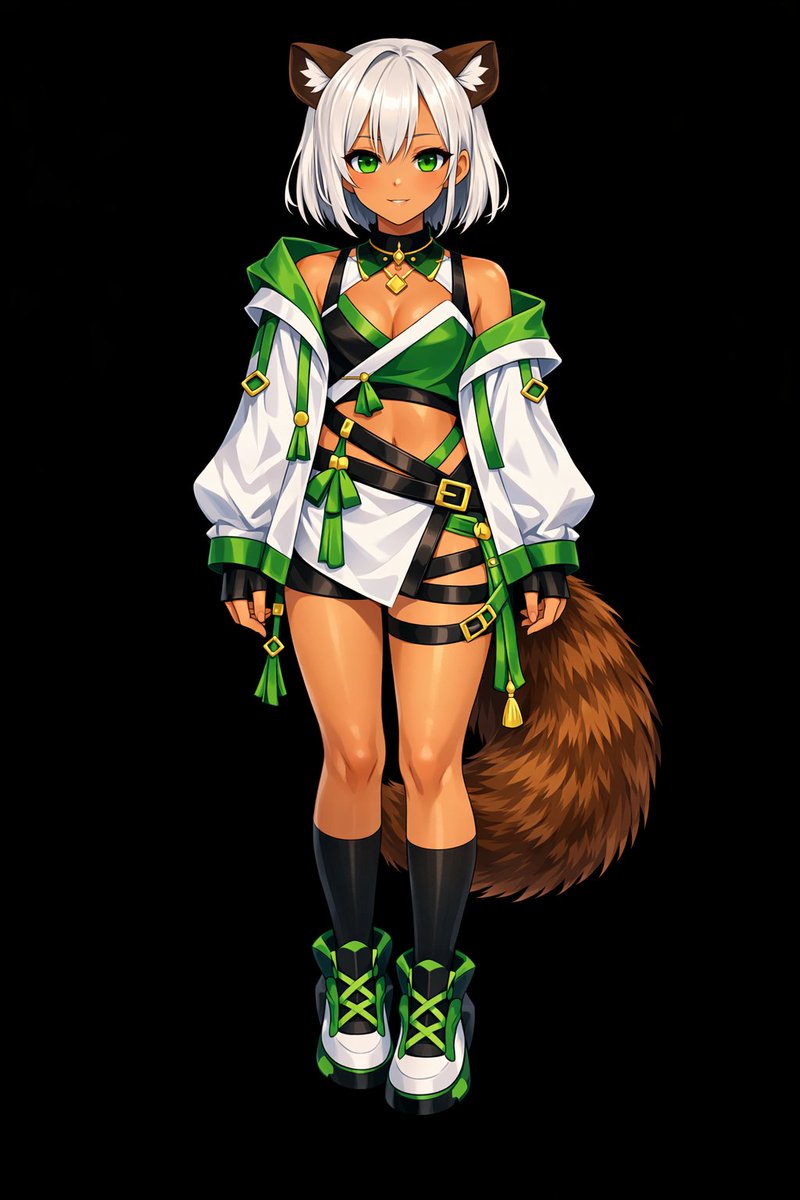
Transform Flat Art into Glossy Anime — Sora 2 Prompt
Turn flat-colored character references into dynamic, high-gloss anime illustrations with dramatic lighting, deep shadows, bright highlights, and realistic metallic textures on a pure black background.
提示词 · EN
以 REFERENCE_0 为基础,将扁平配色转换为 argrendering style: 高细节、光泽感动漫插画风格。应用深层阴影、戏剧性光影以及明亮的高光,特别是在角色的皮肤、头发和尾巴上。增强衣物褶皱感,并赋予金属装饰真实的质感。将背景更改为 argbackground color: 纯黑色。
关于这个提示词
Turn flat-colored character references into dynamic, high-gloss anime illustrations with dramatic lighting, deep shadows, bright highlights, and realistic metallic textures on a pure black background. 它更适合作为 GPT Image 2 的概念艺术起点:先保留画面结构、主体关系和风格约束,再替换成你的品牌、人物或场景。
使用时优先替换 rendering style、background color 等占位符,并保持镜头、构图和材质描述的顺序不变。这样更容易获得稳定的画面结果,也方便继续做多版本对比。
如何使用这个提示词
- Copy this prompt from the page.
- Paste it into an AI image generator that supports reference images (like Sora 2).
- Upload your flat-color character reference.
- Adjust optional arguments (e.g., rendering style or background color) if desired.
- Generate your high-detail, glossy anime artwork.


