
GPT Image 2AI 提示词
Chinese Coastal Bridge Blueprint Poster — Vintage Line Art Prompt
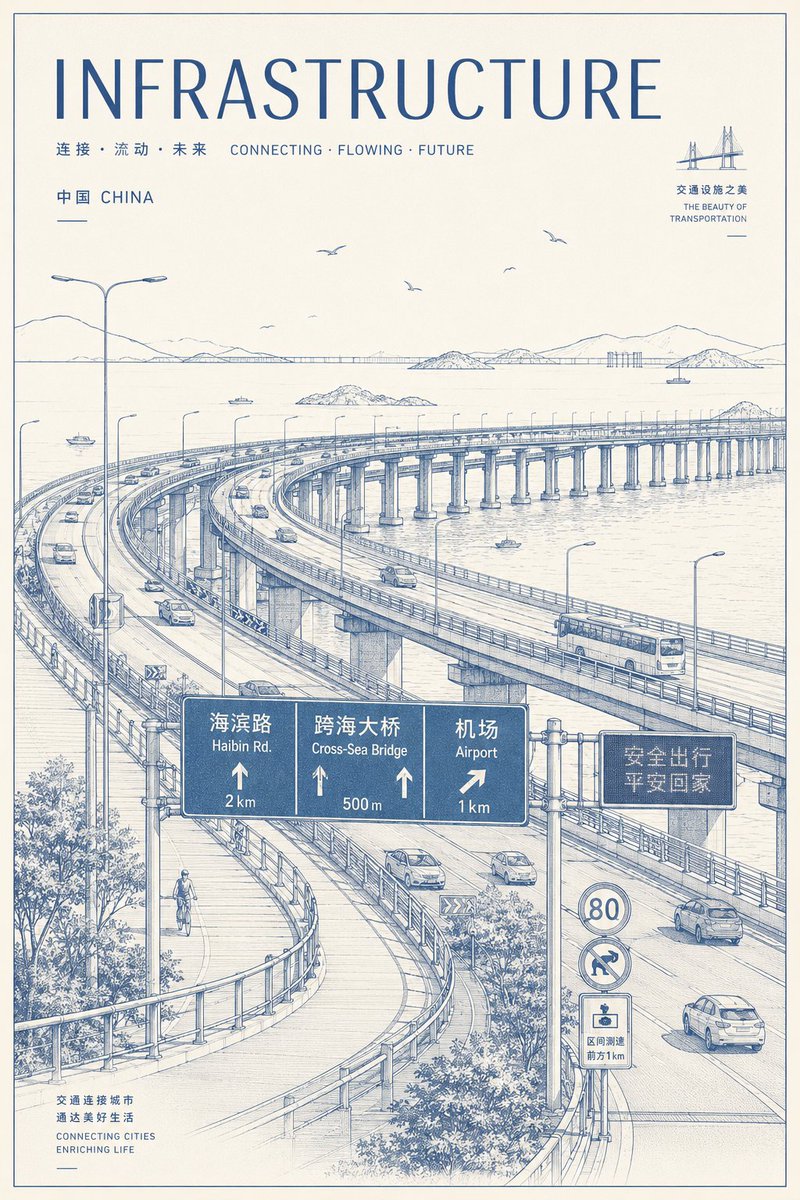
Create a vintage blueprint-style poster of a Chinese coastal highway interchange with elegant line art, bilingual road signs, and minimalist typography.
提示词 · EN
type
竖版基础设施旅行海报 / 技术线条插画style
米色纸张背景,单色蓝色墨水,精准的建筑绘图,精细的阴影线,蓝图般的轮廓线,极简复古海报设计,干净的页边距和细边框format
aspect_ratio
2:3 竖版海报color_palette
仅限灰白色纸张和深哑光蓝色headline
text
{argument name="headline text" default="基础设施"}position
顶部style
超大字号、字间距宽的无衬线大写字母subheadings
count
3items
item 1
text
连接 · 流动 · 未来 CONNECTING · FLOWING · FUTUREposition
标题下方,居左item 2
text
中国 CHINAposition
左上方item 3
text
交通设施之美 / THE BEAUTY OF TRANSPORTATIONposition
右上方,微型桥梁图标旁main_scene
location
{argument name="location" default="中国沿海海湾"}subject
横跨水面的宏伟高架跨海高速公路立交桥composition
高视角俯瞰前景中多条弯曲的桥梁匝道,长桥延伸跨越海面至远处的岛屿和山脉,广阔的天空中有几只小鸟details
平静水面上倒映着许多纤细的桥墩,护栏、路灯、车道标线、小船、远处的船舶、岛屿、海岸山脉,前景下方有树木和灌木vehicles
行驶在高架路上的小汽车、轿车、面包车和一辆巴士road_signage
count
5items
item 1
description
大型悬挂式蓝色指示牌,分为 3 个面板position
下方中心labels
item 1
海滨路 / Haibin Rd. / 2 kmitem 2
跨海大桥 / Cross-Sea Bridge / 500 mitem 3
机场 / Airport / 1 kmitem 2
description
电子信息板position
悬挂式指示牌右侧label
安全出行 / 平安回家item 3
description
圆形限速标志position
右下方label
80item 4
description
圆形车道或转弯指示标志position
限速标志下方label
弯曲箭头符号item 5
description
小型矩形区域道路警告标志position
标志堆底部label
区间测速 / 前方1kmhuman_element
count
1description
前景左下方有一名骑行者在独立的行人或自行车道上骑行footer_text
text
交通连接城市 / 通达美好生活 / CONNECTING CITIES / ENRICHING LIFEposition
左下方rendering_instructions
不要使用照片级真实色彩;保持所有内容为暖色纸张上精致的蓝色钢笔绘图风格。强调基础设施的规模感、优雅的桥梁曲线、精准的透视和海报排版。在可能的情况下,严格保留指定的中文和英文文本。关于这个提示词
Create a vintage blueprint-style poster of a Chinese coastal highway interchange with elegant line art, bilingual road signs, and minimalist typography. 它更适合作为 GPT Image 2 的概念艺术起点:先保留画面结构、主体关系和风格约束,再替换成你的品牌、人物或场景。
这条提示词使用结构化 JSON 组织信息,包含 type、style、format、headline、subheadings、main scene、road signage 等字段。保留这种层级能让模型更清楚地区分画面主题、布局、界面元素和细节约束。
使用时建议先小幅修改主体、场景、镜头和色调,再生成多个版本对比构图与细节。这样页面内容对用户有实际帮助,也避免把模型名或标签机械堆在正文里。
如何使用这个提示词
- Copy the full prompt and paste it into a compatible Sora 2 or text-to-image model.
- Choose a 2:3 portrait aspect ratio for the best poster layout.
- Customize the
headline textandlocationarguments to match your project or region. - Generate the image and adjust the color settings if needed to maintain the blue-on-cream aesthetic.
- Use the output for architectural prints, editorial visuals, or infrastructure-themed design projects.


