
GPT Image 2AI 提示词
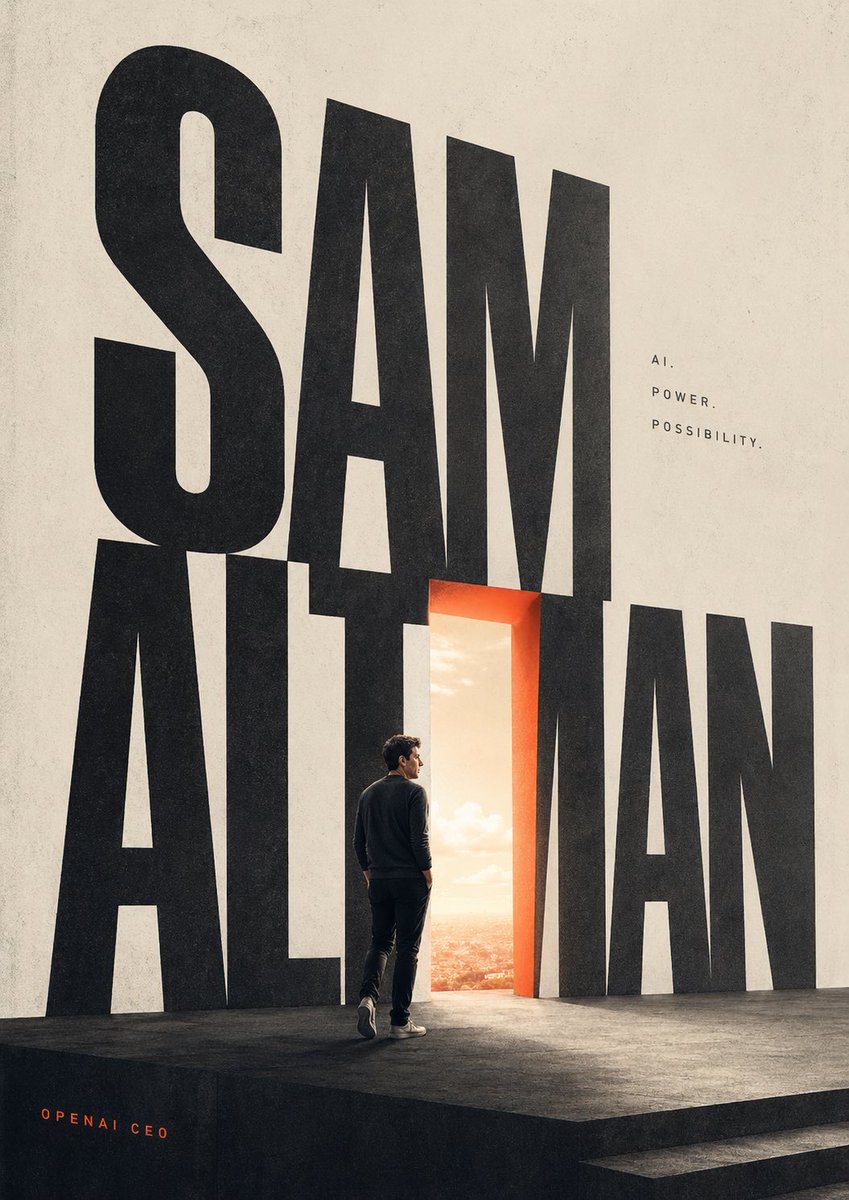
Cinematic Typography Poster Prompt — Glowing Portal & Figure
Create a cinematic poster with giant typography, a glowing orange doorway to a cityscape, and a lone figure—ideal for magazine covers and tech art.
提示词 · EN
一张极简主义的电影感海报,采用高垂直画布,背景为米白色纹理纸张,底部为深色哑光舞台平台。画面主体为巨大的黑色紧凑型无衬线字母,拼写出 argmain title: SAM ALTMAN,几乎占据了整个构图的高度,第一个单词堆叠在第二个单词上方并与之重叠。将其中一个中央垂直字母替换为一个发光的开放式门廊,轮廓呈现温暖的橙红色光芒,显露出明亮的日出天空和远处的城市景观。在舞台上,放置 1 位从背后看去呈四分之三侧面的成年男性,正走向门廊,身穿深色圆领毛衣、深色长裤和浅色运动鞋,比例真实,并带有微妙的戏剧性轮廓光。在排版的右上角,添加 3 行间距较大的大写文本,内容为 argtagline line 1: AI.,argtagline line 2: POWER.,以及 argtagline line 3: POSSIBILITY.。在左下角,添加 1 行小型的橙色致谢文字,内容为 argcredit text: OPENAI CEO。运用强烈的比例对比、大量的留白、杂志封面式的编辑风格、简洁现代的布局、柔和的中性色调并辅以一抹温暖的橙色点缀,呈现出逼真的光影、细腻的胶片颗粒感以及精致的未来主义氛围。
关于这个提示词
Create a cinematic poster with giant typography, a glowing orange doorway to a cityscape, and a lone figure—ideal for magazine covers and tech art. 它更适合作为 GPT Image 2 的概念艺术起点:先保留画面结构、主体关系和风格约束,再替换成你的品牌、人物或场景。
使用时优先替换 main title、tagline line 1、tagline line 2、tagline line 3 等占位符,并保持镜头、构图和材质描述的顺序不变。这样更容易获得稳定的画面结果,也方便继续做多版本对比。
如何使用这个提示词
- Copy the prompt into your preferred AI image generation tool (e.g., Sora 2, Midjourney, DALL-E).
- Customize the main title, tagline, and credit text variables to match your name or brand.
- Set a high vertical canvas (e.g., 2:3 aspect ratio) for the cinematic poster effect.
- Generate the image and iterate on the composition or lighting for best results.


