
GPT Image 2AI 提示词
Luxury Watch Blueprint Poster — Sora 2 Prompt
Create a Swiss luxury watch poster with a hero shot, movement detail, case cross-section, strap system, and spec list—perfect for high-end brand pages.
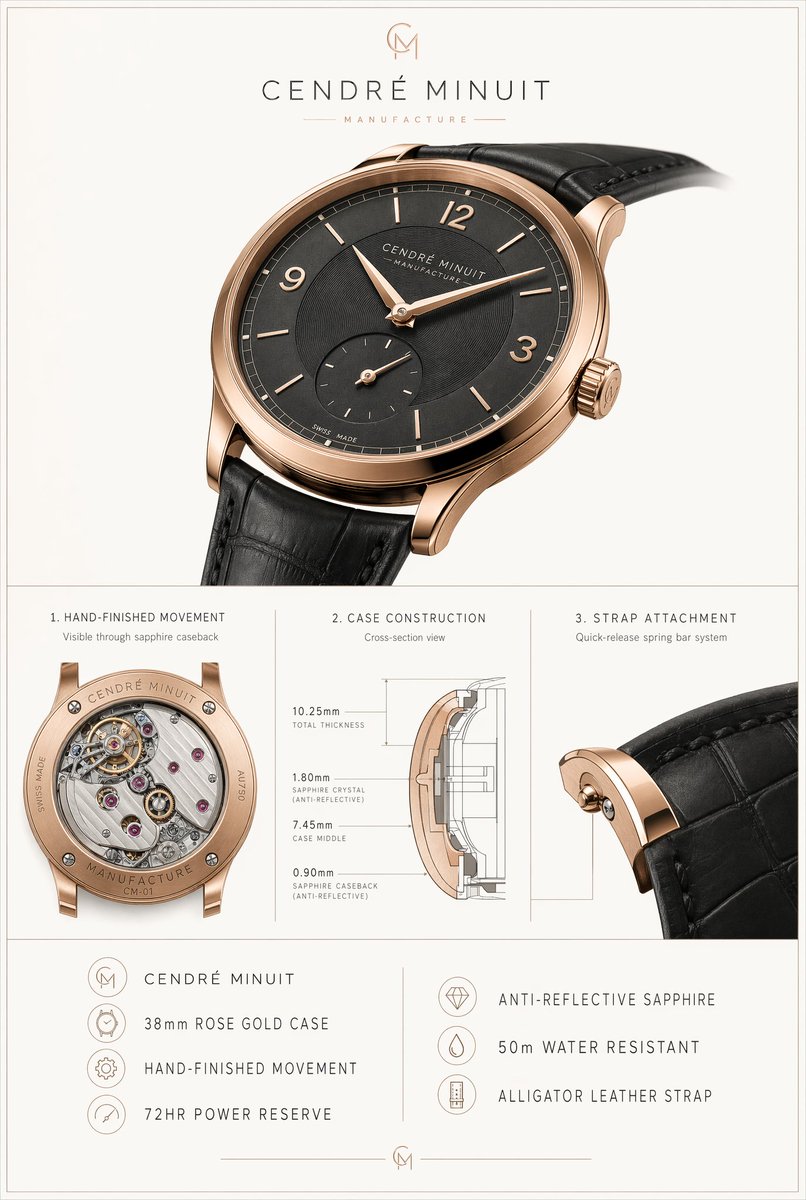
提示词 · EN
type
奢华腕表产品规格海报brand
name
{argument name="brand name" default="CENDRÉ MINUIT"}tagline
MANUFACTUREmonogram
CMsubject
product
正装腕表case
diameter
{argument name="case size" default="38mm"}material
{argument name="case material" default="玫瑰金"}finish
高抛光暖色玫瑰金调shape
圆形超薄表壳,配以优雅的弧形表耳crown
镌刻品牌字母组合的凹槽表冠dial
color
{argument name="dial color" default="炭黑色"}style
极简扇形纹理表盘markers
count
10details
8 枚纤细条形刻度,12、3、9 点位为阿拉伯数字,6 点位因小秒盘无刻度hands
叶形玫瑰金时针和分针subdials
count
1type
6 点位小秒盘text
item 1
CENDRÉ MINUITitem 2
MANUFACTUREitem 3
SWISS MADEstrap
material
{argument name="strap material" default="黑色鳄鱼皮"}color
黑色attachment
快拆生耳系统movement
type
机械手工打磨机芯visible_caseback
truepower_reserve
72 小时layout
background
柔和暖灰色,画布四周环绕纤细双线边框orientation
竖版海报sections
item 1
title
主视觉产品图position
顶部count
1labels
item 1
主腕表item 2
title
1. 手工打磨机芯position
中左count
1labels
item 1
透过蓝宝石底盖可见item 3
title
2. 表壳结构position
中中count
1labels
item 1
横截面视图item 2
总厚度 10.25mmitem 3
1.80mm 蓝宝石水晶玻璃(防反射)item 4
7.45mm 表壳中框item 5
0.90mm 蓝宝石底盖(防反射)item 4
title
3. 表带连接position
中右count
1labels
item 1
快拆生耳系统item 5
title
左侧功能列表position
底部左侧count
4labels
item 1
CENDRÉ MINUITitem 2
38mm 玫瑰金表壳item 3
手工打磨机芯item 4
72 小时动力储备item 6
title
右侧功能列表position
底部右侧count
3labels
item 1
防反射蓝宝石玻璃item 2
50 米防水item 3
鳄鱼皮表带dividers
纤细的灰色垂直和水平线分隔各区域visual_style
look
高端瑞士腕表广告及技术规格表lighting
柔和摄影棚灯光,呈现逼真的金属反射与细腻阴影camera
主腕表以大尺寸四分之三正面视角呈现,略向右倾斜,表带延伸至画框外;下方板块展示精细微距特写typography
精致的大写奢华无衬线字体,字间距宽裕render_quality
照片级真实感,高端产品目录品质,精准的镌刻细节,逼真的皮革纹理,清晰的技术图解线条关于这个提示词
Create a Swiss luxury watch poster with a hero shot, movement detail, case cross-section, strap system, and spec list—perfect for high-end brand pages. 它更适合作为 GPT Image 2 的概念艺术起点:先保留画面结构、主体关系和风格约束,再替换成你的品牌、人物或场景。
这条提示词使用结构化 JSON 组织信息,包含 type、brand、subject、layout、visual style 等字段。保留这种层级能让模型更清楚地区分画面主题、布局、界面元素和细节约束。
使用时建议先小幅修改主体、场景、镜头和色调,再生成多个版本对比构图与细节。这样页面内容对用户有实际帮助,也避免把模型名或标签机械堆在正文里。
如何使用这个提示词
- Copy the entire prompt from the text area above.
- Open your preferred AI image generator (e.g., Midjourney, DALL·E, Stable Diffusion).
- (Optional) Adjust the variables like
case material,dial color, orstrap materialto fit your brand. - Paste the prompt and generate. For best results, use a model with strong detail rendering.
- Review the output; if labels aren't perfect, add final text in a design tool.


