
GPT Image 2AI 提示词
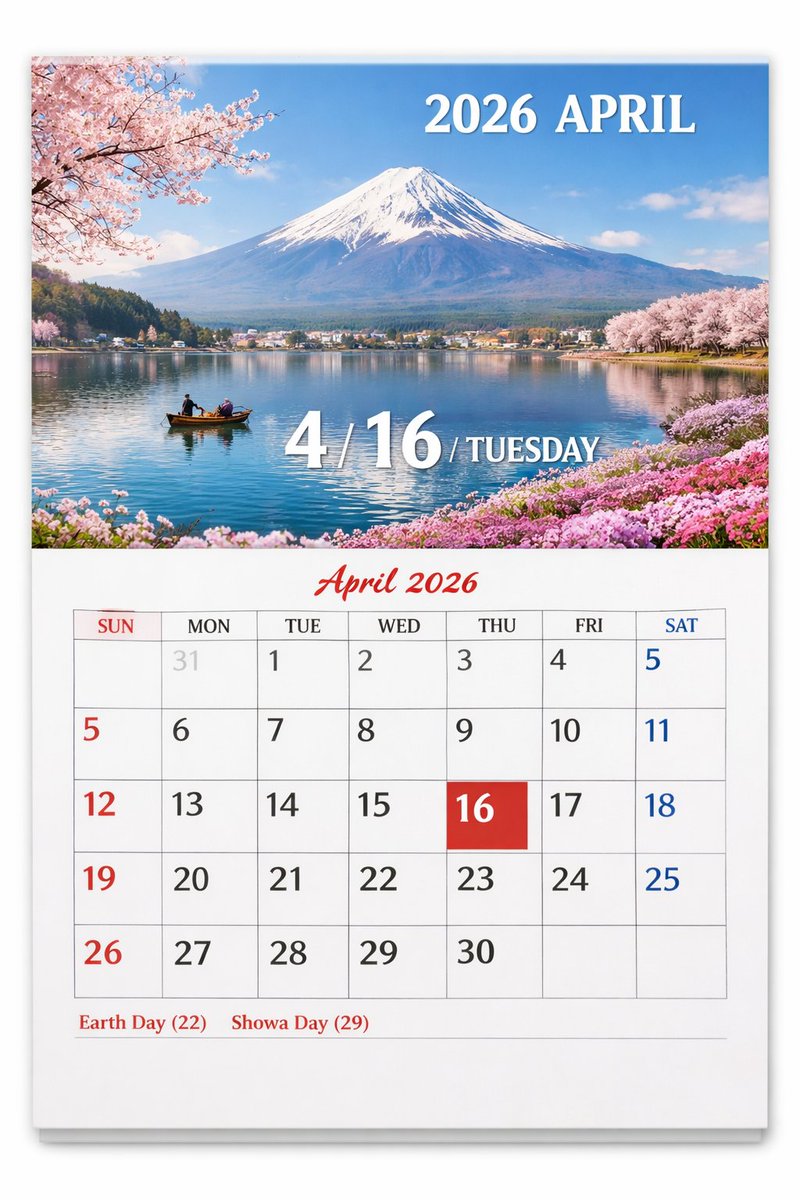
Fuji & Cherry Blossom Calendar Page — Sora 2 Prompt
Generate a photo-realistic wall calendar featuring custom scenic photos, a detailed monthly grid, and elegant text overlays — perfect for personalized prints.
提示词 · EN
type
挂历页面presentation
挂在白色墙壁上的实体纸质日历,带有细微的投影效果layout
top_half
type
风景照片subject
{argument name="scenic location" default="富士山、樱花与湖泊"}details
白雪皑皑的山峰,平静的蓝色湖面倒影,一艘载着两人的小木船,左上角和右上角的岸边有粉色樱花点缀,右下角岸边有粉色花朵text_overlays
item 1
position
右上角text
{argument name="year and month" default="2026 年 4 月"}style
白色衬线字体item 2
position
底部居中text
4 / {argument name="highlighted date" default="16"} / {argument name="day of week" default="星期二"}style
带有投影效果的大号白色衬线字体bottom_half
type
日历网格header
text
2026 年 4 月style
红色草书字体,居中grid_structure
columns
7rows
5column_headers
item 1
周日item 2
周一item 3
周二item 4
周三item 5
周四item 6
周五item 7
周六grid_content
highlighted_cell
date
{argument name="highlighted date" default="16"}style
纯红色方形背景,白色文字number_colors
周日为红色,周六为蓝色,工作日为黑色,上个月日期为浅灰色notable_features
AI 生成的伪影,数字 5 出现了两次(第一行末尾和第二行开头)footer
text
{argument name="holidays" default="地球日 (22) 昭和之日 (29)"}position
左下角style
红色衬线字体关于这个提示词
Generate a photo-realistic wall calendar featuring custom scenic photos, a detailed monthly grid, and elegant text overlays — perfect for personalized prints. 它更适合作为 GPT Image 2 的概念艺术起点:先保留画面结构、主体关系和风格约束,再替换成你的品牌、人物或场景。
这条提示词使用结构化 JSON 组织信息,包含 type、presentation、layout 等字段。保留这种层级能让模型更清楚地区分画面主题、布局、界面元素和细节约束。
使用时建议先小幅修改主体、场景、镜头和色调,再生成多个版本对比构图与细节。这样页面内容对用户有实际帮助,也避免把模型名或标签机械堆在正文里。
如何使用这个提示词
- Copy the prompt and paste it into your Sora 2 or compatible AI image generator.
- Replace the
{argument}placeholders with your desired scenic location, date, and holidays (e.g., "Swiss Alps", "2026 May 15 Wednesday"). - Choose a high-quality, photo-realistic model for best results.
- Generate the image and refine the prompt as needed to fine-tune details like text clarity or layout.
- Download and use your personalized calendar page.


