
GPT Image 2AI 提示词
Japanese Mountain Safety Infographic — Climbing Registration Prompt
Create a square public safety infographic promoting mountain climbing registration and preparedness, with clear Japanese text and friendly illustration style.
提示词 · EN
type
日本公共安全信息图海报topic
登山登记与安全预防措施headline
{argument name="headline text" default="饭能市登山届提交呼吁与山岳安全注意事项"}style
友好且具插画风格的政府公告,简洁的矢量艺术,粗圆边框,蓝色步骤编号,绿色山脉,温暖的米白色背景,手绘图形记录风格,清晰易读的日语文本,正方形社交媒体图片layout
overall
正方形海报,顶部有醒目的大标题,中心为四格流程图,右下角有一个醒目的红色行动呼吁框,底部为浅绿色检查清单条main panels
count
4items
item 1
number
1position
左上content
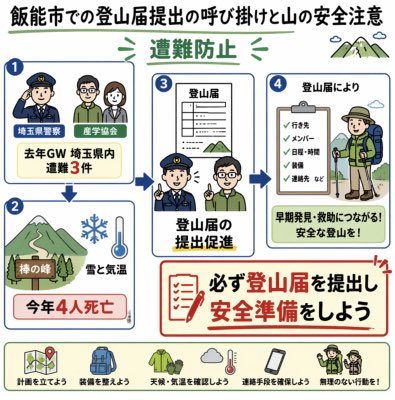
警察、登山者和登山俱乐部代表图标,讨论安全问题;标签块显示“埼玉県警察”和“越生会”;中心文字为“去年黄金周埼玉县内发生 3 起遇险事故”item 2
number
2position
左下content
山路插图,配有雪花和温度计图标;标签显示“棒之峰”、“雪与气温”,以及红色警告框“今年已有 4 人死亡”item 3
number
3position
中心content
一份标题为“登山届”的文件,上方为警察与登山者交谈;主要标题为“促进提交登山届”item 4
number
4position
右上content
剪贴板检查清单,旁边是戴帽子和穿着绿色装备的背包客;清单文字包括“目的地”、“成员”、“日程与时间”、“装备”、“联系方式等”;黄色信息框显示“有助于早期发现与救援!安全登山!”flow arrows
count
4description
蓝色箭头将面板 1 连接至面板 2,面板 1 连接至面板 3,面板 2 连接至面板 3,面板 3 连接至面板 4,展示安全意识的提升过程call to action
position
右下border
粗红色圆角矩形icon
红色检查清单纸和铅笔text
{argument name="call to action text" default="务必提交登山届,做好安全准备"}bottom checklist strip
count
5items
item 1
icon
带有定位针的地图label
制定计划item 2
icon
背包和装备label
准备装备item 3
icon
太阳、云、雨和温度计label
确认天气与气温item 4
icon
智能手机联系图标label
确保联系方式item 5
icon
向导或警察指示图标label
量力而行!visual details
color palette
绿色、海军蓝、红色警告强调色、浅黄色、奶油色背景typography
粗体日语无衬线标题,死亡人数和行动文字使用红色强调,圆角框内的小标签mood
紧迫但亲切,教育性,市政防灾公告subject location
{argument name="city name" default="饭能市"}safety statistic
{argument name="death toll text" default="今年 4 人死亡"}holiday statistic
{argument name="incident statistic text" default="去年黄金周埼玉县内发生 3 起遇险事故"}rendering instructions
生成一张精美、清晰的日语信息图,所有文字拼写准确,间距平衡,图标风格统一,非写实风格,无多余面板,并严格保持面板数量和检查清单项数。关于这个提示词
Create a square public safety infographic promoting mountain climbing registration and preparedness, with clear Japanese text and friendly illustration style. 它更适合作为 GPT Image 2 的概念艺术起点:先保留画面结构、主体关系和风格约束,再替换成你的品牌、人物或场景。
这条提示词使用结构化 JSON 组织信息,包含 type、topic、headline、style、layout、visual details、rendering instructions 等字段。保留这种层级能让模型更清楚地区分画面主题、布局、界面元素和细节约束。
使用时建议先小幅修改主体、场景、镜头和色调,再生成多个版本对比构图与细节。这样页面内容对用户有实际帮助,也避免把模型名或标签机械堆在正文里。
如何使用这个提示词
- Copy the full prompt into your AI image generator.
- Choose a model that supports detailed graphic design prompts (e.g., DALL-E 3, Midjourney).
- Customize variables like headline text, city name, and death toll statistic to match your local data.
- Generate the image and review the square layout with four-panel flowchart and call-to-action box.


