
GPT Image 2AI 提示词
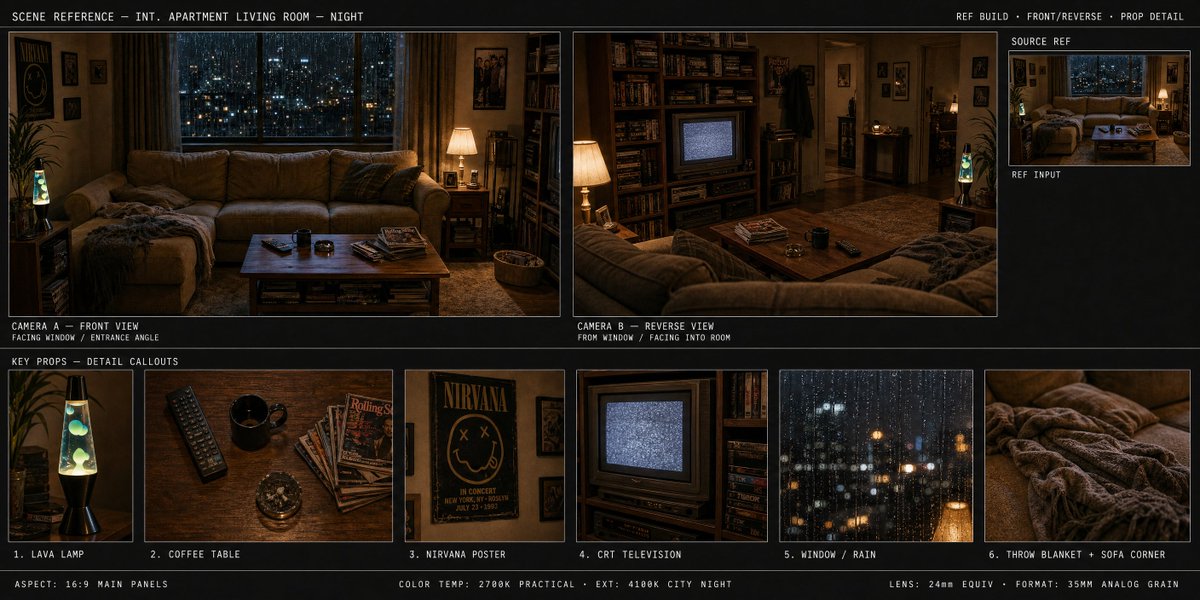
Multi-Camera Scene Director Prompt — Sora 2 Spatial Design
A structured prompt that generates a three-zone set layout with dual camera angles and numbered prop close-ups for cinematic scene planning.
提示词 · EN
生成一个包含三个区域的项目:
— 摄像机 A (argcamera a view: 正面视角,面向窗户)
— 摄像机 B (argcamera b view: 真实 180° 反打,前景为沙发靠背)
— 道具细节条:argprop list: ①熔岩灯 ②毛毯 ③马克杯 ④CRT 电视机
— 每个道具均已编号,且每个都配有特写图块
关于这个提示词
A structured prompt that generates a three-zone set layout with dual camera angles and numbered prop close-ups for cinematic scene planning. 它更适合作为 GPT Image 2 的概念艺术起点:先保留画面结构、主体关系和风格约束,再替换成你的品牌、人物或场景。
使用时优先替换 camera a view、camera b view、prop list 等占位符,并保持镜头、构图和材质描述的顺序不变。这样更容易获得稳定的画面结果,也方便继续做多版本对比。
如何使用这个提示词
- Copy the entire prompt into your preferred AI video or image generation tool.
- Select a model that supports multi-shot or multi-region generation, such as Sora 2 or similar.
- Customize the camera views, prop list, and other bracketed variables to match your creative vision.
- Generate the output and review each zone—the two camera angles and the prop detail strip—separately or as a unified storyboard.
- Iterate by tweaking prop descriptions or camera perspectives until the scene composition feels right.


