
GPT Image 2AI 提示词
Snowy Station Anime VN Screenshot — Sora 2 Prompt
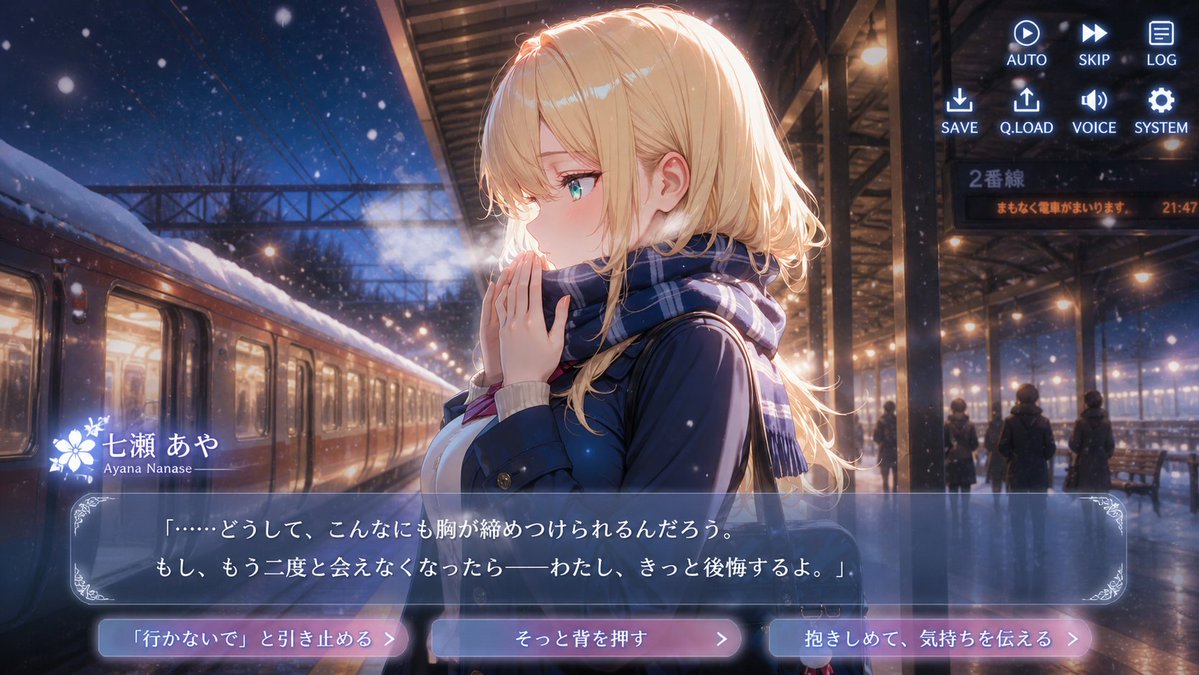
Generate a cinematic anime visual novel screenshot of a golden-haired heroine in a snowy night station, complete with romantic dialogue UI and emotional choice buttons.
提示词 · EN
type
电影感动漫视觉小说截图aspect_ratio
16:9 宽屏setting
location
夜晚雪中的火车站台atmosphere
浪漫、忧郁的冬夜,飘落的雪花,可见的呼气白雾,温暖的车站灯光与深蓝色的夜空形成对比background_details
左侧停靠着一列车,车窗透出光亮,车顶覆盖着积雪,上方有钢结构雨棚和电线,远处有乘客剪影、长椅、湿润反光的站台,发光的指示牌写着“2番線”,橙色告示牌写着“まもなく電車がまいります。 21:47”main_character
name
{argument name="character name" default="七濑绫"}romanized_name
Ayana Nanaseposition
中右前景,侧身面向左侧appearance
美丽的动漫少女,皮肤白皙,青绿色眼睛,淡淡的红晕,精致的五官hair
{argument name="hair color" default="长波浪金发,带有侧分刘海和发光的轮廓光"}outfit
{argument name="outfit" default="深蓝色冬季校服风格外套,内搭浅色毛衣,脖子上围着蓝色格子围巾"}pose_expression
双手合十放在嘴边,仿佛在取暖或犹豫,表情沉思且脆弱,寒冷空气中可见呼吸的白雾visual_style
高细节日本动漫关键视觉图,高级恋爱模拟视觉小说 CG,柔和光晕,电影级灯光,浅景深,闪烁的雪花颗粒,光泽反光,精致的游戏 UI 覆盖层layout
ui_overlay
count
4components
item 1
component
右上角指令菜单position
右上角count
8labels
item 1
AUTOitem 2
SKIPitem 3
LOGitem 4
SAVEitem 5
Q.LOADitem 6
VOICEitem 7
SYSTEMitem 8
播放、快进、文档、下载、上传、扬声器、齿轮图标item 2
component
角色名牌position
对话框左下方count
2labels
item 1
七濑绫item 2
Ayana Nanasedecoration
名字旁有白色花卉纹章item 3
component
对话框position
底部三分之一count
1text
{argument name="dialogue text" default="「……怎么会,心口这么紧。如果,再也见不到你了——我一定会后悔的。」"}appearance
半透明蓝灰色矩形框,带有细边框和华丽的边角装饰item 4
component
选项按钮position
最底部count
3labels
item 1
挽留她:“别走”item 2
轻轻推她一把item 3
拥抱她,传达心意appearance
三个圆角发光粉蓝渐变按钮,带有右箭头符号composition
角色占据右半部分,火车和雪中站台从左侧向背景延伸出强烈的透视感,UI 保持清晰且不遮挡面部mood
苦涩的告别抉择场景,列车出发前充满情感张力的浪漫氛围generation_instructions
创建一张完整的最终截图,而非参考图。包含所有可见的游戏界面元素,确保日语文字清晰可读,呈现逼真的雪景和灯光,以及高制作水准的动漫视觉小说美学。关于这个提示词
Generate a cinematic anime visual novel screenshot of a golden-haired heroine in a snowy night station, complete with romantic dialogue UI and emotional choice buttons. 它更适合作为 GPT Image 2 的概念艺术起点:先保留画面结构、主体关系和风格约束,再替换成你的品牌、人物或场景。
这条提示词使用结构化 JSON 组织信息,包含 type、aspect ratio、setting、main character、visual style、layout、generation instructions 等字段。保留这种层级能让模型更清楚地区分画面主题、布局、界面元素和细节约束。
使用时建议先小幅修改主体、场景、镜头和色调,再生成多个版本对比构图与细节。这样页面内容对用户有实际帮助,也避免把模型名或标签机械堆在正文里。
如何使用这个提示词
- Copy the full prompt JSON into your AI image generator.
- Select a model capable of high-detail anime or illustration styles (e.g., Sora 2, DALL·E 3, Midjourney).
- Customize the character name, hair color, outfit, and dialogue text by editing the
{argument}fields. - Generate the image and verify all UI overlays (command menu, dialogue box, choice buttons) render correctly.
- Adjust the scene description or mood keywords if the output needs fine-tuning.


