
GPT Image 2AI 提示词
Japanese Character Manual Poster — Sora 2 Prompt
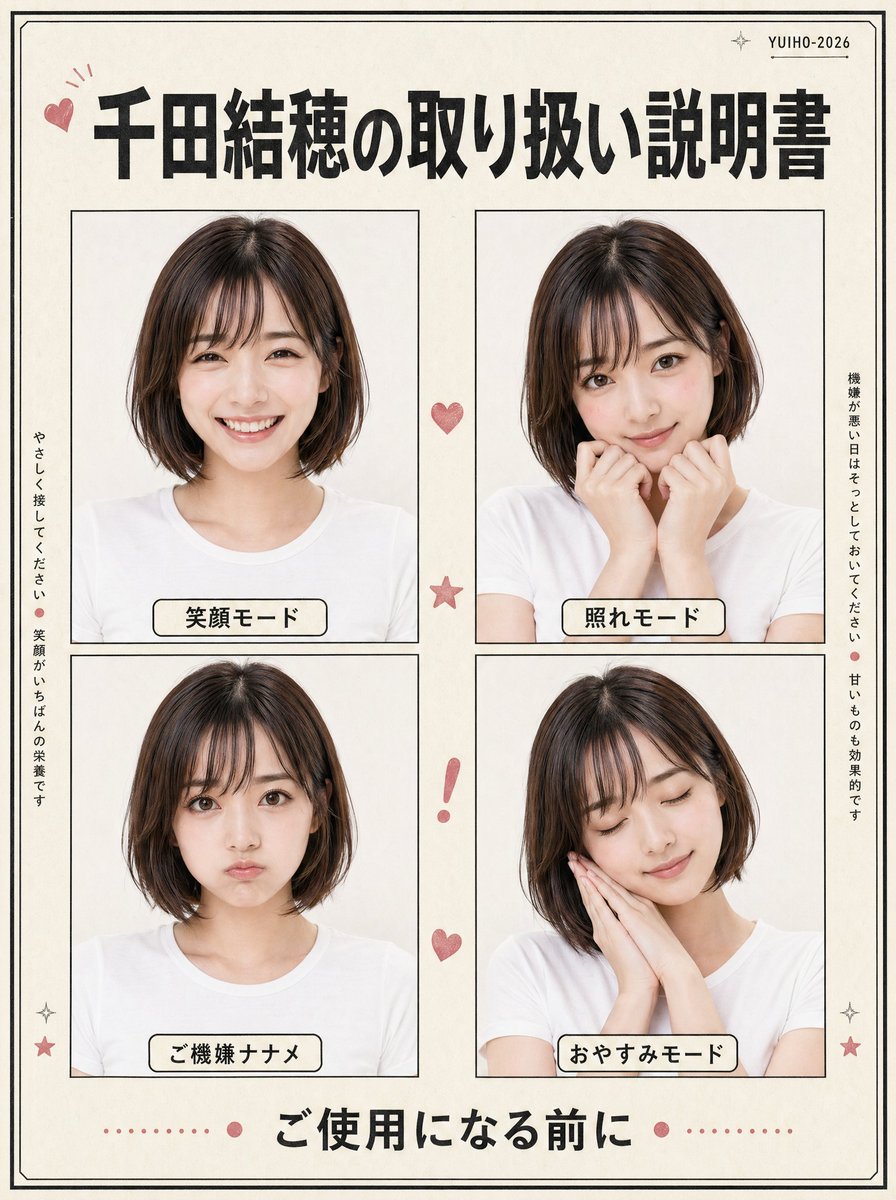
Create a charming retro-style Japanese instruction poster featuring four expressive portrait panels, perfect for character profiles and social media fun.
提示词 · EN
type
日系复古风格角色说明书海报subject
person
年轻日本女性appearance
hair
color
{argument name="hair color" default="深棕色"}style
柔顺的下巴长度波波头,侧分刘海clothing
纯白色圆领 T 恤photo_style
干净的摄影棚肖像,柔和均匀的灯光,米白色背景,自然的肤色,极简的阴影design
paper
带有细腻复古纹理的暖象牙色纸张border
页面四周环绕细双线黑边accent_color
灰粉色overall_style
可爱的说明书或操作指南布局,整洁的编辑拼贴风格,略带复古的日系印刷美学layout
header
count
3items
item 1
左上角的小粉色爱心涂鸦item 2
居中的大号加粗日文标题item 3
右上角写有 YUIHO-2026 的小字,带有微小的闪光标记title
{argument name="headline text" default="千田结穗的取用说明书"}main_grid
rows
2columns
2count
4panels
item 1
position
左上label
笑容模式pose
正面半身像,肩膀放松,表情温柔愉悦item 2
position
右上label
害羞模式pose
略显羞涩的姿势,双手抬起靠近嘴部和脸颊item 3
position
左下label
心情不佳pose
正面半身像,情绪低落或不悦,表情克制item 4
position
右下label
晚安模式pose
头部微倾,双手合十贴在脸颊旁,呈现睡意side_text
count
2items
item 1
position
左侧竖排text
请温柔对待。笑容是最好的营养。item 2
position
右侧竖排text
心情不好时请让她静一静。甜食也很有效。decorations
count
7items
item 1
顶部两张图之间的一颗小粉色爱心item 2
两行中间的一颗粉色星星item 3
下方两张图之间的一个粉色感叹号item 4
感叹号下方的一颗粉色爱心item 5
左下角和右下角附近的 2 个小闪光/星星图标item 6
页脚文字周围带有居中圆点的粉色虚线分割线footer
count
1text
{argument name="footer text" default="使用前请阅读"}style
底部居中的大号加粗日文字体composition
方形海报,对称间距,四个等大的肖像框,带有黑色细边框,每个肖像面板下方均有带黑色边框的圆角奶油色标签rendering
嵌入图形海报布局的写实肖像照片,高分辨率,清晰的排版,平衡的页边距关于这个提示词
Create a charming retro-style Japanese instruction poster featuring four expressive portrait panels, perfect for character profiles and social media fun. 它更适合作为 GPT Image 2 的概念艺术起点:先保留画面结构、主体关系和风格约束,再替换成你的品牌、人物或场景。
这条提示词使用结构化 JSON 组织信息,包含 type、subject、design、layout、composition、rendering 等字段。保留这种层级能让模型更清楚地区分画面主题、布局、界面元素和细节约束。
使用时建议先小幅修改主体、场景、镜头和色调,再生成多个版本对比构图与细节。这样页面内容对用户有实际帮助,也避免把模型名或标签机械堆在正文里。
如何使用这个提示词
- Copy the full prompt JSON and paste it into your preferred AI image generator.
- Select a model that excels at photorealistic portraits and graphic design layouts (e.g., Sora 2, Midjourney v6).
- Customize the variables like hair color, headline text, and footer text to match your character.
- Generate the image and review the four-panel layout, adjusting prompt details if needed for better results.


