
GPT Image 2AI 提示词
Neon Cyber Business YouTube Thumbnail Prompt
Generate an eye-catching YouTube thumbnail with neon green and black cyber aesthetic, featuring layered text, bullet points, and a business theme.
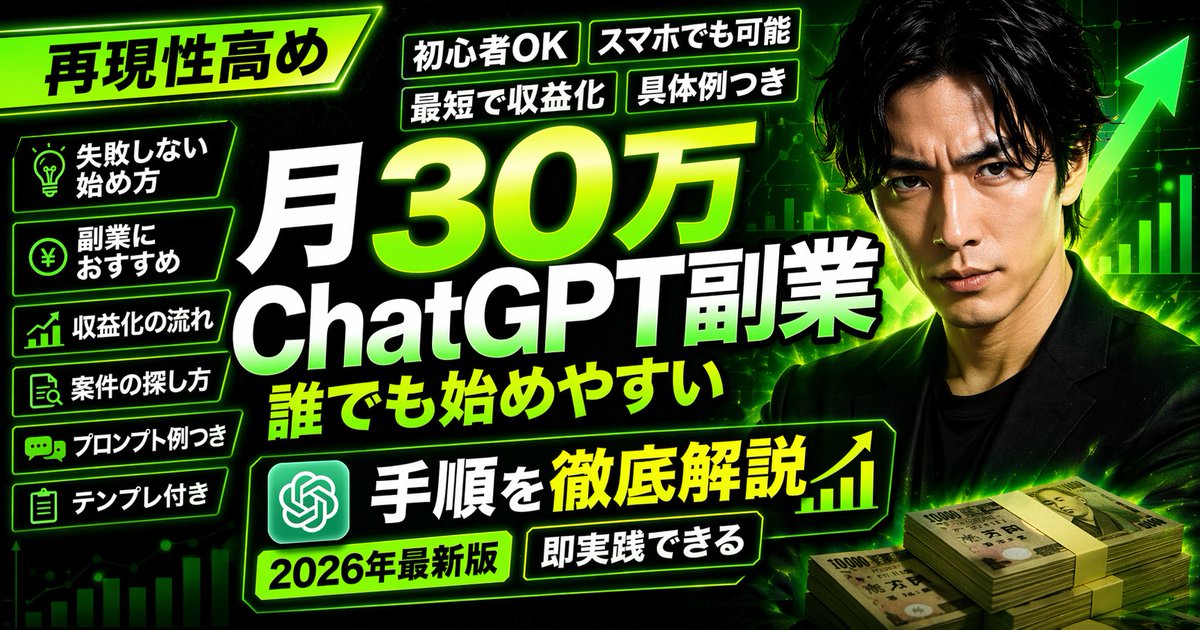
提示词 · EN
type
YouTube 缩略图style
高冲击力,霓虹绿与黑色配色方案,赛博商务美学background
深色背景,带有发光的绿色网格、向上的图表线条和巨大的绿色箭头subject
description
{argument name="subject description" default="身着黑色西装的严肃日本男性"}position
右侧props
右下角堆叠的 1 万日元钞票layout
main_title
text
{argument name="main title" default="月入 30 万 ChatGPT 副业,人人皆可上手"}position
居中,巨大的粗体白色与绿色渐变文字top_left_badge
text
{argument name="top left badge" default="高可复制性"}style
倾斜的霓虹绿边框top_tags
count
4labels
item 1
新手友好item 2
手机即可操作item 3
快速实现变现item 4
附具体案例left_bullet_points
count
6style
带有霓虹绿边框和图标的深色方框items
item 1
灯泡图标:零失败起步法item 2
日元硬币图标:副业推荐item 3
图表图标:变现流程item 4
搜索图标:项目寻找方法item 5
聊天图标:附提示词示例item 6
剪贴板图标:附模板bottom_banner
text
{argument name="bottom banner text" default="步骤详解"}icons
左侧 ChatGPT Logo,右侧向上图表bottom_tags
count
2labels
item 1
{argument name="year tag" default="2026 年最新版"}item 2
即刻上手关于这个提示词
Generate an eye-catching YouTube thumbnail with neon green and black cyber aesthetic, featuring layered text, bullet points, and a business theme. 它更适合作为 GPT Image 2 的概念艺术起点:先保留画面结构、主体关系和风格约束,再替换成你的品牌、人物或场景。
这条提示词使用结构化 JSON 组织信息,包含 type、style、background、subject、layout 等字段。保留这种层级能让模型更清楚地区分画面主题、布局、界面元素和细节约束。
使用时建议先小幅修改主体、场景、镜头和色调,再生成多个版本对比构图与细节。这样页面内容对用户有实际帮助,也避免把模型名或标签机械堆在正文里。
如何使用这个提示词
- Copy the prompt text.
- Paste it into an AI image generator like Midjourney or DALL·E 3.
- Replace the text inside curly braces
{}with your own content (e.g., main title, subject description). - Set the aspect ratio to 16:9 for YouTube thumbnails.
- Generate the image and pick the best result.


