
GPT Image 2AI 提示词
Photorealistic Chalkboard Lesson with Custom Logo — Sora 2 Prompt
Create a photorealistic classroom blackboard featuring your company logo and organized handwritten notes in a customizable, AI-generated snapshot.
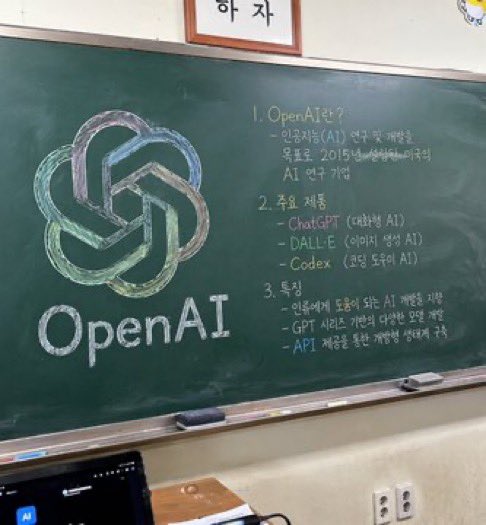
提示词 · EN
一张照片级逼真、略带角度的教室绿板快照。黑板左侧是一幅精心绘制的粉笔画,展示了 argcompany name: OpenAI 的标志,采用绿色、蓝色和紫色等混合柔和色彩渲染,下方用整洁的白色粉笔写着“arglogo text: OpenAI”。黑板右侧是组织成 3 个编号部分的手写文本。第 1 部分标题为“argsection one title: 1. OpenAI란?”,后跟一段简短的说明性文字。第 2 部分标题为“argsection two title: 2. 주요 제품”,列出了 3 个要点,包括 ChatGPT、DALL-E 和 Codex。第 3 部分标题为“argsection three title: 3. 특징”,包含 3 个描述特征的要点。黑板配有银色金属边框,粉笔槽上放着 2 块长方形黑板擦和零散的粉笔。黑板下方是灰白色的墙壁,上面有一个双孔电源插座。在左下角前景中,可以看到深色笔记本电脑屏幕的顶部边缘,黑板上方,一个带框标志的底部边缘被画面截断。
关于这个提示词
Create a photorealistic classroom blackboard featuring your company logo and organized handwritten notes in a customizable, AI-generated snapshot. 它更适合作为 GPT Image 2 的概念艺术起点:先保留画面结构、主体关系和风格约束,再替换成你的品牌、人物或场景。
使用时优先替换 company name、logo text、section one title、section two title 等占位符,并保持镜头、构图和材质描述的顺序不变。这样更容易获得稳定的画面结果,也方便继续做多版本对比。
如何使用这个提示词
- Copy the prompt text from this page.
- Choose your AI model (e.g., Sora 2, Midjourney).
- Replace the placeholder variables (company name, logo text, section titles) with your desired content.
- Generate the image. For best results, use high-resolution settings.
- Optionally tweak the prompt to adjust colors or add more details.


