
GPT Image 2AI 提示词
Fluffy Monster Ability Design Sheet — Sora 2 Prompt
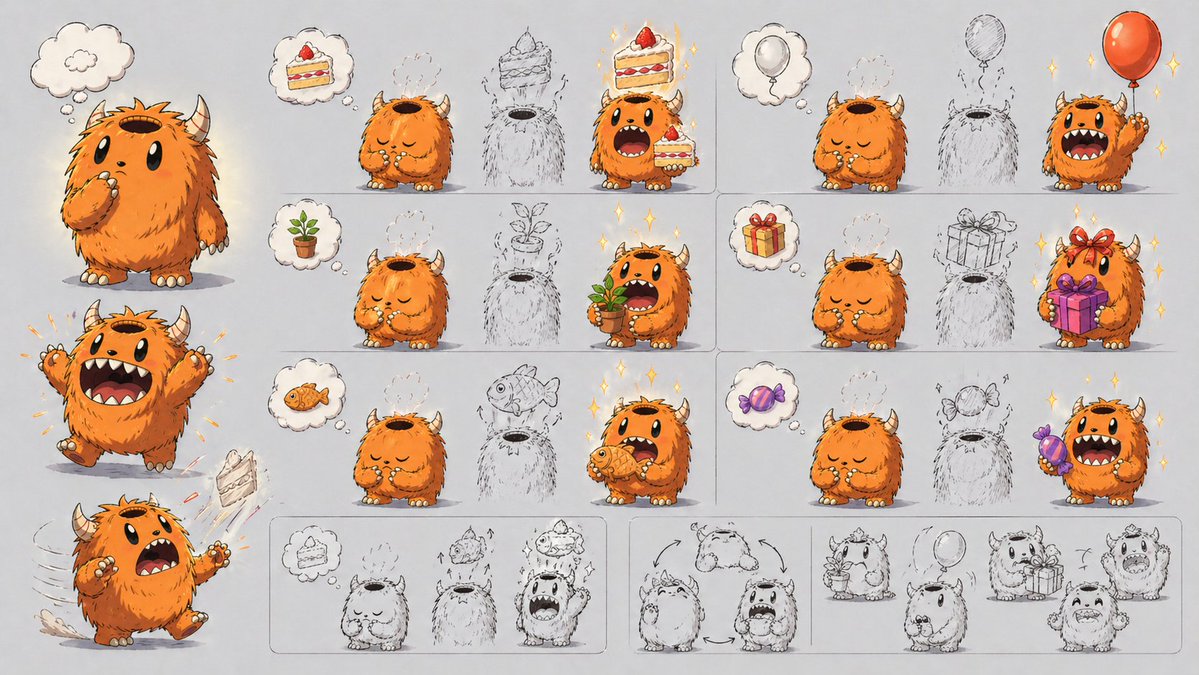
Generate a wide-format character design sheet showcasing a cute, horned monster and its unique head-opening item-summoning mechanic with six detailed visual examples.
提示词 · EN
type
角色设计机制图style
可爱绘本概念艺术,精致的数字插画与粗犷的铅笔构思相结合,干净的浅灰色纸张背景,柔和的阴影,成功变形时带有细微的闪光subject
species
小型毛茸茸长角怪物name
{argument name="character name" default="橙色毛茸茸怪物"}appearance
body
圆润矮胖,毛发非常浓密,四肢短小,奶油色的爪子和趾甲fur_color
{argument name="fur color" default="亮橙色"}horns
2 只短而弯曲的米色角face
巨大的黑色椭圆形眼睛,宽大的嘴巴配有小尖牙,表情丰富的眉毛top_opening
头顶有一个巨大的中空开口,像容器或罐子一样core_mechanic
想象中的物品会出现在头顶的开口中,然后角色会抓取或展示该物品layout
format
宽幅横向角色机制说明图sections
item 1
title
左侧角色姿势position
左侧栏count
3labels
item 1
思考时的中立站姿item 2
双臂举起的兴奋跳跃item 3
蛋糕飞出的惊讶奔跑姿势item 2
title
顶行示例position
右上网格count
2labels
item 1
蛋糕到蛋糕的显现item 2
气球到气球的显现item 3
title
中行示例position
中右网格count
2labels
item 1
盆栽到盆栽的显现item 2
礼盒到礼盒的显现item 4
title
底行示例position
下右网格count
2labels
item 1
鱼到鱼的显现item 2
糖果到糖果的显现item 5
title
底部草图序列带position
底部横条count
4labels
item 1
蛋糕变形序列item 2
转向旋转箭头item 3
植物和气球的草图概念item 4
礼物和兴奋表情的草图概念grid_examples_total
6thought_bubbles_total
8manifested_object_types_total
6objects
manifested_items
item 1
item
草莓蛋糕切片count
2item 2
item
红色气球count
2item 3
item
小型盆栽嫩芽count
2item 4
item
带丝带的包装礼盒count
2item 5
item
橙色鱼count
2item 6
item
紫色包装糖果count
2rough_outline_placeholders_in_grid
6composition
左侧堆叠着大型全彩角色姿势,右侧排列着 3 行 2 列的六个方框示例面板,底部有一长排粗犷的单色概念草图rendering
linework
墨线勾勒,部分区域可见底层的草图痕迹color
中性灰色背景下的暖橙色角色,配以色彩鲜艳的道具mood
俏皮、富有创意,用于视觉化解释能力的角色设计展示关于这个提示词
Generate a wide-format character design sheet showcasing a cute, horned monster and its unique head-opening item-summoning mechanic with six detailed visual examples. 它更适合作为 GPT Image 2 的概念艺术起点:先保留画面结构、主体关系和风格约束,再替换成你的品牌、人物或场景。
这条提示词使用结构化 JSON 组织信息,包含 type、style、subject、layout、objects、composition、rendering 等字段。保留这种层级能让模型更清楚地区分画面主题、布局、界面元素和细节约束。
使用时建议先小幅修改主体、场景、镜头和色调,再生成多个版本对比构图与细节。这样页面内容对用户有实际帮助,也避免把模型名或标签机械堆在正文里。
如何使用这个提示词
- Copy the entire prompt JSON block.
- In your AI model interface (like Sora 2), paste it into the prompt field.
- Replace the default variable values (like
character nameorfur color) to customize your character. - Generate the image and review the output for the structured layout and color palette.


