
GPT Image 2AI 提示词
Cute Picture Book Spread — Sora 2 Prompt for 6-Panel Fairy Tale Illustration
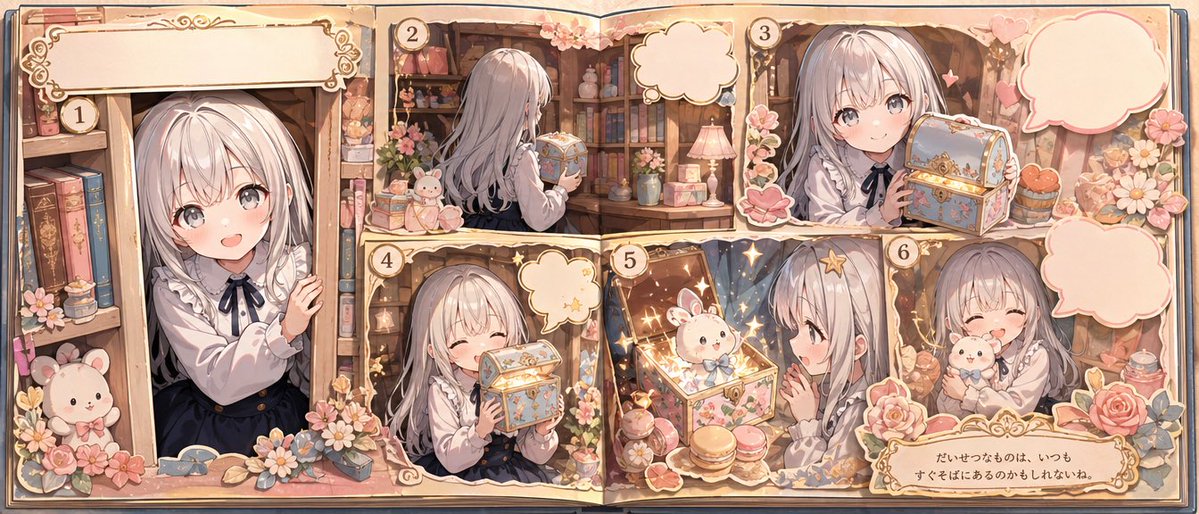
Create a magical 6-panel storybook spread featuring a little girl discovering an enchanted treasure box with a bunny companion in soft watercolor anime style.
提示词 · EN
type
绘本插画跨页style
可爱怀旧的动画绘本美学,柔和的粉彩色调,温暖的金色光影,细腻的类水彩动漫渲染,高度精细的花卉装饰,充满魔法与治愈的氛围format
双页展开的书籍构图,包含 6 个带编号的画格和装饰性对话气泡subject
main character
age_appearance
小女孩hair
color
{argument name="hair color" default="银白色"}style
长直发,带有柔和的刘海,发尾微卷outfit
top
白色长袖衬衫,配有荷叶边领口和黑色丝带蝴蝶结dress
深蓝色无袖连衣裙或背带裙expression
温柔、天真、快乐companion
小型白色兔兔玩偶或带有蓝色蝴蝶结的魔法兔子角色environment
setting
温馨的古董图书馆或书房,摆满了书籍、鲜花、丝带装饰、蕾丝、蜡烛和可爱的小饰品props
item 1
带有金色饰边和花卉装饰的华丽粉彩宝盒item 2
书架item 3
粉色花朵和玫瑰item 4
小型泰迪熊或老鼠玩具item 5
台灯item 6
马卡龙item 7
精致的装饰瓶罐item 8
闪光和魔法光效layout
sections
item 1
title
1position
左侧全高画格count
1labels
item 1
女孩从书架或门口探出头,露出一只手,周围环绕着书籍和花朵item 2
title
2position
顶部中央画格count
1labels
item 1
女孩背影,在温馨的书房中拿着或靠近那个华丽的宝盒item 3
title
3position
顶部右侧画格count
1labels
item 1
女孩将紧闭的宝盒抱在胸前item 4
title
4position
底部中左画格count
1labels
item 1
女孩闭着眼睛微笑,开心地抱着宝盒item 5
title
5position
底部中央画格count
1labels
item 1
宝盒打开,散发出魔法光芒,在闪光和星星中显现出小兔子item 6
title
6position
底部右侧画格count
1labels
item 1
女孩带着愉悦的笑容拥抱小兔子additional_elements
speech_bubbles
4caption_boxes
2numbered_panel_badges
6text
top_left_caption
{argument name="top caption text" default=""}top_right_bubble
{argument name="speech bubble text" default=""}bottom_right_caption
{argument name="bottom caption text" default="だいせつなものは、いつも すぐそばにあるのかもしれないね。"}composition
从上方俯瞰的展开绘本,带有撕纸风格的画格边缘、华丽的奶油色与金色边框、花卉角落装饰,以及从好奇到发现再到情感重逢的电影般叙事流程quality
高度精致、迷人、奇幻,适合作为儿童绘本页面或动画绘本视频的关键帧关于这个提示词
Create a magical 6-panel storybook spread featuring a little girl discovering an enchanted treasure box with a bunny companion in soft watercolor anime style. 它更适合作为 GPT Image 2 的概念艺术起点:先保留画面结构、主体关系和风格约束,再替换成你的品牌、人物或场景。
这条提示词使用结构化 JSON 组织信息,包含 type、style、format、subject、environment、layout、text 等字段。保留这种层级能让模型更清楚地区分画面主题、布局、界面元素和细节约束。
使用时建议先小幅修改主体、场景、镜头和色调,再生成多个版本对比构图与细节。这样页面内容对用户有实际帮助,也避免把模型名或标签机械堆在正文里。
如何使用这个提示词
- Copy the full prompt JSON and paste it into your preferred AI image generation model (e.g., Sora 2, Midjourney).
- Customize the available variables like
{hair color}(default: silver-white),{top caption text},{speech bubble text}, and{bottom caption text}to personalize the story. - Choose a model that supports high-resolution, detailed illustration outputs for best results.
- Generate the image and review the 6-panel narrative layout, adjusting prompts if needed.
- Use the output for storybook art, animation concepts, or fairy tale visual projects.


