
GPT Image 2AI 提示词
Dual-Era Naval Movie Poster & Technical Spec — Sora 2 Prompt
Render a cinematic split-layout: a movie-style poster of a Yamato battleship and an Aegis destroyer, with detailed ship orthographics and character turnarounds.
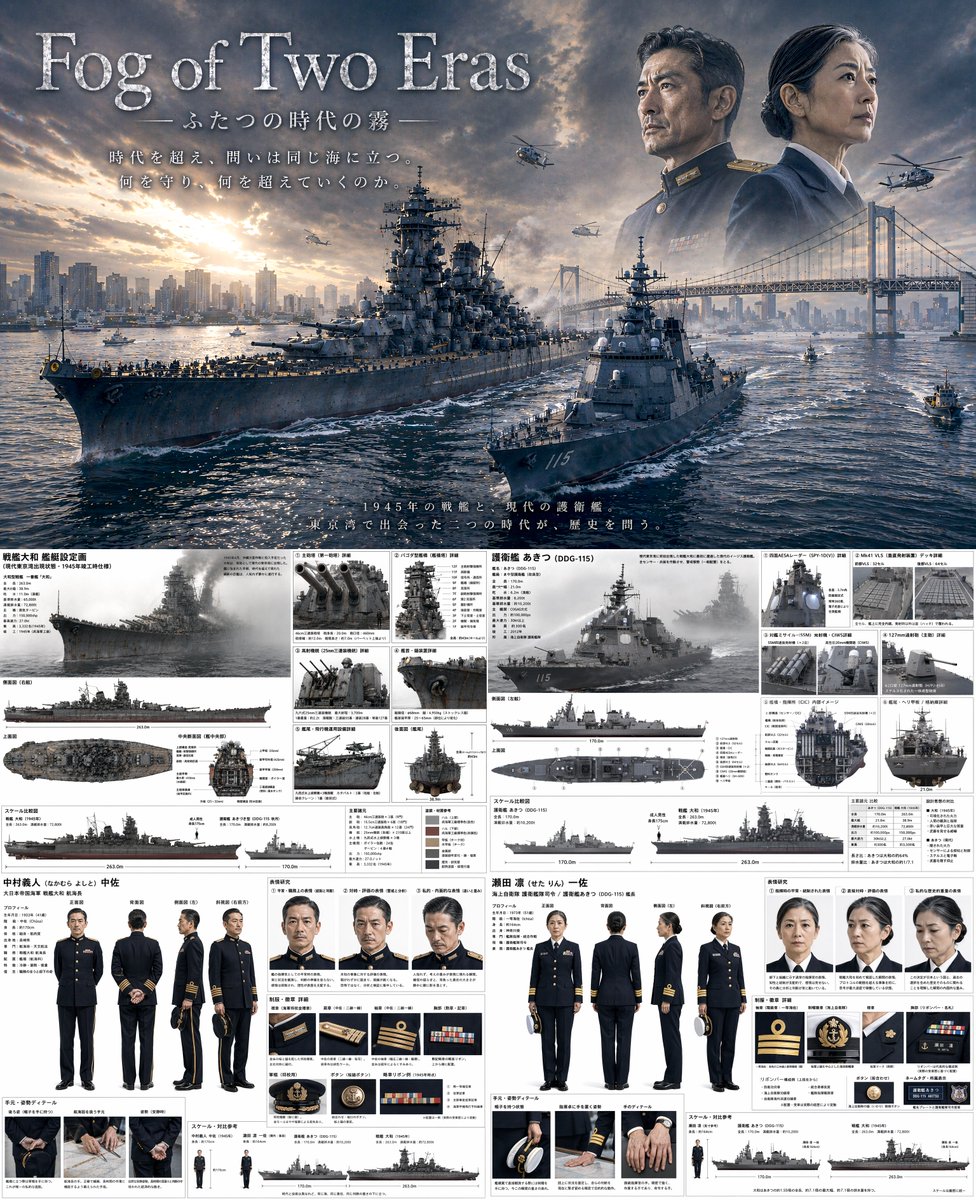
提示词 · EN
type
电影海报与技术参考图组合theme
{argument name="theme" default="时空穿越军事剧"}layout
top_half
type
电影海报title
{argument name="main title" default="双世之雾"}subtitle
ふたつの時代の霧tagline
时代更迭,海域依旧。何为守护,何为超越。scene
一艘 {argument name="ww2 ship class" default="大和级战列舰"} 与一艘 {argument name="modern ship class" default="宙斯盾驱逐舰"} 在日落时分的 {argument name="setting" default="东京湾(含彩虹大桥与城市天际线)"} 并肩航行。sky_elements
二战海军指挥官与现代女性海军舰长的虚化肖像,俯瞰海湾,背景有军用直升机飞过。bottom_half
type
分割式技术参考图left_column
subject
二战战列舰与指挥官ship_details
title
戦艦大和 艦艇設定画main_render
1 个侧角视图orthographic_views
3 个视图(侧面、顶部、正面横截面)detail_panels
count
6descriptions
item 1
主炮item 2
塔式舰桥item 3
防空炮item 4
雷达item 5
弹射器item 6
舰尾scale_chart
1 个轮廓对比图character_details
name
中村义人 中佐turnaround
count
5poses
item 1
正面item 2
背面item 3
侧面item 4
3/4 正面item 5
3/4 背面expressions
count
3types
item 1
中性item 2
严肃item 3
沉思uniform_details
count
6items
item 1
军衔徽章item 2
纽扣item 3
勋章item 4
帽饰细节hand_details
count
3poses
item 1
持帽item 2
自然下垂item 3
紧握right_column
subject
现代驱逐舰与舰长ship_details
title
护卫舰 秋津 (DDG-115)main_render
1 个侧角视图orthographic_views
3 个视图(侧面、顶部、正面横截面)detail_panels
count
6descriptions
item 1
雷达面板item 2
垂直发射系统item 3
反舰导弹item 4
主炮item 5
舰桥内部item 6
直升机甲板scale_chart
1 个轮廓对比图character_details
name
濑田 凛 一佐turnaround
count
5poses
item 1
正面item 2
背面item 3
侧面item 4
3/4 正面item 5
3/4 背面expressions
count
3types
item 1
中性item 2
严肃item 3
沉思uniform_details
count
6items
item 1
军衔徽章item 2
纽扣item 3
勋表item 4
帽饰细节hand_details
count
3poses
item 1
持帽item 2
自然下垂item 3
紧握关于这个提示词
Render a cinematic split-layout: a movie-style poster of a Yamato battleship and an Aegis destroyer, with detailed ship orthographics and character turnarounds. 它更适合作为 GPT Image 2 的概念艺术起点:先保留画面结构、主体关系和风格约束,再替换成你的品牌、人物或场景。
这条提示词使用结构化 JSON 组织信息,包含 type、theme、layout 等字段。保留这种层级能让模型更清楚地区分画面主题、布局、界面元素和细节约束。
使用时建议先小幅修改主体、场景、镜头和色调,再生成多个版本对比构图与细节。这样页面内容对用户有实际帮助,也避免把模型名或标签机械堆在正文里。
如何使用这个提示词
- Copy and paste the full prompt into your AI image generator (Sora 2, Midjourney, or DALL·E).
- Select a high-quality cinematic model for realistic poster visuals.
- Adjust the variables like ship classes, location, and character names to suit your project.
- Generate the image; use it as concept art or production reference.
- Iterate by tweaking the theme or layout details for new variations.


