
GPT Image 2AI 提示词
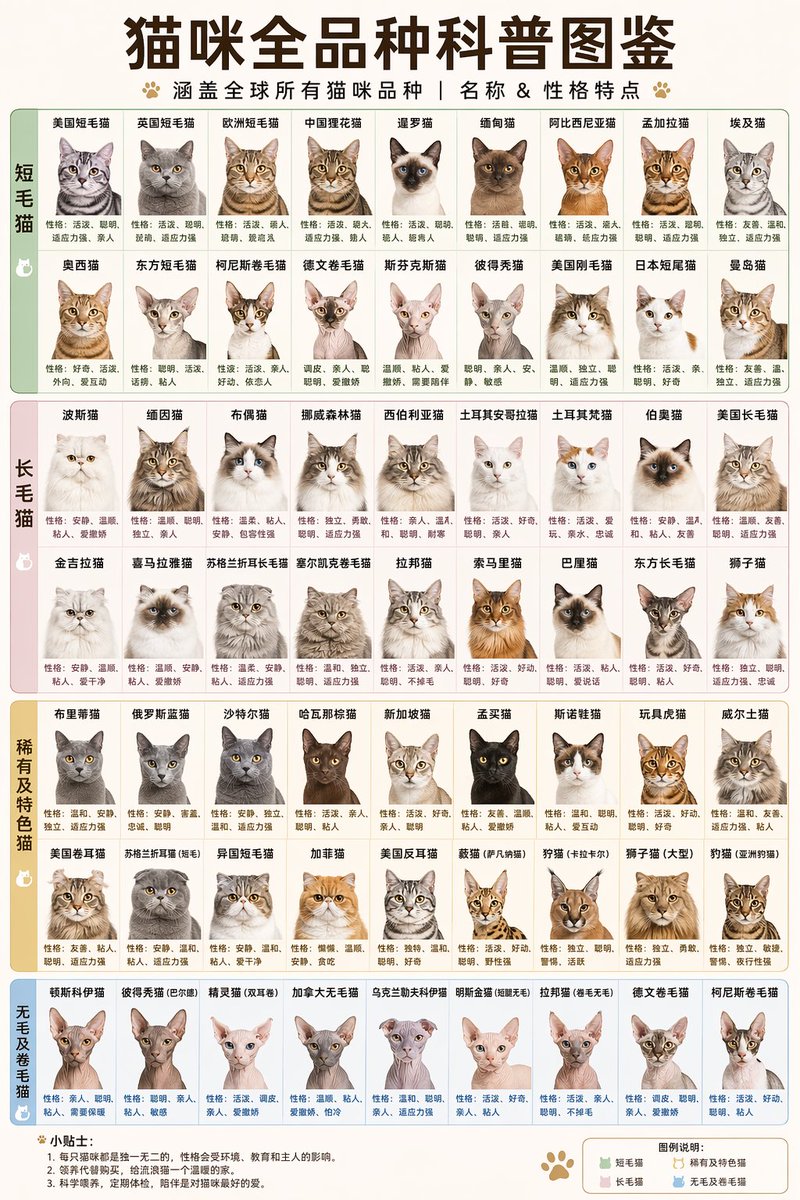
63 Cat Breeds Infographic Prompt — Complete Breed Chart
Generate a stunning cat breed encyclopedia poster with 63 realistic breed portraits and personality traits. Ideal for educators, vets, and cat enthusiasts.
提示词 · EN
type
infographic chartheader
title
{argument name="main title" default="猫咪全品种科普图鉴"}subtitle
{argument name="subtitle" default="涵盖全球所有猫咪品种 | 名称 & 性格特点"}decorations
paw print iconslayout
style
grid-based encyclopedia poster, pastel color-coded sectionssections
item 1
title
{argument name="section 1 title" default="短毛猫"}color
pastel greenlayout
2 rows of 9 columnscount
18item_format
breed name above, realistic cat portrait, personality description belowitem 2
title
{argument name="section 2 title" default="长毛猫"}color
pastel pinklayout
2 rows of 9 columnscount
18item_format
breed name above, realistic cat portrait, personality description belowitem 3
title
稀有及特色猫color
pastel orangelayout
2 rows of 9 columnscount
18item_format
breed name above, realistic cat portrait, personality description belowitem 4
title
无毛及卷毛猫color
pastel bluelayout
1 row of 9 columnscount
9item_format
breed name above, realistic cat portrait, personality description belowfooter
left_section
title
{argument name="footer tips title" default="小贴士:"}content
3 numbered bullet pointsright_section
title
图例说明:content
color legend with 4 items matching main sections关于这个提示词
Generate a stunning cat breed encyclopedia poster with 63 realistic breed portraits and personality traits. Ideal for educators, vets, and cat enthusiasts. 它更适合作为 GPT Image 2 的概念艺术起点:先保留画面结构、主体关系和风格约束,再替换成你的品牌、人物或场景。
这条提示词使用结构化 JSON 组织信息,包含 type、header、layout、footer 等字段。保留这种层级能让模型更清楚地区分画面主题、布局、界面元素和细节约束。
使用时建议先小幅修改主体、场景、镜头和色调,再生成多个版本对比构图与细节。这样页面内容对用户有实际帮助,也避免把模型名或标签机械堆在正文里。
如何使用这个提示词
- Copy the prompt template by clicking the "Copy" button above.
- Paste it into an advanced AI image generator that supports complex layout descriptions, such as Midjourney, DALL·E 3, or Stable Diffusion.
- Customize the variables if needed: you can change section titles, number of breeds, color palette, or layout by modifying the text inside {argument name="..." default="..."}.
- Generate the image. You may need to add specific rendering instructions like "--ar 2:3" for poster aspect ratio if your model requires it.
- Review the output; if the layout isn't perfect, try re-rolling or adjusting the prompt's detail. Download and share!


