
GPT Image 2AI 提示词
Macro Rice Pile with Hidden Engraved Grain — Sora 2 Prompt
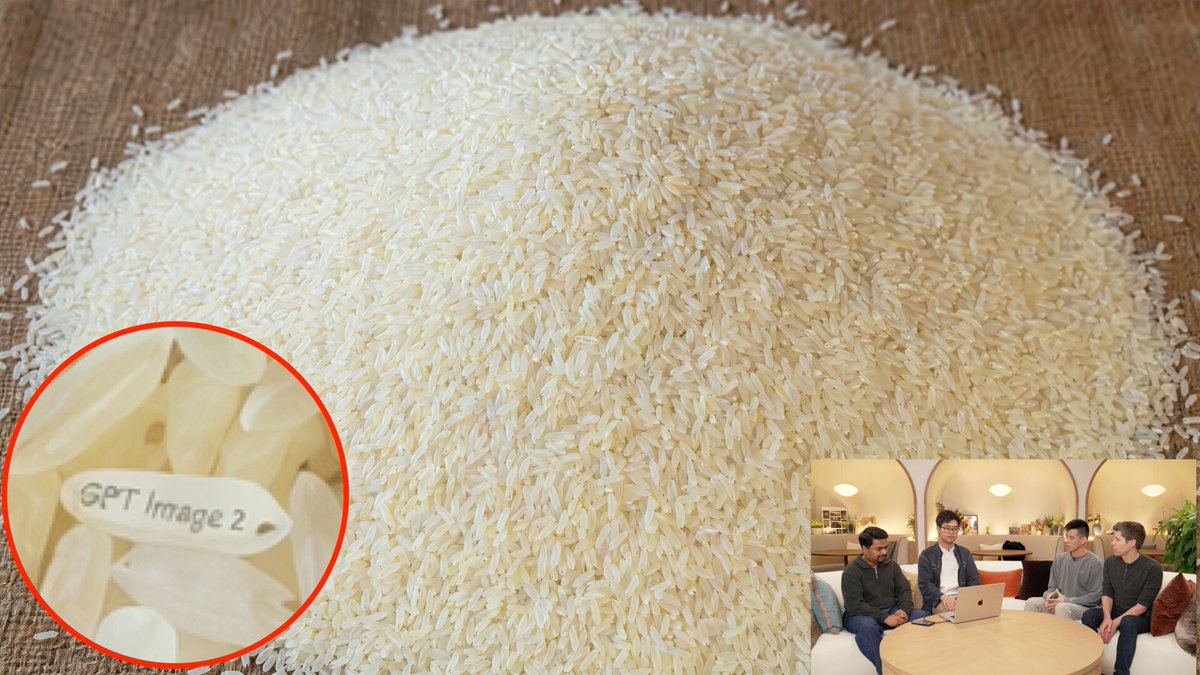
Generate a photorealistic macro shot of rice with a hidden engraved message and magnifying detail, perfect for Easter egg art.
提示词 · EN
一张照片级逼真的桌面特写场景,展示了一大堆倒在温暖棕色木质表面上的生白长粒米,几乎填满了整个画面。相机位置略高并朝向米堆倾斜,使米堆在画面中心形成一个宽阔的圆顶,数千粒米清晰可见,并被温暖的室内光线柔和地照亮。在米堆中隐藏一个小彩蛋:左下角区域附近有 1 粒特殊的米粒,它水平旋转,表面整齐地刻有“argengraved text: GPT Image 2”字样,字体清晰易读。在左下角添加一个带有亮红色轮廓的圆形放大标注,聚焦于那粒刻字米粒,使其文字清晰可见。此外,在右下角添加 1 个画中画小窗口,展示一个休闲的室内直播或访谈场景,4 个人围坐在圆木桌旁,桌上放着一台打开的笔记本电脑,环境光温暖,人物面部略显模糊;该小窗口应呈现为次要的背景缩略图,尺寸远小于主图。优先考虑逼真的纹理、令人信服的微距细节、自然的阴影、米粒细微的象牙色变化,以及高亮米粒上清晰且真实可信的刻字。
关于这个提示词
Generate a photorealistic macro shot of rice with a hidden engraved message and magnifying detail, perfect for Easter egg art. 它更适合作为 GPT Image 2 的概念艺术起点:先保留画面结构、主体关系和风格约束,再替换成你的品牌、人物或场景。
使用时优先替换 engraved text 等占位符,并保持镜头、构图和材质描述的顺序不变。这样更容易获得稳定的画面结果,也方便继续做多版本对比。
如何使用这个提示词
- Copy the prompt text to your clipboard.
- Paste it into your preferred AI image generator (like Sora 2, Midjourney, or DALL·E).
- Adjust the
engraved textvariable (default "GPT Image 2") to any text you want on the rice grain. - Generate the image and refine if needed by tweaking details like lighting or camera angle.
- Use the output for Easter egg visuals, demos, or creative projects.


