
Sora2 Hub
Sora2 Hub
  • 提示词库
  • 定价
  • 案例展示
Sora2 Hub
Sora2 Hub
Sora2 Hub

Sora2 Hub

由 Sora 2、Veo 3.1 和 Nano Banana Pro 驱动的专业 AI 创作平台。提供高级控制、高清画质和无水印的视频与工作室级图像创作。

Email:support@sora2hub.org

AI 视频生成

  • 文生视频
  • 图生视频
  • Veo 3.1
  • Sora 2
  • Kling 3.0
  • Kling 2.6
  • Kling 2.5
  • Runway
  • Wan 2.6
  • Seedance 2.0
  • Hailuo 2.3
  • Grok Imagine
  • HappyHorse-1.0

AI 图像生成

  • 文生图
  • 图生图
  • Nano Banana Pro
  • Nano Banana
  • 4o Image
  • Flux Kontext
  • Z Image
  • Seedream 4.5
  • Seedream 5.0 Lite
  • Nano Banana 2
  • GPT Image 2
  • AI 图片增强

AI 特效

  • AI 年龄滤镜
  • AI 性别转换
  • AI 亲吻
  • AI 拥抱
  • 吉卜力图片
  • AI 美人鱼滤镜
  • AI 身体摇摆
  • 微笑滤镜
  • AI 变胖
  • 动作人偶

产品

  • 功能特点
  • 案例展示
  • 定价

公司

  • 关于我们
  • 联系我们

© 2025 • Sora2 Hub ORG 保留所有权利。

  • 隐私政策
  • 服务条款
  • 退款政策
  1. 首页
  2. /
  3. 提示词
  4. /
  5. GPT Image 2
  6. /
  7. Cinematic Stoic Portrait — Sora 2 Prompt with Dramatic Lighting
GPT Image 2AI 提示词

Cinematic Stoic Portrait — Sora 2 Prompt with Dramatic Lighting

Generate a hyper-realistic, commercial-grade portrait with dramatic chiaroscuro lighting, a luxurious chronograph focus, and a profound, contemplative mood.
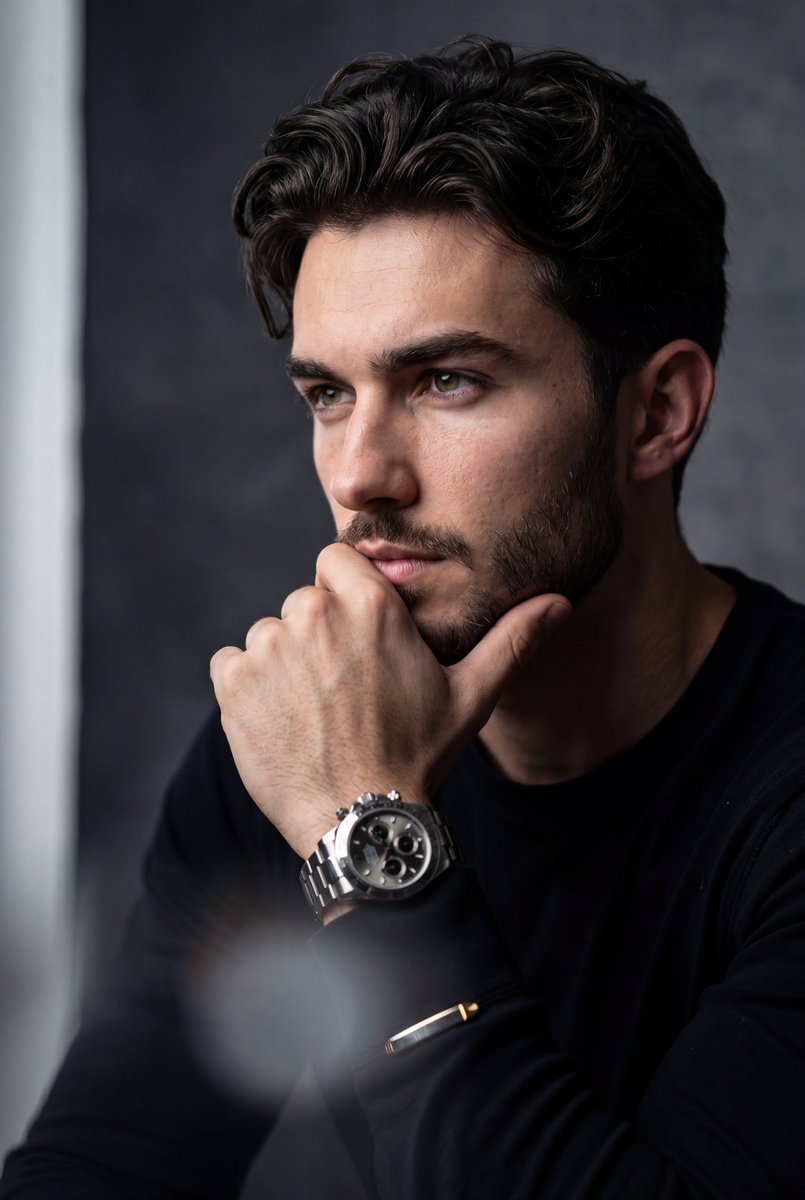
Cinematic Stoic Portrait — Sora 2 Prompt with Dramatic Lighting
提示词 · EN
一张超写实、电影质感的中景特写肖像,主体为上传的人物。主体躯干略微前倾,头部转向侧面,看向画框左侧,神情深沉、严肃且具有斯多葛风格。一只手抬起,轻轻托住下巴和下唇,呈现经典的“思考”姿态,手指轻微弯曲。手腕上佩戴着 argaccessory: 一枚醒目且奢华的金属计时码表,表盘细节复杂。主体穿着 argoutfit: 一件干练的深黑色长袖衬衫或西装外套,与阴影融为一体,金属袖口在光线下闪烁。背景:极简、情绪化的 argbackground: 带纹理的炭灰色渐变背景,左侧边缘有一道柔和、微弱的垂直光带。相机角度与摄影:平视角度,顶级商业肖像摄影。灯光、剪辑与效果:戏剧性的明暗对照侧光照亮了主体面部的右侧,同时在左侧投下深邃、浓郁的阴影。图像具有浅景深效果,焦点清晰地落在可见的眼睛和奢华腕表上。前景有明显的重度模糊(一种朦胧、柔和的白/灰色漏光效果),遮挡了画面的最底部和左下角,以营造氛围深度。高对比度剪辑,情绪化的电影级调色,呈现出高度精致的高级质感。ar 4:5

关于这个提示词

Generate a hyper-realistic, commercial-grade portrait with dramatic chiaroscuro lighting, a luxurious chronograph focus, and a profound, contemplative mood. 它更适合作为 GPT Image 2 的概念艺术起点:先保留画面结构、主体关系和风格约束,再替换成你的品牌、人物或场景。

使用时优先替换 accessory、outfit、background 等占位符,并保持镜头、构图和材质描述的顺序不变。这样更容易获得稳定的画面结果,也方便继续做多版本对比。

如何使用这个提示词

  1. Copy the entire prompt text from the page.
  2. Select a compatible AI image generator, such as Sora 2 or another advanced model.
  3. Customize the bracketed variables ({accessory}, {outfit}, {background}) to match your specific subject and style.
  4. Generate the image and refine by adjusting camera angles or lighting intensity if needed.

常见问题

K

@ChillaiKalan__→

发布时间
2026年4月30日
原始语言
EN
模型
GPT Image 2
分类
概念艺术
GPT Image 2概念艺术gpt-image-2twitter
浏览
2.3K
复制
131
点赞
110

分享

更多来自 GPT Image 2

浏览全部
Futuristic Google Search Ad — AI Prompt

Futuristic Google Search Ad — AI Prompt

@AiWithTariq
Dark Anime Devil Girl Mario Kart Poster — Sora 2 Prompt

Dark Anime Devil Girl Mario Kart Poster — Sora 2 Prompt

@opener_ai
Anime Reaction Thumbnail Prompt — Neon Edgy VTuber

Anime Reaction Thumbnail Prompt — Neon Edgy VTuber

@abdiisan

用 Sora2Hub 提示词更快创作。

把精选提示词页面作为可搜索入口,然后带着模型上下文直接进入生成流程。

探索更多提示词

