
GPT Image 2AI 提示词
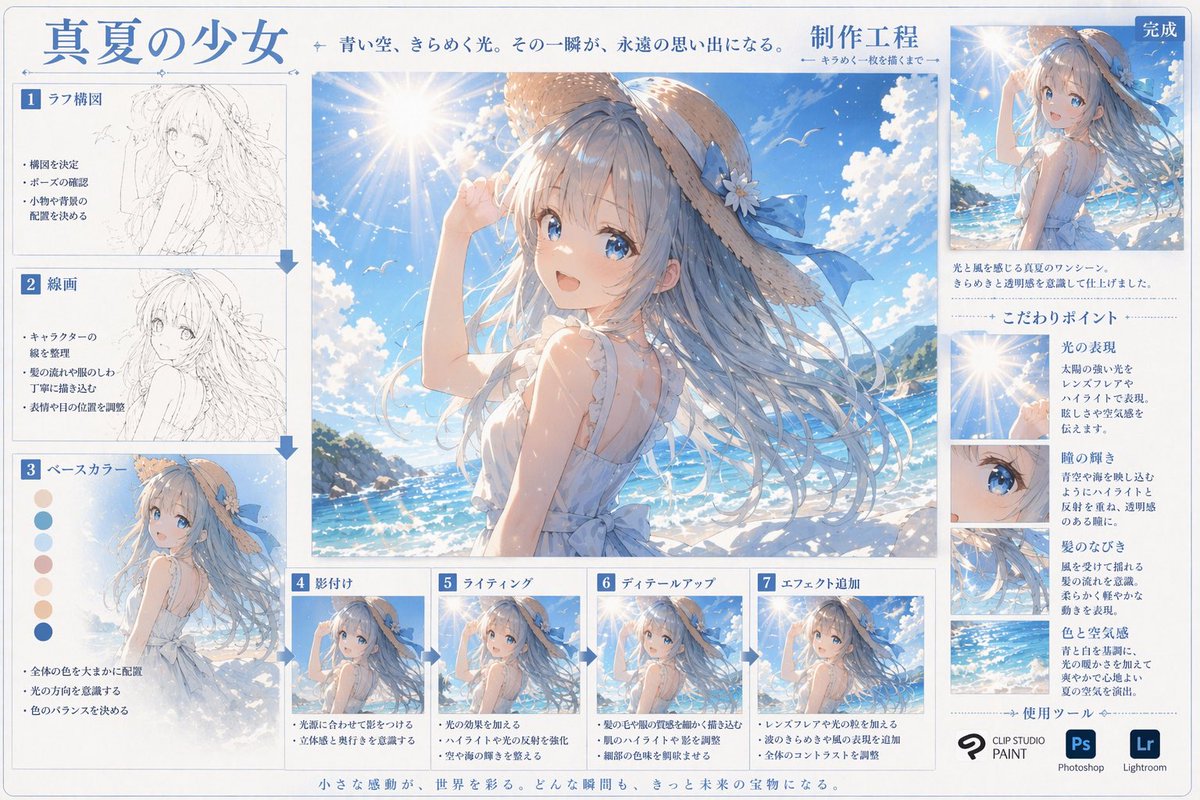
Anime Art Creation Infographic: Midsummer Girl Tutorial
Generate a detailed anime art process infographic showing each step from sketch to final render, with composition tips, color palettes, and close-up details.
提示词 · EN
type
数字艺术创作流程信息图header
title
{argument name="main title" default="盛夏少女"}subtitle
湛蓝天空,闪烁光影。那一瞬间,成为永恒的回忆。process_label
{argument name="process title" default="制作工程"}centerpiece
description
高质量的大幅动漫插画,描绘了 {argument name="character appearance" default="一位留着飘逸蓝长发、戴着系有蓝色丝带草帽、身穿白色无袖夏装的动漫少女"} 站在 {argument name="setting" default="阳光明媚的海滩、波光粼粼的蓝色海洋、带有镜头光晕的晴朗天空"} 前。layout
left_column
count
3steps
item 1
label
1 草图构图image_type
粗略铅笔草图bullet_points
3item 2
label
2 线稿image_type
干净的单色线稿bullet_points
3item 3
label
3 底色image_type
平涂颜色extra_elements
7 个圆形色卡bullet_points
3bottom_row
count
4steps
item 1
label
4 阴影image_type
基础赛璐珞阴影bullet_points
2item 2
label
5 光影image_type
添加光效和高光bullet_points
2item 3
label
6 细节刻画image_type
精细细节渲染bullet_points
2item 4
label
7 特效添加image_type
最终后期处理效果bullet_points
3right_column
top_section
label
完成image_type
缩小的最终插画description_text
2 行文字focus_points
title
核心要点count
4items
item 1
label
光影表现image_crop
镜头光晕与太阳description_text
简短段落item 2
label
瞳孔光泽image_crop
少女蓝色眼睛特写description_text
简短段落item 3
label
发丝飘动image_crop
飘逸发丝特写description_text
简短段落item 4
label
色彩与氛围image_crop
海洋与天空背景description_text
简短段落tools_used
title
使用工具count
3logos
item 1
{argument name="primary software" default="CLIP STUDIO PAINT"}item 2
Photoshop (Ps)item 3
Lightroom (Lr)footer
text
微小的感动,点缀着世界。每一个瞬间,都将成为未来的宝藏。关于这个提示词
Generate a detailed anime art process infographic showing each step from sketch to final render, with composition tips, color palettes, and close-up details. 它更适合作为 GPT Image 2 的概念艺术起点:先保留画面结构、主体关系和风格约束,再替换成你的品牌、人物或场景。
这条提示词使用结构化 JSON 组织信息,包含 type、header、centerpiece、layout 等字段。保留这种层级能让模型更清楚地区分画面主题、布局、界面元素和细节约束。
使用时建议先小幅修改主体、场景、镜头和色调,再生成多个版本对比构图与细节。这样页面内容对用户有实际帮助,也避免把模型名或标签机械堆在正文里。
如何使用这个提示词
- Copy the entire prompt, including all arguments in curly braces.
- Choose a high-detail AI image generator (e.g., Midjourney v6, DALL·E 3, Stable Diffusion with an anime checkpoint).
- Customize optional variables like 'character appearance' and 'setting' to match your desired scene.
- Paste the prompt and generate your infographic; use it as a learning reference or shareable art resource.


