
GPT Image 2AI 提示词
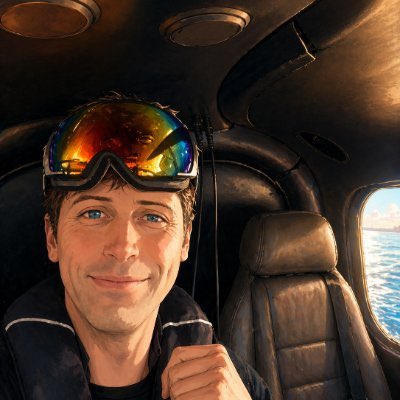
Helicopter Cabin Selfie at Golden Hour — Cinematic Travel Prompt
Generate a hyper-realistic, moody smartphone selfie inside a helicopter cabin with golden-hour light, ocean views, and a cinematic travel vibe perfect for social media.
提示词 · EN
一张在小型直升机机舱内拍摄的随性特写自拍,由前置手机摄像头拍摄,画面左侧坐着一名成年乘客。人物面部被一个位于中心的大型矩形隐私模糊块遮挡,但上方可见反光的彩虹色环绕式太阳镜。主体留着深色短发,身穿深色夹克,一只手靠近胸前,仿佛正抓着带子或衣领。直升机内部昏暗封闭,配有黑色天花板、头顶的圆形通风口、弧形机舱框架、中心顶线附近可见的电线,右侧是一个空的黑色真皮乘客座椅。最右侧明亮的圆形窗户展示了窗外阳光明媚的蓝色水域以及远处的海岸线或低矮的城市天际线。温暖的黄金时刻光线透过窗户射入,形成了强烈的对比,机舱表面带有橙色高光,呈现出一种充满情绪感的电影级旅行照片质感。逼真的智能手机摄影,略带颗粒感的低光曝光,紧凑的构图,自然的视角,营造出真实随性的度假直升机之旅氛围。
关于这个提示词
Generate a hyper-realistic, moody smartphone selfie inside a helicopter cabin with golden-hour light, ocean views, and a cinematic travel vibe perfect for social media. 它更适合作为 GPT Image 2 的概念艺术起点:先保留画面结构、主体关系和风格约束,再替换成你的品牌、人物或场景。
使用时建议先小幅修改主体、场景、镜头和色调,再生成多个版本对比构图与细节。这样页面内容对用户有实际帮助,也避免把模型名或标签机械堆在正文里。
如何使用这个提示词
- Copy the full prompt text.
- Choose a model that excels at photorealism (e.g., Sora 2, Runway Gen-3 Alpha, or a capable image generator).
- Optionally tweak details: swap the time of day (e.g., sunset to sunrise), change the scenery outside the window (e.g., mountains, city skyline), or adjust the subject’s outfit.
- Generate the image and review the output. If the privacy blur or reflections aren't right, re-run or slightly rephrase that section.
- Use the final image as a travel-style social media post, blog header, or portfolio piece.


