
GPT Image 2AI 提示词
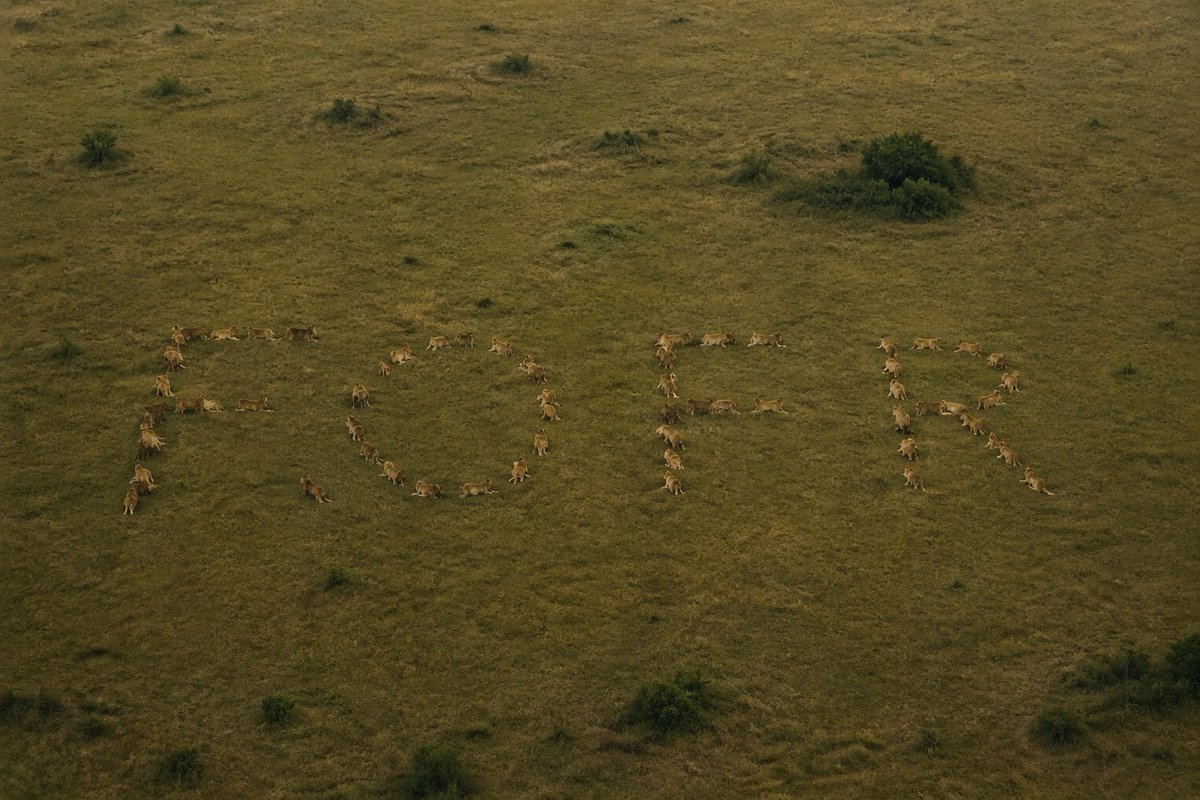
Embed a Hidden Word in a Lion Pride Photo — Sora 2 Prompt
Create mind-bending optical illusions: embed any word in a lion pride photo. Once spotted, it's unforgettable. Perfect for puzzles and creative AI art.
提示词 · EN
制作一张将隐藏单词嵌入其中的照片,让这个单词在被发现之前难以察觉,一旦发现后便无法忽视。使用单词 "argword: fofr"。用 argcomposition element: 狮群 来构成这个单词。
关于这个提示词
Create mind-bending optical illusions: embed any word in a lion pride photo. Once spotted, it's unforgettable. Perfect for puzzles and creative AI art. 它更适合作为 GPT Image 2 的概念艺术起点:先保留画面结构、主体关系和风格约束,再替换成你的品牌、人物或场景。
使用时优先替换 word、composition element 等占位符,并保持镜头、构图和材质描述的顺序不变。这样更容易获得稳定的画面结果,也方便继续做多版本对比。
如何使用这个提示词
- Copy the prompt from this page.
- Choose a compatible AI image generator (Sora 2, Midjourney, Stable Diffusion).
- Replace
{word}with your secret word (default "fofr") and{composition element}with your visual subject (e.g., "pride of lions"). - Paste the modified prompt into the model and generate.
- Experiment with different words and scenes to create unique illusions.


