
GPT Image 2AI 提示词
Magical Girl Pastry Chef Reference Chart — Sora 2 Prompt
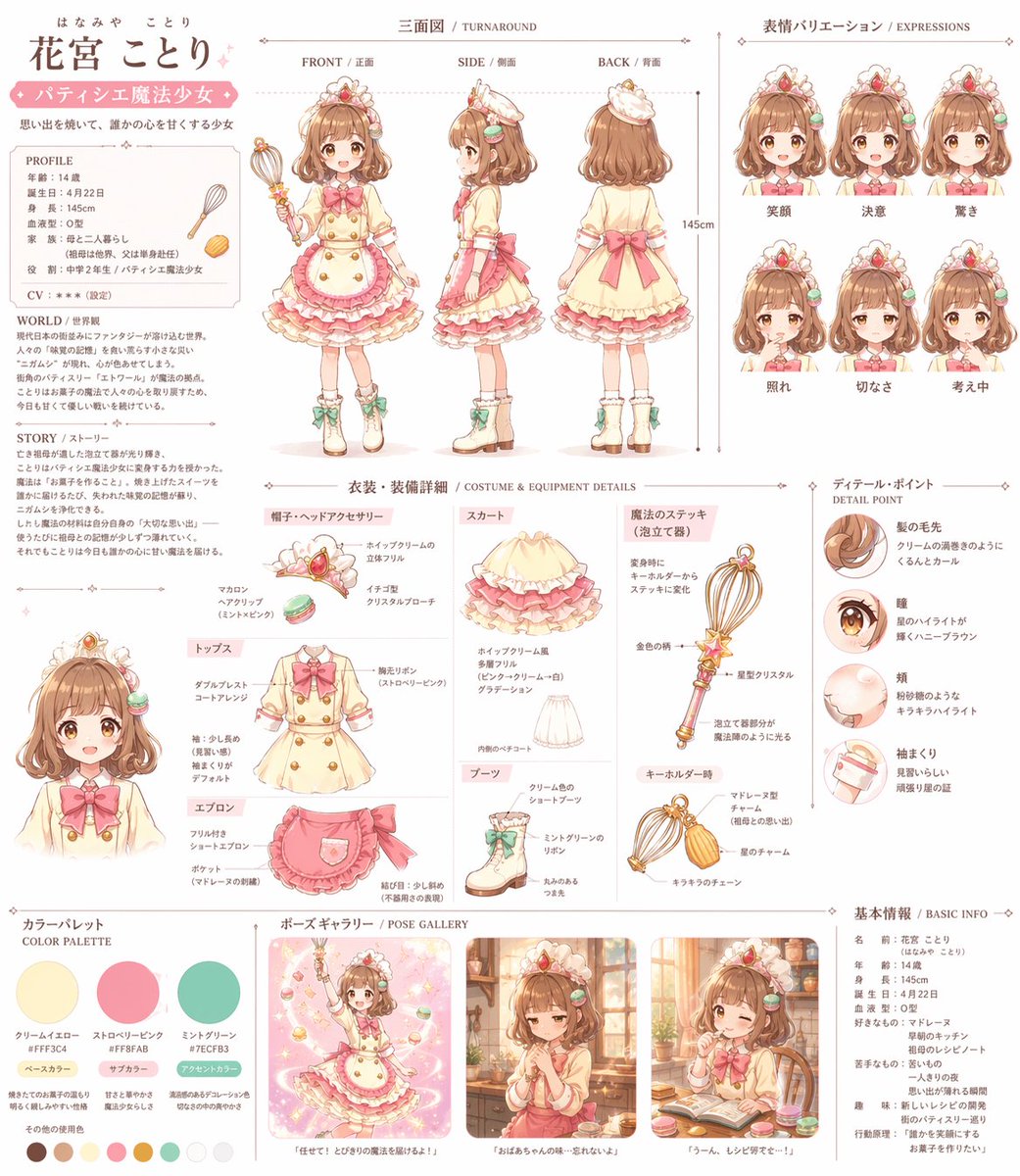
Generate a detailed multi-panel anime character reference chart for your magical girl pastry chef, complete with turnaround, expressions, costume breakdown, and pose gallery.
提示词 · EN
type
综合动漫角色参考图表character
name
{argument name="character name" default="花宫小鸟"}theme
{argument name="character theme" default="甜点师魔法少女"}hair
{argument name="hair color" default="棕色"} 蓬松发型,配有马卡龙发夹eyes
{argument name="eye color" default="棕色"},带有星星高光weapon
{argument name="weapon type" default="打蛋器造型魔法棒"}outfit
荷叶边连衣裙、围裙、靴子layout
sections
item 1
title
个人资料与故事position
top-leftdescription
用于展示个人资料、世界观和故事的文本块。item 2
title
三面图 / TURNAROUNDposition
top-centercount
3labels
item 1
正面 / FRONTitem 2
侧面 / SIDEitem 3
背面 / BACKitem 3
title
表情变化 / EXPRESSIONSposition
top-rightcount
6labels
item 1
笑容item 2
决心item 3
惊讶item 4
害羞item 5
忧伤item 6
思考中item 4
title
服装与装备细节 / COSTUME & EQUIPMENT DETAILSposition
centercount
7labels
item 1
帽子与头饰item 2
上衣item 3
围裙item 4
裙子item 5
靴子item 6
魔法棒 (打蛋器)item 7
挂件形态item 5
title
细节要点 / DETAIL POINTposition
center-rightcount
4labels
item 1
发梢item 2
瞳孔item 3
脸颊item 4
袖口细节item 6
title
配色方案 / COLOR PALETTEposition
bottom-leftcount
3labels
item 1
奶油黄item 2
草莓粉item 3
薄荷绿additional_swatches_count
7item 7
title
姿势展示 / POSE GALLERYposition
bottom-centercount
3descriptions
item 1
魔法动作姿势item 2
忧郁的窗边场景item 3
吃东西时眨眼item 8
title
基本信息 / BASIC INFOposition
bottom-rightdescription
包含角色属性和偏好的文本块。关于这个提示词
Generate a detailed multi-panel anime character reference chart for your magical girl pastry chef, complete with turnaround, expressions, costume breakdown, and pose gallery. 它更适合作为 GPT Image 2 的概念艺术起点:先保留画面结构、主体关系和风格约束,再替换成你的品牌、人物或场景。
这条提示词使用结构化 JSON 组织信息,包含 type、character、layout 等字段。保留这种层级能让模型更清楚地区分画面主题、布局、界面元素和细节约束。
使用时建议先小幅修改主体、场景、镜头和色调,再生成多个版本对比构图与细节。这样页面内容对用户有实际帮助,也避免把模型名或标签机械堆在正文里。
如何使用这个提示词
- Copy the JSON prompt.
- Paste it into Sora 2 or another AI that supports structured inputs.
- Replace the variable arguments (e.g., character name, hair color) with your own details.
- Generate the reference sheet.
- If needed, refine the layout by editing the panel sections in the JSON.


