
GPT Image 2AI 提示词
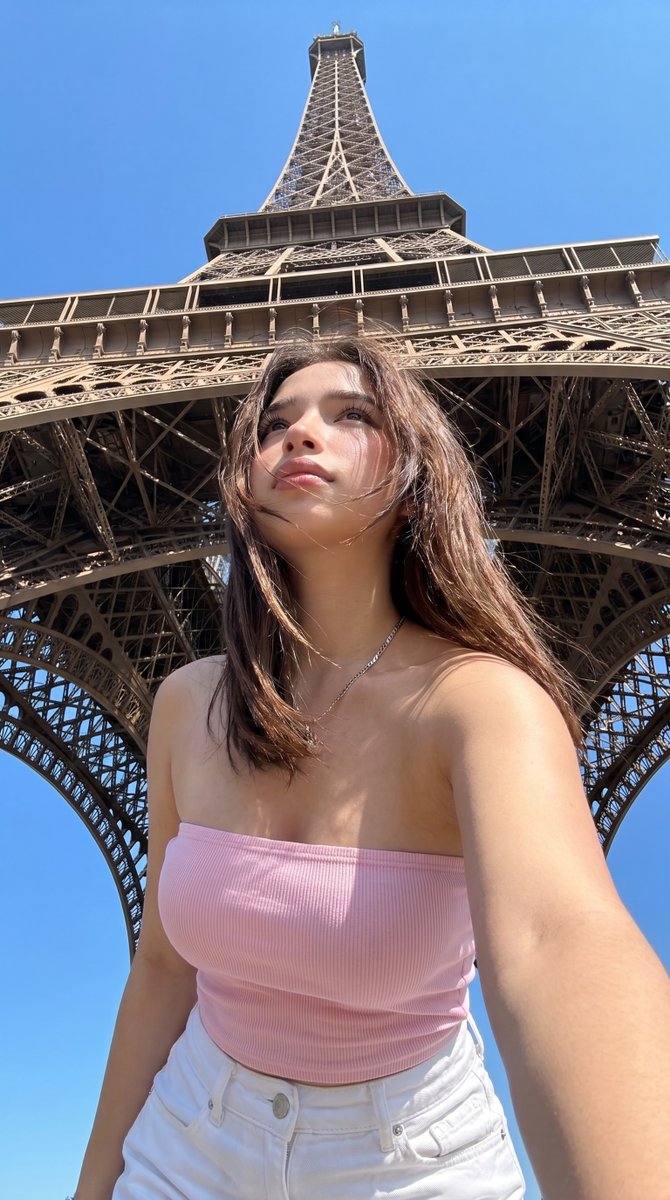
Eiffel Tower Low-Angle Selfie — Realistic Travel Photo Prompt
Generate a hyper-realistic, casual summer selfie taken directly beneath the Eiffel Tower, complete with customizable outfit and hair details for a perfect vacation shot.
提示词 · EN
一张在巴黎埃菲尔铁塔正下方以低角度拍摄的超写实旅行自拍,背景是明亮无云的晴天,铁塔在头顶上方高耸,与湛蓝的天空形成完美的垂直对称。前景中,一位留着 arghair color: 中棕色 中长直发的年轻女性非常靠近镜头,手机置于胸部下方,呈现出仰视的自拍视角。她的表情自然放松,带有休闲随意的度假照片感。她身穿 argtop color: 浅粉色 的修身罗纹抹胸上衣,搭配 argbottom color: 白色 高腰牛仔裤,并佩戴两条细银项链。她的皮肤在强烈的正午阳光下显得温暖,铁塔结构投下清晰的自然阴影,肩膀和锁骨处有细腻的高光。构图从大腿中部到头部,一只手臂自然伸向镜头,呈现自然的自拍姿态。强调写实的智能手机摄影感、埃菲尔铁塔铁架结构清晰的建筑细节、真实的游客快照构图、自然的身体比例、清爽的夏季造型以及高细节的写实感。使其看起来像是 argcharacter name: 一位时尚年轻女性 在 arglocation: 巴黎 拍摄的真实手持度假自拍,而非摄影棚图像。
关于这个提示词
Generate a hyper-realistic, casual summer selfie taken directly beneath the Eiffel Tower, complete with customizable outfit and hair details for a perfect vacation shot. 它更适合作为 GPT Image 2 的概念艺术起点:先保留画面结构、主体关系和风格约束,再替换成你的品牌、人物或场景。
使用时优先替换 hair color、top color、bottom color、character name 等占位符,并保持镜头、构图和材质描述的顺序不变。这样更容易获得稳定的画面结果,也方便继续做多版本对比。
如何使用这个提示词
- Copy the full prompt text into your preferred AI image generator (e.g., Sora 2, Midjourney).
- Select a model optimized for photorealism or real-world image generation.
- Edit the variables in curly braces
{}(like hair color, top color, or location) to match your desired character and setting. - Generate the image and review the output for the desired composition and realism.
- Regenerate with minor tweaks to the prompt wording if the initial result needs adjustment.


