
AI 提示词
Galgame Style Phone Screenshot — Sora 2 Prompt
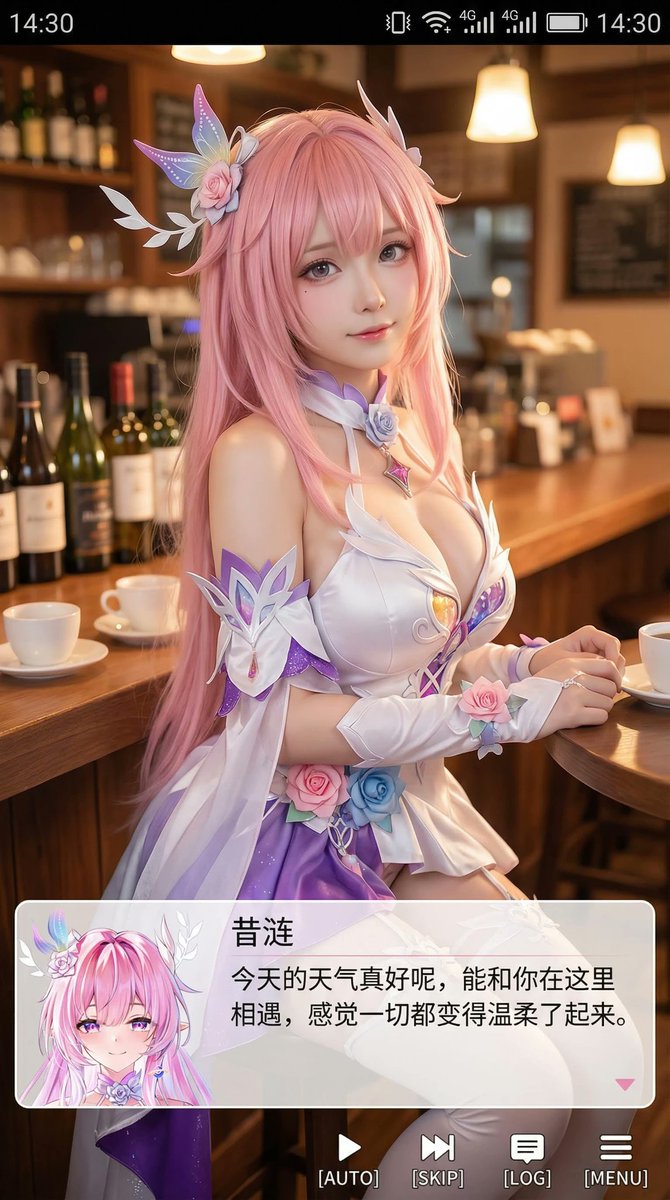
Generate a high-def portrait of an anime cosplayer in a mobile screenshot with a galgame dialog box and gentle healing dialogue. Perfect for visual novel styles.
提示词 · EN
Generate a portrait mobile phone screenshot style image, with an overall aspect ratio close to 9:16. In the upper center of the frame is a real-life coser, playing a 2D anime character named (Character Name). The character is in a realistic style, but with facial features slightly showing an anime feel, delicate skin, slightly larger eyes, a gentle expression looking at the camera, sitting in an indoor casual scene, such as in front of a cafe or bar counter, with background props fitting the scene. At the very top of the image, add a mobile phone system status bar UI, including icons for time, battery, signal, and network, to make the whole image look like a mobile phone screenshot. At the bottom of the image, overlay a wide semi-transparent galgame style dialog box, place an anime or Q-version avatar corresponding to the character in the image on the left side of the dialog box; on the right side of the dialog box, typeset text: the first line displays the same character name as before in a larger font, the following one to two lines display a piece of Simplified Chinese dialogue suitable for this character's personality, in a gentle and healing style, automatically created by you. Then add an operation bar below the dialog box, imitating the galgame UI. The overall style is high-definition, rich in details, with soft lighting, and a natural fusion of 2D anime and real-life photography.
关于这个提示词
Generate a high-def portrait of an anime cosplayer in a mobile screenshot with a galgame dialog box and gentle healing dialogue. Perfect for visual novel styles. 它更适合作为 AI 模型 的概念艺术起点:先保留画面结构、主体关系和风格约束,再替换成你的品牌、人物或场景。
常见用途包括 chatgpt、二次元、截图、扮演。这些标签只作为创作方向参考,实际生成时仍应以提示词结构和预览图为准。
使用时建议先小幅修改主体、场景、镜头和色调,再生成多个版本对比构图与细节。这样页面内容对用户有实际帮助,也避免把模型名或标签机械堆在正文里。
如何使用这个提示词
- Copy the prompt from this page.
- Paste into your AI image generator (Sora, DALL·E, etc.) and select a 9:16 portrait mode.
- Replace
(Character Name)with your desired character and customize the dialogue text in the prompt. - Generate and enjoy a realistic anime cosplay mobile screenshot.


