
GPT Image 2AI 提示词
Natural Light Portrait Photography — Sora 2 Prompt
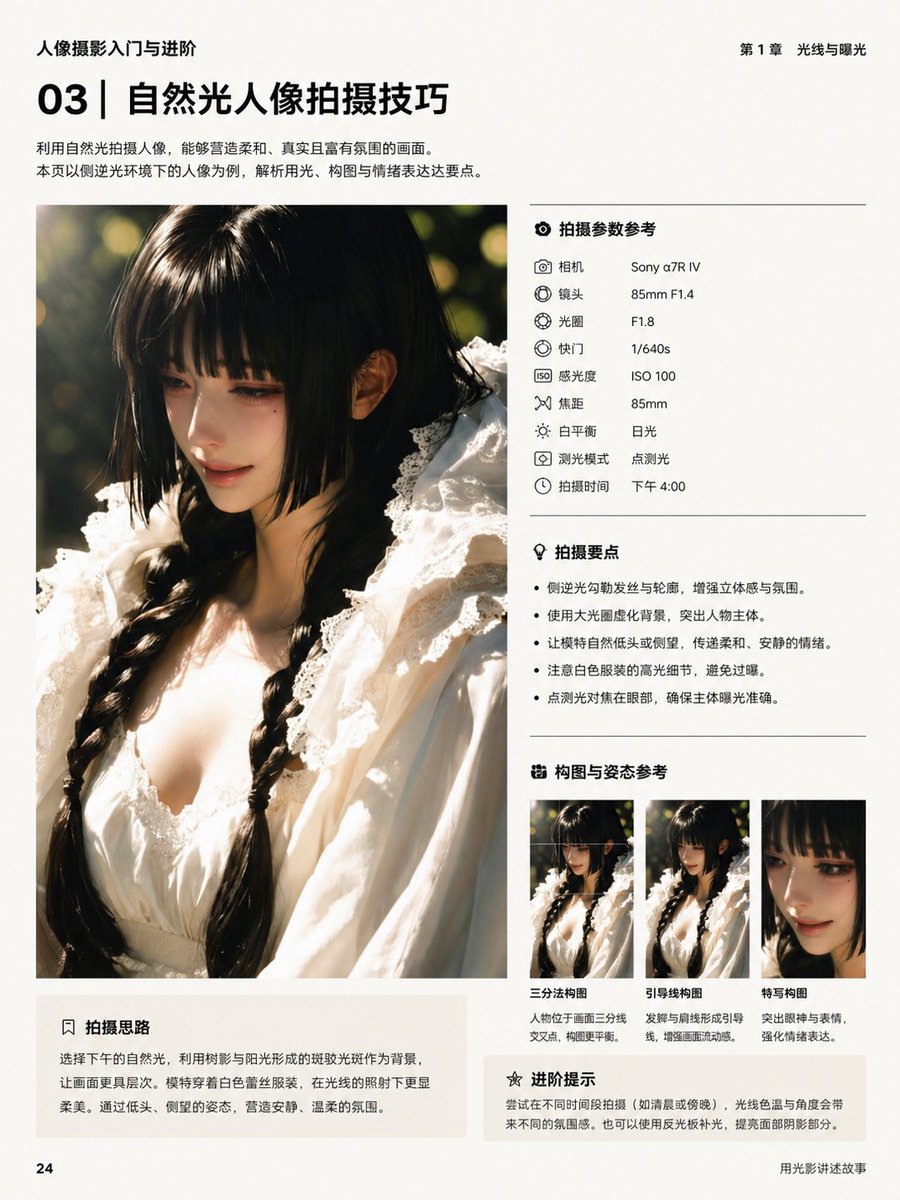
Generate a detailed photography tutorial book page featuring a natural light portrait, camera specs, and composition tips, perfect for educational or magazine-style designs.
提示词 · EN
type
书籍内页排版language
中文genre
摄影教程排版page
size
竖版书页background
米白色哑光纸page_number
24header_left
人像摄影入门与进阶header_right
第 1 章 光线与曝光footer_right
用光影讲述故事title_block
section_number
03headline
自然光人像拍摄技巧subtext
利用自然光拍摄人像,能够营造柔和、真实且富有氛围的画面。本页以侧逆光环境下的人像为例,解析用光、构图与情绪表达这三大要点。position
左上角main_image
position
左侧栏subject
一位留着黑色双麻花辫年轻女性的特写人像,身穿带有荷叶边领口和精致饰边的白色蕾丝裙,在午后温暖的自然光下拍摄framing
从胸部到头顶的竖向裁剪lighting
强烈的侧逆光,发丝和肩部带有金色轮廓光,柔和的暖色高光,浅景深,圆形背景虚化background
深绿色户外植被,带有阳光斑驳的虚化效果face
面部区域覆盖有刻意模糊的矩形right_column
sections
item 1
title
拍摄参数参考position
右上角count
9items
item 1
label
相机value
Sony α7R IVitem 2
label
镜头value
85mm F1.4item 3
label
光圈value
F1.8item 4
label
快门value
1/640sitem 5
label
感光度value
ISO 100item 6
label
焦距value
85mmitem 7
label
白平衡value
日光item 8
label
测光模式value
点测光item 9
label
拍摄时间value
下午 4:00item 2
title
拍摄要点position
中右侧count
4items
item 1
侧逆光勾勒发丝与轮廓,增强立体感与氛围。item 2
使用大光圈虚化背景,突出人物主体。item 3
让模特自然低头或侧望,传递柔和、安静的情绪。item 4
点测光对焦在面部,确保主体曝光准确。item 3
title
构图与姿态参考position
右下角count
3items
item 1
label
三分法构图description
人物位于画面三分线交叉点,构图更平衡。item 2
label
引导线构图description
发辫与肩线形成引导线,增强画面流动感。item 3
label
特写构图description
突出眼神与表情,强化情绪表达。item 4
title
进阶提示position
右底部count
1items
item 1
尝试在不同时间段拍摄(如清晨或傍晚),光线色温与角度会带来不同的氛围感。也可以使用反光板补光,提高面部明暗影部分。bottom_left_box
title
拍摄思路position
主图下方左侧body
选择下午的自然光,利用树影与阳光形成的斑驳光斑作为背景,让画面更具层次。模特穿着白色蕾丝服装,在光线的照射下更显柔美。通过低头、侧望的姿态,营造安静、温柔的氛围。style
overall
简洁高级的书籍排版,极简中文排版,现代摄影教育布局grid
左侧大图,右侧结构化信息面板,各板块间有细微分割线typography
粗体无衬线章节号与标题,较小的常规正文,整齐对齐的标签与数值,单色黑色文本color_palette
暖奶油色、黑色、柔灰色、金色阳光、深绿色、白色织物关于这个提示词
Generate a detailed photography tutorial book page featuring a natural light portrait, camera specs, and composition tips, perfect for educational or magazine-style designs. 它更适合作为 GPT Image 2 的概念艺术起点:先保留画面结构、主体关系和风格约束,再替换成你的品牌、人物或场景。
这条提示词使用结构化 JSON 组织信息,包含 type、language、genre、page、title block、main image、right column 等字段。保留这种层级能让模型更清楚地区分画面主题、布局、界面元素和细节约束。
使用时建议先小幅修改主体、场景、镜头和色调,再生成多个版本对比构图与细节。这样页面内容对用户有实际帮助,也避免把模型名或标签机械堆在正文里。
如何使用这个提示词
- Copy the prompt text above.
- Paste it into an AI image generator like Sora 2, Midjourney, or DALL·E that supports complex layouts.
- Modify any text elements (e.g., camera model, titles, or tips) to suit your content.
- Generate the image and iterate with small adjustments until satisfied.


