
GPT Image 2AI 提示词
Korean Hydrating Water Cream Ad — Sora 2 Prompt
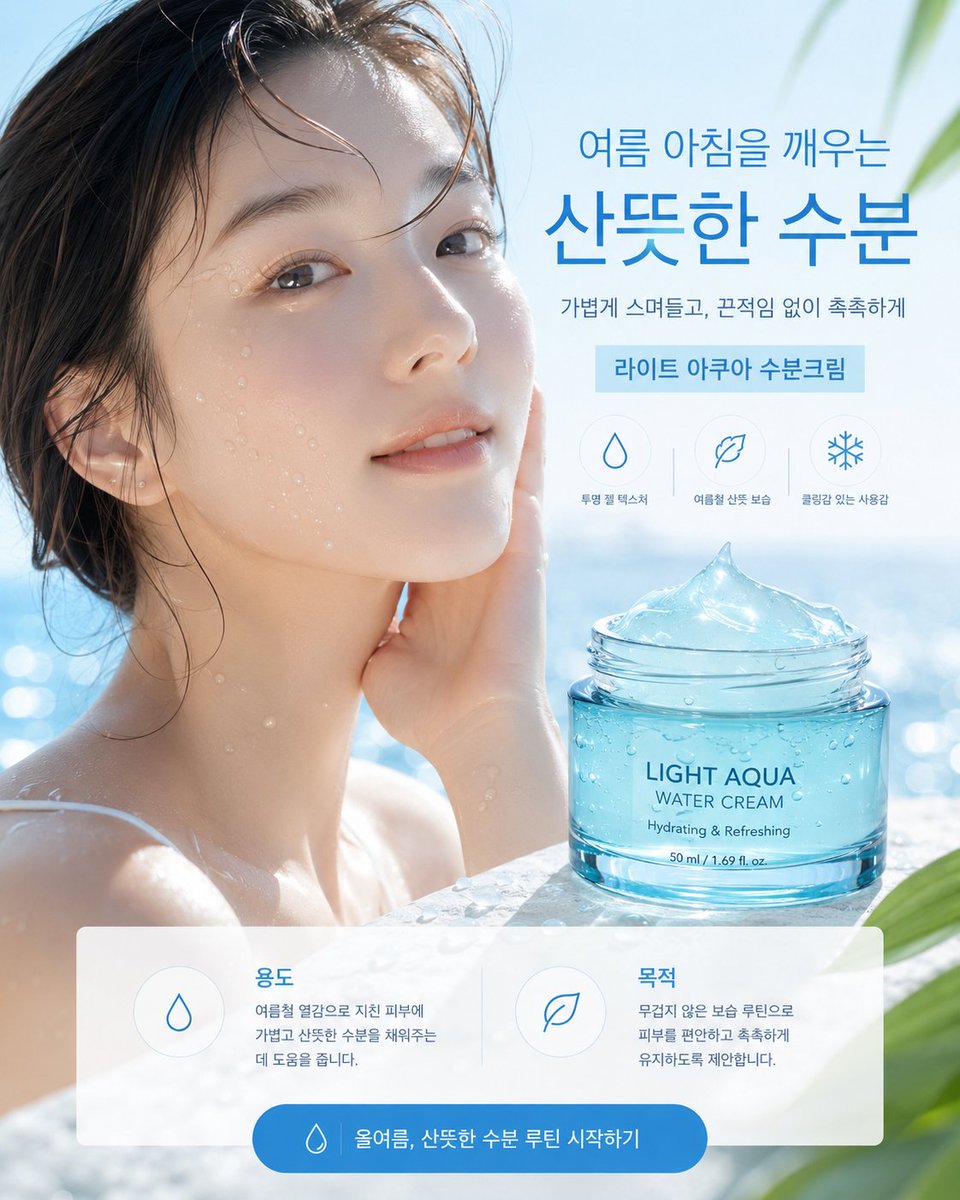
Generate a realistic, high-end Korean skincare ad for a water cream, featuring a summer pool scene, product jar, benefit icons, and a call-to-action button.
提示词 · EN
type
韩式护肤广告海报format
单张竖版社交媒体广告,4:5 比例style
高端写实夏季美妆商业摄影,明亮清爽的蓝白配色,简洁的韩式化妆品排版,光泽感水面反射,柔和日光,浅景深scene
background
阳光明媚的户外泳池或海滨水疗场景,带有波光粼粼的蓝色水面虚化效果,浅色天空,右上角和右下角点缀柔和的绿色热带叶片model
湿发、露肩的年轻女性在水中,位于画面左侧,手触脸颊,皮肤水润带有水珠,面部覆盖一个大型半透明方形隐私占位符,呈柔和的米灰色渐变,占位符位于面部和上颈部中心mood
清凉、沁爽、水润、宁静的夏日清晨product
item
装有水感凝霜的透明绿松石色化妆品罐position
右下角前景,置于湿润的石面或泳池边缘label text
{argument name="product label text" default="LIGHT AQUA\nWATER CREAM\n补水保湿 & 清爽沁凉\n50 ml / 1.69 fl. oz."}appearance
开口玻璃罐,带有螺旋盖边缘,蓝色调凝霜堆叠成光泽的冰峰状,罐身带有冷凝水珠,写实的折射与高光效果typography
language
韩语font style
现代简洁无衬线字体,大号加粗蓝色标题,搭配较细的辅助文字main headline
{argument name="headline text" default="唤醒夏日清晨的\n清爽水润"}subheadline
{argument name="subheadline text" default="轻盈吸收,清爽不粘腻,持久水润"}product ribbon
{argument name="product ribbon text" default="轻盈水感面霜"}layout
top-right text block
标题位于右上角,副标题在下方,浅蓝色长方形丝带位于下方benefit icons
count
3position
产品罐上方右侧style
浅色圆圈内的细蓝色线条图标items
item 1
icon
水滴label
透明凝胶质地item 2
icon
叶子label
夏季清爽保湿item 3
icon
雪花label
沁凉使用感bottom information panel
count
2position
底部三分之一处,横跨几乎全宽的半透明白色圆角矩形cards
item 1
title
用途icon
水滴body
帮助为夏季受热疲惫的肌肤补充轻盈清爽的水分。item 2
title
目的icon
叶子body
建议采用无负担的保湿方案,让肌肤保持舒适水润。call to action
position
最底部居中,位于蓝色圆角胶囊按钮内icon
小水滴text
{argument name="button text" default="这个夏天,开启清爽水润护肤流程"}composition
模特占据左侧,产品罐锚定右下角,标题占据右上角,UI 面板覆盖底部,所有元素对齐并留有充足的留白,呈现精致的电商广告层级lighting
高调自然日光,冷蓝色高光,光泽反射,写实的水汽与玻璃焦散效果quality
超写实广告摄影,产品渲染清晰,韩文文字易读,无额外 Logo,画面整洁关于这个提示词
Generate a realistic, high-end Korean skincare ad for a water cream, featuring a summer pool scene, product jar, benefit icons, and a call-to-action button. 它更适合作为 GPT Image 2 的概念艺术起点:先保留画面结构、主体关系和风格约束,再替换成你的品牌、人物或场景。
这条提示词使用结构化 JSON 组织信息,包含 type、format、style、scene、product、typography、layout 等字段。保留这种层级能让模型更清楚地区分画面主题、布局、界面元素和细节约束。
使用时建议先小幅修改主体、场景、镜头和色调,再生成多个版本对比构图与细节。这样页面内容对用户有实际帮助,也避免把模型名或标签机械堆在正文里。
如何使用这个提示词
- Copy the full prompt and paste it into your Sora 2 or compatible AI video/image generator.
- Select a high-quality model like Sora 2 that excels at photorealistic scenes and fine details.
- Customize the variables within the prompt, such as
{product label text}and{headline text}, to match your specific product or campaign. - Generate the output and review the composition, text, and overall aesthetic.
- Iterate on the prompt by adjusting the scene, model pose, or color scheme if needed.


