
GPT Image 2AI 提示词
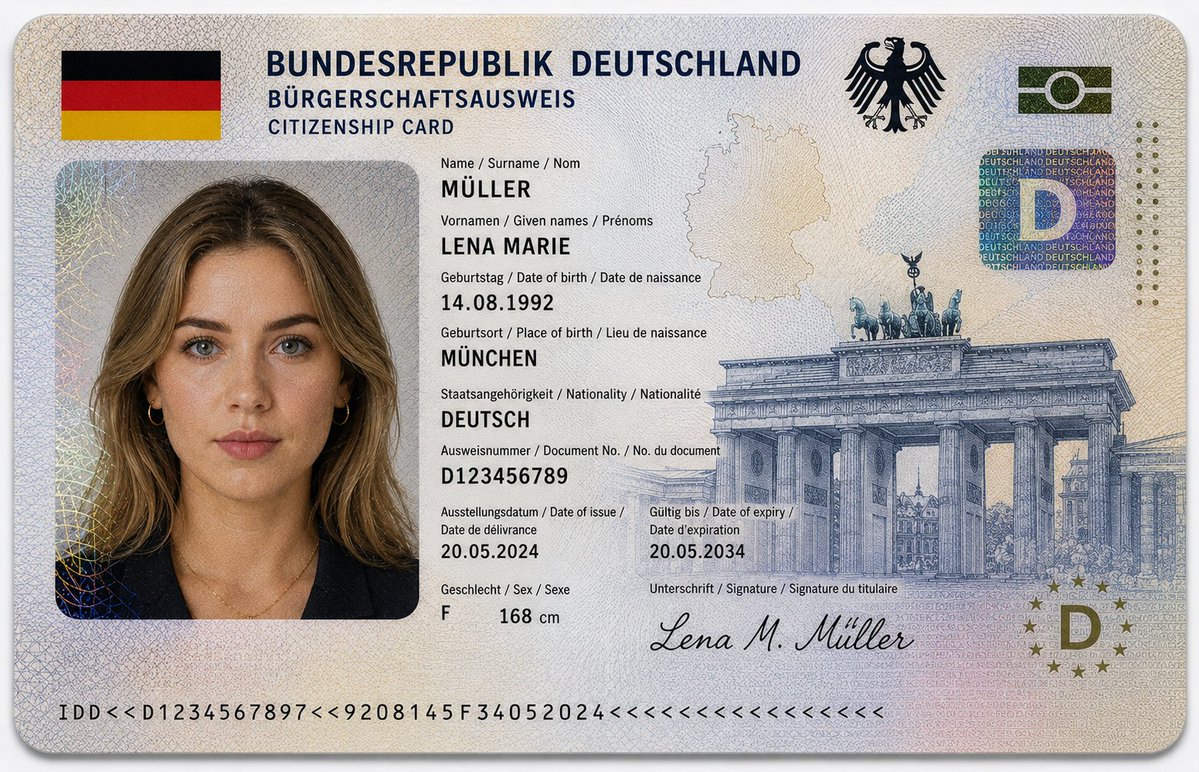
German ID Card Mockup — Ultra-Realistic Sora 2 Prompt
Generate hyper-detailed German citizenship ID mockups with official seals, holograms, and biometric portraits for design and training projects.
1 / 2
提示词 · EN
16:9 超逼真特写摄影作品,展示了一张 argdocument type: 德国公民身份证,放置在干净的浅灰色或白色背景上。证件水平对齐,位于画面中心,对焦清晰,采用柔和的漫射摄影棚灯光。设计遵循欧洲政府签发证件的官方美学,布局结构严谨,字体清晰,并具备先进的防伪细节。顶部标题为:“BUNDESREPUBLIK DEUTSCHLAND”,副标题为“BÜRGERSCHAFTSAUSWEIS / CITIZENSHIP CARD”。左上角包含德国国旗。右上角印有德国联邦鹰徽(Bundesadler)。证件包含一张 argportrait subject: 年轻德国女性 的护照风格肖像:– 白皙的欧洲肤色,带有细微的自然雀斑 – 肩部长度的 arghair style: 深金色微卷发,中分 – 蓝绿色眼睛,表情中性,直视镜头 – 妆容清淡,皮肤纹理真实 – 身穿深蓝色或黑色西装外套,佩戴精致的金色首饰。个人身份信息以欧洲多语言格式(德语 / 英语 / 法语)显示:– Name / Surname / Nom: MÜLLER – Vornamen / Given names / Prénoms: LENA MARIE – Geburtstag / Date of birth / Date de naissance: 14.08.1992 – Geburtsort / Place of birth / Lieu de naissance: MÜNCHEN – Staatsangehörigkeit / Nationality / Nationalité: DEUTSCH – Ausweisnummer / Document No. / No. du document: D123456789 – Ausstellungsdatum / Date of issue / Date de délivrance: 20.05.2024 – Gültig bis / Date of expiry / Date d’expiration: 20.05.2034 – Geschlecht / Sex / Sexe: F – Height: 168 cm。安全与设计特征包括:– 覆盖整个证件表面的复杂扭索纹图案 – 类似于欧元纸币印刷的细线雕刻纹理 – 微缩印刷文字层和防伪线条 – 带有虹彩反射的全息安全贴片 – 带有嵌入式“D”符号的圆形欧盟风格全息图 – 背景中融入了微妙的德国轮廓地图 – 右侧印有大型勃兰登堡门雕刻插图 – 底部边缘设有机器可读区域条 – 底部签名:“Lena M. Müller”。其他设计亮点:– 受德国国旗启发的黑、红、金柔和渐变色调 – 带有透明安全覆盖层的分层聚碳酸酯纹理 – 简约、干净的欧盟身份证风格。材质外观:层压聚碳酸酯卡片,带有轻微光泽、逼真的反射、全息箔效果和浮雕微纹理。灯光柔和且均匀漫射,突显安全细节、雕刻图案和逼真的印刷纹理。画面中无手部出现。构图简洁、专业。风格:超精细、照片级真实感、8K 分辨率、微距清晰度、专业产品摄影、纪录片式写实。
关于这个提示词
Generate hyper-detailed German citizenship ID mockups with official seals, holograms, and biometric portraits for design and training projects. 它更适合作为 GPT Image 2 的概念艺术起点:先保留画面结构、主体关系和风格约束,再替换成你的品牌、人物或场景。
使用时优先替换 document type、portrait subject、hair style 等占位符,并保持镜头、构图和材质描述的顺序不变。这样更容易获得稳定的画面结果,也方便继续做多版本对比。
如何使用这个提示词
- Copy the full prompt text from this page.
- Select Sora 2 (or another compatible image/video model) as your generation engine.
- Customize the
{document type}and{portrait subject}variables to match your desired ID style or character. - Paste the prompt into the model interface and run generation.
- Review the output; regenerate or adjust lighting/detail settings for best results.


