
GPT Image 2AI 提示词
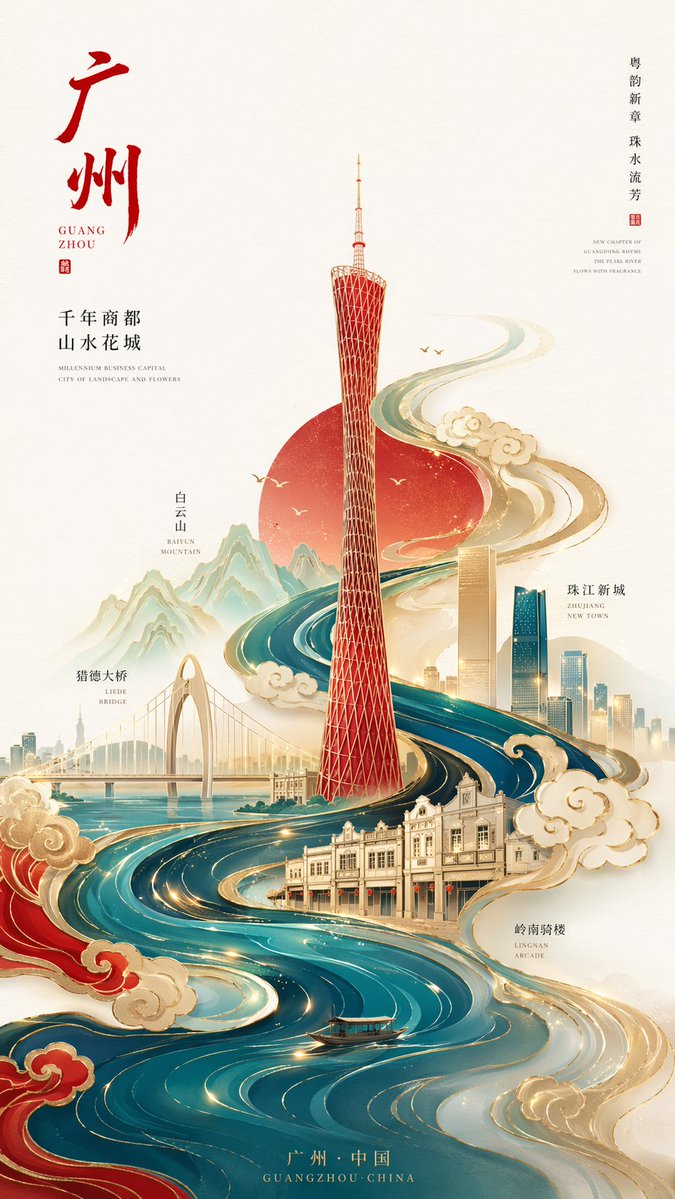
New Chinese Minimalist City Poster Prompt — Sora 2 & AI Art
Create stunning 8K minimalist city posters featuring geometric landmarks, flowing river motifs, and traditional Chinese patterns for a premium brand aesthetic.
提示词 · EN
新中式极简风格高端城市海报,argaspect ratio: 9:16 竖构图,以 argcity: 广州 为核心主题。画面中心为广州塔的抽象几何版本,简洁且具有辨识度。整体采用 S 型流动构图,由底部向上延伸。珠江水系设计为流动的水波纹,并融合传统祥云纹样,环绕整个画面形成视觉动线。地标点缀采用“留白 + 线条 + 局部色块”的处理方式。风格:极简 + 高级 + 东方意境。配色方案:以 argcolor scheme: 中国红、天青蓝和金色 为主色调,辅以少量暖金色点缀。背景:大面积纯白留白或浅色宣纸纹理。整体风格:国潮高端插画 / 品牌海报质感 / 8K / 超清细节。
关于这个提示词
Create stunning 8K minimalist city posters featuring geometric landmarks, flowing river motifs, and traditional Chinese patterns for a premium brand aesthetic. 它更适合作为 GPT Image 2 的概念艺术起点:先保留画面结构、主体关系和风格约束,再替换成你的品牌、人物或场景。
使用时优先替换 aspect ratio、city、color scheme 等占位符,并保持镜头、构图和材质描述的顺序不变。这样更容易获得稳定的画面结果,也方便继续做多版本对比。
如何使用这个提示词
- Copy the full prompt text, including the bracketed variables.
- Paste it into your preferred AI image generator (e.g., Sora 2, Midjourney, or Stable Diffusion).
- Replace the variables inside
{}with your desired values (e.g., change 'city' from 'Guangzhou' to 'Shanghai'). - Adjust the
aspect ratiovariable to match your desired output orientation (e.g., 9:16 for vertical, 16:9 for horizontal). - Generate the image and refine the prompt as needed by tweaking the color scheme or landmark details.


