
GPT Image 2AI 提示词
Satellite Anomaly Web Interface Mockup — Sora 2 Prompt
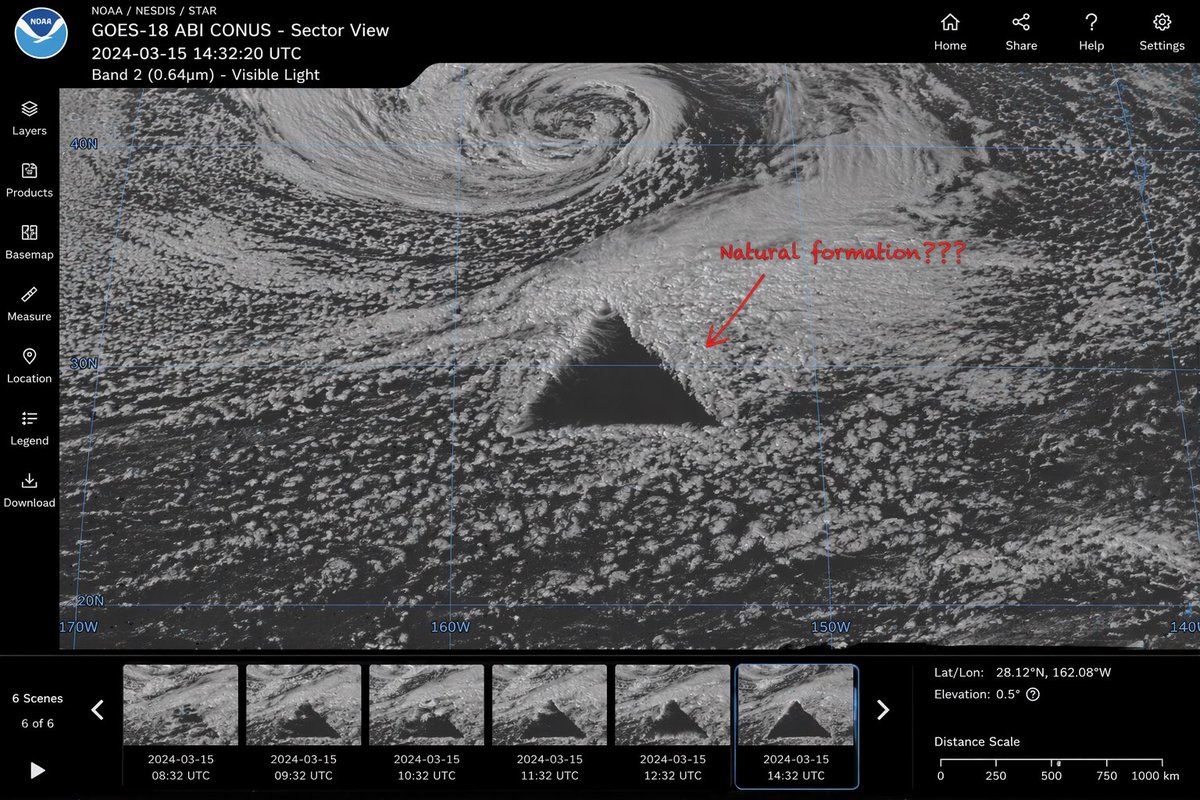
Generate a realistic satellite image UI featuring a massive geometric triangle anomaly, handwritten annotation, timeline thumbnails, and full interactive controls.
提示词 · EN
type
卫星图像网页界面模型main_display
imagery
海洋云层的灰度卫星视图,中心处包含一个 {argument name="anomaly shape" default="巨大的、完美的几何深色三角形"}annotation
红色的手写文字“{argument name="annotation text" default="自然形成???"}”,并配有一个指向该异常的红色箭头overlay
淡蓝色的经纬度网格线,带有 40N、30N、160W 等坐标标签ui_layout
top_header
left_section
NOAA 标志,文字“{argument name="satellite name" default="GOES-18 ABI CONUS - Sector View"}”、“{argument name="timestamp" default="2024-03-15 14:32:20 UTC"}”以及“Band 2 (0.64µm) - 可见光”right_section
4 个导航图标,标签分别为:首页、分享、帮助、设置left_sidebar
count
7items
item 1
图层item 2
产品item 3
底图item 4
测量item 5
位置item 6
图例item 7
下载bottom_panel
timeline
controls
播放按钮、左右箭头、文字“6 个场景”、“6 / 6”thumbnails
count
6description
展示异常演变过程的连续卫星图像,包含从 08:32 UTC 到 14:32 UTC 的每小时时间戳data_readout
coordinates
{argument name="coordinate text" default="经纬度:28.12°N, 162.08°W"}elevation
海拔:0.5°scale
0 到 1000 km 的距离比例尺关于这个提示词
Generate a realistic satellite image UI featuring a massive geometric triangle anomaly, handwritten annotation, timeline thumbnails, and full interactive controls. 它更适合作为 GPT Image 2 的概念艺术起点:先保留画面结构、主体关系和风格约束,再替换成你的品牌、人物或场景。
这条提示词使用结构化 JSON 组织信息,包含 type、main display、ui layout 等字段。保留这种层级能让模型更清楚地区分画面主题、布局、界面元素和细节约束。
使用时建议先小幅修改主体、场景、镜头和色调,再生成多个版本对比构图与细节。这样页面内容对用户有实际帮助,也避免把模型名或标签机械堆在正文里。
如何使用这个提示词
- Copy the prompt code from sora2hub.com.
- Paste it into an AI video/image model (e.g., Sora 2).
- Adjust optional arguments like
anomaly shape,annotation text,satellite name, ortimestampto customize the scene. - Generate the output and iterate to refine details like grid overlay or data readouts.
- Use the result for design inspiration, storytelling, or visual effects projects.


