
GPT Image 2AI 提示词
Bauhaus Abstract Vector Icons — Sora 2 Prompt
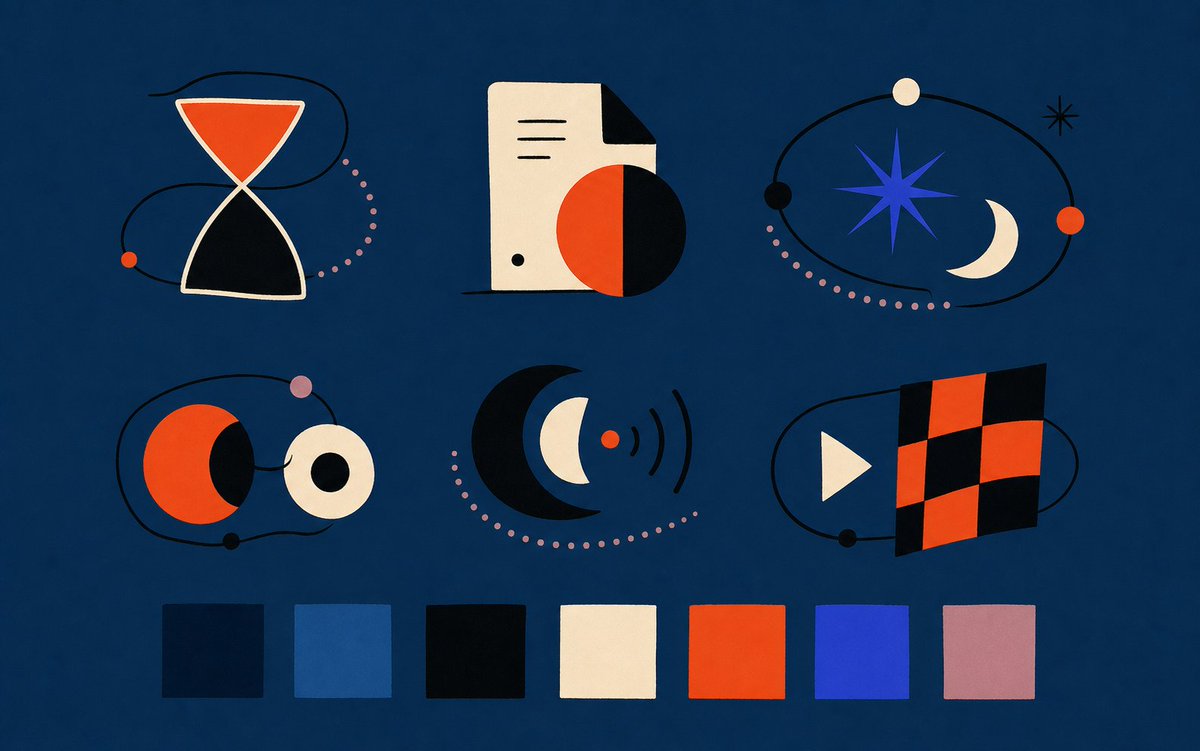
Generate a sleek set of six geometric UI icons with a modern abstract style and a 7-color palette for web design systems.
提示词 · EN
type
用于前端素材的现代抽象矢量图标样式项目overall_style
扁平几何编辑插画,包豪斯风格,利落的剪纸形状,细腻的颗粒质感,极简黑色线条,深海军蓝背景,平衡的留白,高对比度,无文字canvas
aspect_ratio
宽屏 16:10background_color
{argument name="background color" default="深海军蓝"}composition
两行三列的抽象图标组合,底部带有调色板条layout
icon_count
6icons
item 1
position
左上description
由两个奶油色轮廓三角形组成的沙漏图标,上部填充橙红色,下部为黑色,周围环绕一条松散的黑色轨道线,带有一个小橙色圆点和一条粉色虚线弧线item 2
position
中上description
带有黑色折角的奶油色文档页,上有三条短黑色水平线,底部附近有一个小黑点,与一个半橙红半黑的大圆重叠,投射出深色的几何阴影item 3
position
右上description
天体轨道图标,中心为蓝色八角星,右侧为奶油色新月,黑色轨道环,小型奶油色、黑色和橙红色行星,小型黑色星爆,以及粉色虚线轨迹item 4
position
左中description
由黑色轨道线连接的两个圆形行星形态:左侧为带有黑色新月阴影的橙红色圆圈,右侧为带有黑色中心的奶油色环形圆圈,外加粉色和黑色小圆点item 5
position
正中description
巨大的黑色新月环绕着蓝色新月和奶油色新月,带有一个发出三条黑色无线电波弧线的小橙红色圆点,以及一条粉色虚线半圆轨迹item 6
position
右中description
媒体旗帜图标,左侧为奶油色播放三角形,右侧为由橙红色和黑色方块交替组成的倾斜棋盘格矩形,周围环绕一条带有小黑点的黑色轨道线palette_strip
position
底部swatch_count
7swatches
item 1
index
1color
深海军蓝item 2
index
2color
中性柔和蓝item 3
index
3color
近黑色item 4
index
4color
暖奶油色item 5
index
5color
{argument name="accent orange" default="鲜艳橙红色"}item 6
index
6color
{argument name="accent blue" default="电光宝蓝色"}item 7
index
7color
{argument name="accent pink" default="灰调淡紫色"}visual_details
使用干净的矢量边缘,带有轻微的纸张质感和柔和的不完美感;保持形状简洁且具有象征意义,黑色轨道线在物体周围穿插;粉色虚线路径应为间距均匀的小圆点;保持适合可交付 Web UI 插画的高级设计系统氛围rendering
高分辨率扁平矢量素材表,居中布局,图标比例一致,无标签,无排版关于这个提示词
Generate a sleek set of six geometric UI icons with a modern abstract style and a 7-color palette for web design systems. 它更适合作为 GPT Image 2 的概念艺术起点:先保留画面结构、主体关系和风格约束,再替换成你的品牌、人物或场景。
这条提示词使用结构化 JSON 组织信息,包含 type、overall style、canvas、layout 等字段。保留这种层级能让模型更清楚地区分画面主题、布局、界面元素和细节约束。
使用时建议先小幅修改主体、场景、镜头和色调,再生成多个版本对比构图与细节。这样页面内容对用户有实际帮助,也避免把模型名或标签机械堆在正文里。
如何使用这个提示词
- Copy the complete prompt JSON from sora2hub.com.
- Select a video or image generation model that supports high-fidelity vector style (e.g., Sora 2, Midjourney).
- Adjust the color arguments (background, accent orange, accent blue, accent pink) to match your brand palette.
- Generate the asset and use the output as a UI style tile or illustration set for your frontend project.


