
GPT Image 2AI 提示词
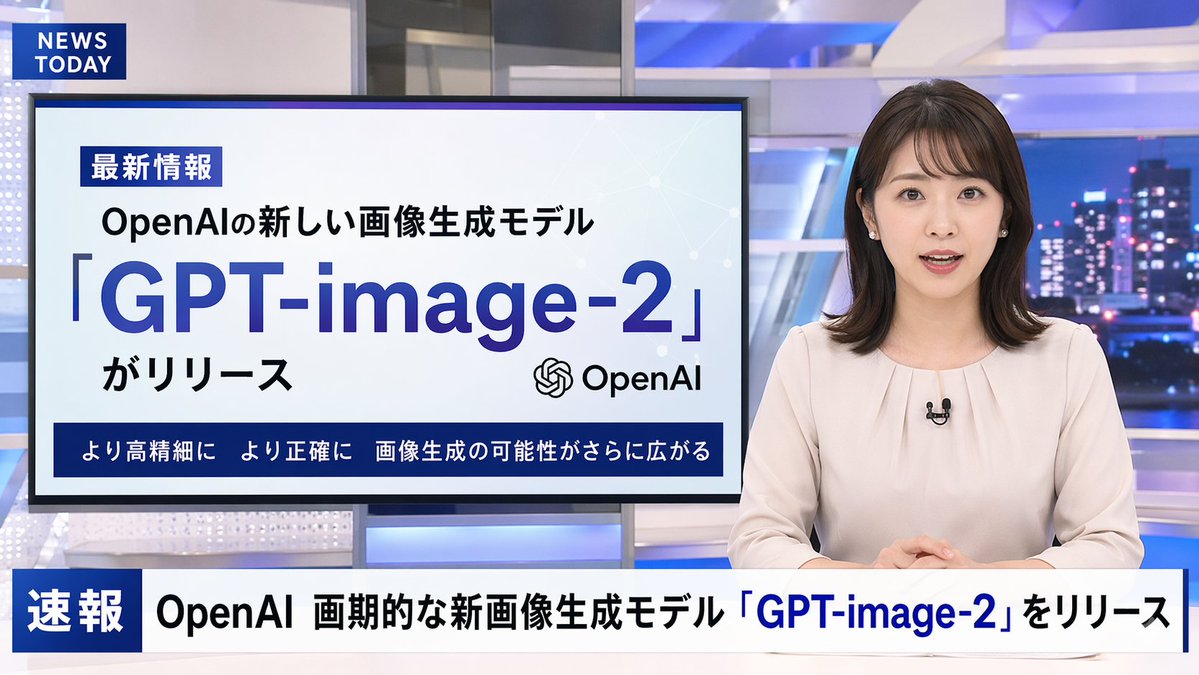
Japanese TV News Broadcast Scene — Sora 2 Prompt
Generate a realistic TV news broadcast scene with a Japanese anchor, modern studio, and customizable graphics and headlines.
提示词 · EN
type
电视新闻广播布局anchor
appearance
{argument name="anchor appearance" default="年轻的日本女性新闻主播,留着齐肩深色短发"}attire
浅米色衬衫,佩戴小型翻领麦克风pose
坐在桌前,双手交叠,面向前方studio_environment
现代新闻演播室,配有蓝色发光面板,背景为夜间城市天际线graphics
top_left_bug
style
深蓝色矩形text
{argument name="channel logo" default="NEWS TODAY"}presentation_monitor
location
主播后方左侧badge
最新情報subtitle
{argument name="subheadline" default="OpenAIの新しい画像生成モデル"}title
{argument name="main headline" default="「GPT-image-2」"}suffix
がリリースicon
OpenAI logobottom_bar
より高精細に より正確に 画像生成の可能性がさらに広がるlower_thirds_ticker
badge
速報headline
{argument name="ticker text" default="OpenAI 画期的な新画像生成モデル「GPT-image-2」をリリース"}关于这个提示词
Generate a realistic TV news broadcast scene with a Japanese anchor, modern studio, and customizable graphics and headlines. 它更适合作为 GPT Image 2 的概念艺术起点:先保留画面结构、主体关系和风格约束,再替换成你的品牌、人物或场景。
这条提示词使用结构化 JSON 组织信息,包含 type、anchor、studio environment、graphics 等字段。保留这种层级能让模型更清楚地区分画面主题、布局、界面元素和细节约束。
使用时建议先小幅修改主体、场景、镜头和色调,再生成多个版本对比构图与细节。这样页面内容对用户有实际帮助,也避免把模型名或标签机械堆在正文里。
如何使用这个提示词
- Copy the prompt text.
- Paste into an AI video generator like Sora 2 (or image tools like DALL·E 3).
- Customize variables: anchor appearance, headlines, ticker text, etc.
- Generate the broadcast scene.
- Refine by tweaking details or regenerating for best results.


