
GPT Image 2AI 提示词
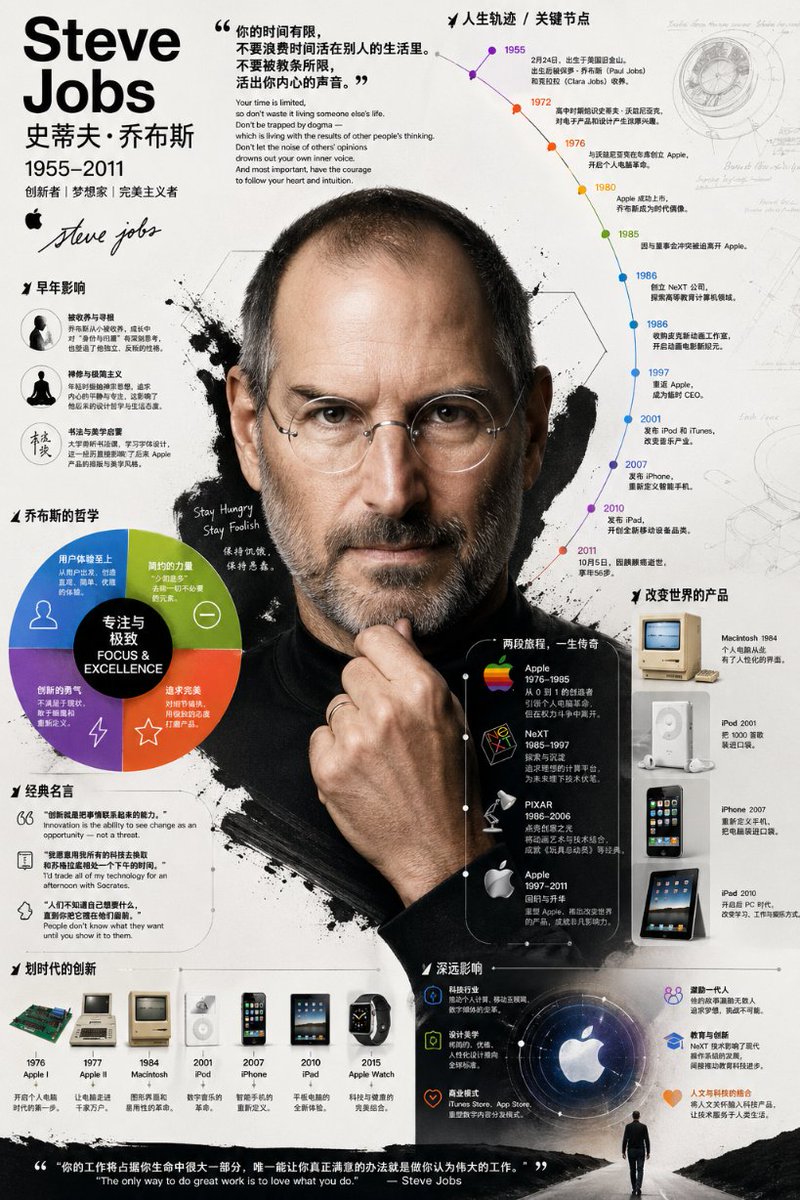
Create Rich Biography Infographics with Realistic Portraits
Craft a rich biographical infographic with a photorealistic portrait, using this AI prompt for professional, layered visuals.
提示词 · EN
请为 argsubject name: [姓名] 创建一张视觉效果极其丰富且深度的信息图。它不应只是信息的罗列:我需要你深入挖掘他们的生平、主要成就、关键职业里程碑、哲学思想,以及他们对技术和设计产生的独特影响。避免生硬的板块式布局;请使用图表、注释和引导线将这些信息有机地结合起来。视觉风格:采用大胆、有力且极具图形感的插画风格。具体来说,它应该呈现如下效果:中心焦点是该人物高度写实、如照片般的肖像。围绕这一核心的是时间轴、分析图表、经典产品、名言警句和简洁的文字等元素。构图:保持背景简洁。利用分层构图,将写实肖像与强烈的图形元素(如各种形状、图标、大色块)完美融合。整张图像应看起来内容充实、富有质感且非常专业。
关于这个提示词
Craft a rich biographical infographic with a photorealistic portrait, using this AI prompt for professional, layered visuals. 它更适合作为 GPT Image 2 的概念艺术起点:先保留画面结构、主体关系和风格约束,再替换成你的品牌、人物或场景。
使用时优先替换 subject name 等占位符,并保持镜头、构图和材质描述的顺序不变。这样更容易获得稳定的画面结果,也方便继续做多版本对比。
如何使用这个提示词
- Copy the prompt below and paste it into your preferred AI image generator (e.g., DALL·E 3, Midjourney, Sora 2 compatible models).
- Replace
[姓名]with the full name of your subject (e.g., "Steve Jobs") to personalize the infographic. - Adjust any descriptive elements like style keywords or composition notes if you want to match a specific design language.
- Generate the image and iterate by tweaking the prompt for even more detail or different visual balance.


