
GPT Image 2AI 提示词
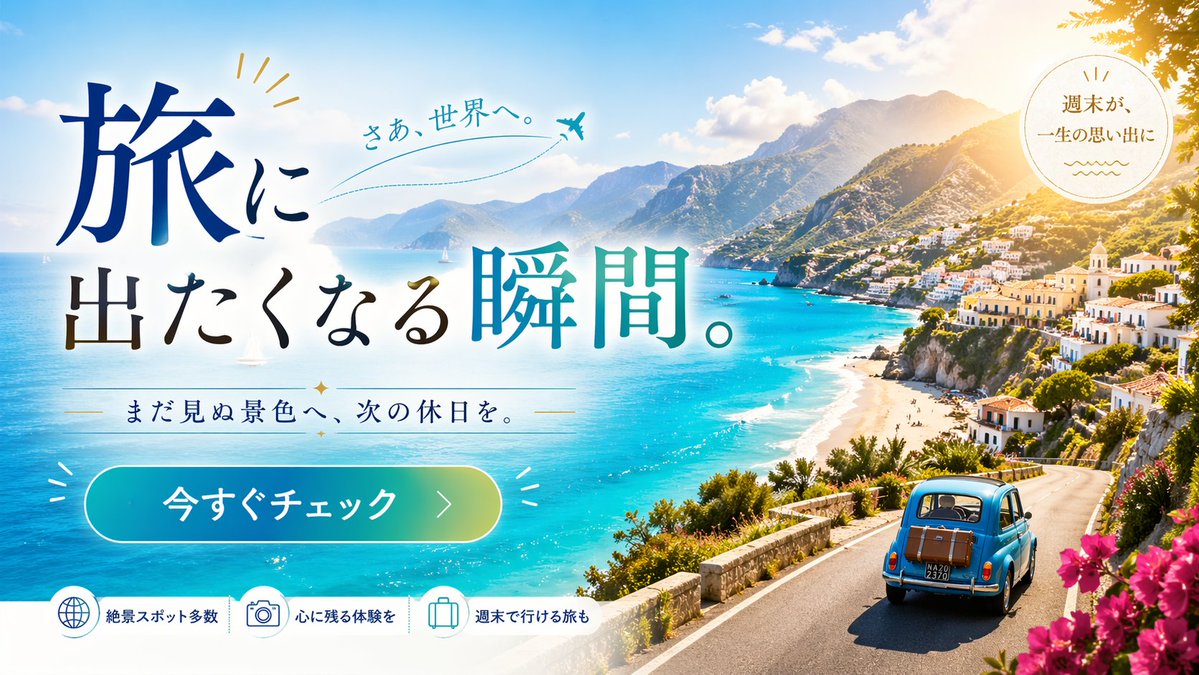
Vibrant Coastal Travel Ad Banner — Sora 2 Prompt
Generate a stunning travel ad banner with a Mediterranean coastal road scene, a vintage car, and professional promotional typography and UI elements.
提示词 · EN
type
旅游广告横幅background
{argument name="destination scene" default="地中海沿岸风光,拥有绿松石般的海水、悬崖边的村庄和蜿蜒的公路"},明媚晴天,右上角有太阳光晕,右下角有粉色三角梅foreground
{argument name="vehicle" default="一辆复古浅蓝色汽车,后备箱上绑着一个棕色行李箱"} 在沿海公路上行驶layout
typography
item 1
type
main headlinetext
{argument name="main headline" default="开启一场说走就走的旅行。"}style
大号衬线字体,深蓝色到青色渐变,左对齐item 2
type
subheadlinetext
{argument name="subheadline" default="奔赴未见之景,开启下一个假期。"}style
中号衬线字体,深蓝色,两侧饰有装饰线条和星星item 3
type
accent texttext
出发,去探索世界。style
手写风格,青色,配有虚线飞行轨迹和飞机图标ui_elements
item 1
type
badgeposition
右上角shape
圆形text
让周末成为一生难忘的回忆item 2
type
cta buttonposition
左下角style
药丸状,青色到绿色渐变text
{argument name="cta text" default="立即查看"}feature_bar
position
底部count
3items
item 1
icon
globetext
众多绝美景点item 2
icon
cameratext
留下难忘体验item 3
icon
suitcasetext
周末即可出发关于这个提示词
Generate a stunning travel ad banner with a Mediterranean coastal road scene, a vintage car, and professional promotional typography and UI elements. 它更适合作为 GPT Image 2 的概念艺术起点:先保留画面结构、主体关系和风格约束,再替换成你的品牌、人物或场景。
这条提示词使用结构化 JSON 组织信息,包含 type、background、foreground、layout 等字段。保留这种层级能让模型更清楚地区分画面主题、布局、界面元素和细节约束。
使用时建议先小幅修改主体、场景、镜头和色调,再生成多个版本对比构图与细节。这样页面内容对用户有实际帮助,也避免把模型名或标签机械堆在正文里。
如何使用这个提示词
- Copy this entire prompt and paste it into a Sora 2 compatible AI image generator.
- Customize the optional variables like
destination scene,vehicle,main headline, andcta textto match your brand. - Choose your desired aspect ratio (e.g., 16:9 for web banners).
- Generate the image and review the output.
- Tweak any arguments as needed and regenerate for the perfect travel ad.


