
Sora2 Hub
Sora2 Hub
  • 提示词库
  • 定价
  • 案例展示
Sora2 Hub
Sora2 Hub
Sora2 Hub

Sora2 Hub

由 Sora 2、Veo 3.1 和 Nano Banana Pro 驱动的专业 AI 创作平台。提供高级控制、高清画质和无水印的视频与工作室级图像创作。

Email:support@sora2hub.org

AI 视频生成

  • 文生视频
  • 图生视频
  • Veo 3.1
  • Sora 2
  • Kling 3.0
  • Kling 2.6
  • Kling 2.5
  • Runway
  • Wan 2.6
  • Seedance 2.0
  • Hailuo 2.3
  • Grok Imagine
  • HappyHorse-1.0

AI 图像生成

  • 文生图
  • 图生图
  • Nano Banana Pro
  • Nano Banana
  • 4o Image
  • Flux Kontext
  • Z Image
  • Seedream 4.5
  • Seedream 5.0 Lite
  • Nano Banana 2
  • GPT Image 2
  • AI 图片增强

AI 特效

  • AI 年龄滤镜
  • AI 性别转换
  • AI 亲吻
  • AI 拥抱
  • 吉卜力图片
  • AI 美人鱼滤镜
  • AI 身体摇摆
  • 微笑滤镜
  • AI 变胖
  • 动作人偶

产品

  • 功能特点
  • 案例展示
  • 定价

公司

  • 关于我们
  • 联系我们

© 2025 • Sora2 Hub ORG 保留所有权利。

  • 隐私政策
  • 服务条款
  • 退款政策
  1. 首页
  2. /
  3. 提示词
  4. /
  5. GPT Image 2
  6. /
  7. RGB Gaming Motherboard Studio Photography — Sora 2 Prompt
GPT Image 2AI 提示词

RGB Gaming Motherboard Studio Photography — Sora 2 Prompt

Generate a hyper-detailed studio shot of a premium ASUS ROG-style motherboard with dramatic lighting, matte-black armor, and vibrant RGB accents.
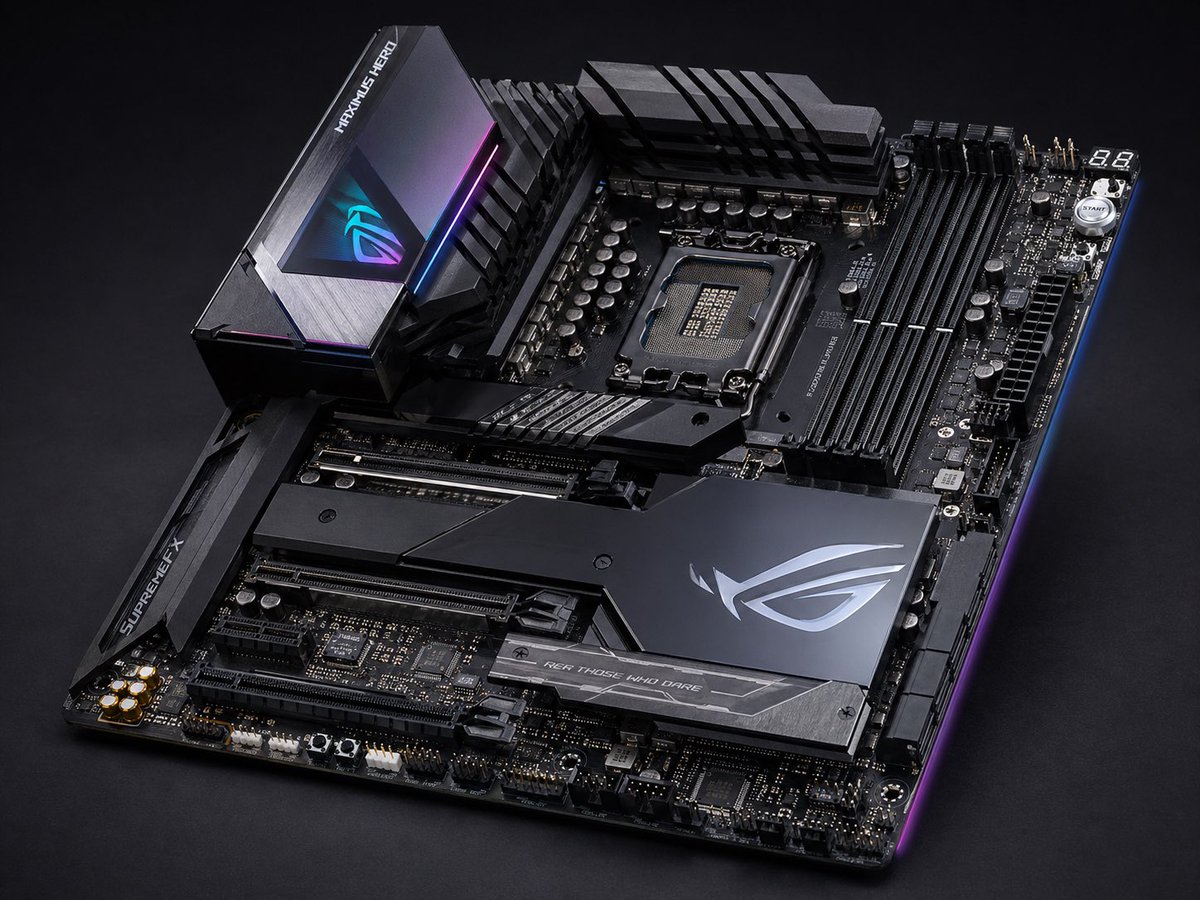
RGB Gaming Motherboard Studio Photography — Sora 2 Prompt
提示词 · EN
一张高端发烧级 ATX 游戏主板产品照片,背景为深色摄影棚环境,采用从左下向右上倾斜的四分之三俯视视角。该项目主体为哑光黑与枪灰色,配有锋利的几何装甲板、拉丝金属纹理,以及蓝色、紫色和洋红色的细微 RGB 边缘灯效。上方中央露出一个现代 Intel 风格 CPU 插槽,右侧设有 4 个黑色 DIMM 内存插槽,顶部和左上方配有大型 VRM 散热片,下半部分有多个加固的 PCIe 插槽。包含 3 个主要的品牌散热片区域:左上方的高大后置 I/O 护罩,带有发光的 RGB 眼睛标志和“MAXIMUS HERO”字样;左侧的芯片组/插槽装甲片,带有“SUPREMEFX”字样;以及右下角大型棱角分明的芯片组盖板,带有银色 ROG 风格徽标和下方写有“FOR THOSE WHO DARE”的条纹。展示详细的电容器、接头、电源接口、右上角显示“88”的调试显示屏,以及附近的一个小型圆形启动按钮。超精细商业产品摄影,全板焦点清晰,金属反射真实,呈现高端奢华科技美感,戏剧性的低调照明,干净的黑色无缝背景,无电缆,无 CPU,无 RAM,无其他杂物。

关于这个提示词

Generate a hyper-detailed studio shot of a premium ASUS ROG-style motherboard with dramatic lighting, matte-black armor, and vibrant RGB accents. 它更适合作为 GPT Image 2 的概念艺术起点:先保留画面结构、主体关系和风格约束,再替换成你的品牌、人物或场景。

使用时建议先小幅修改主体、场景、镜头和色调,再生成多个版本对比构图与细节。这样页面内容对用户有实际帮助,也避免把模型名或标签机械堆在正文里。

如何使用这个提示词

  1. Copy the full prompt text below.
  2. Open your preferred AI image generator (Sora 2, DALL·E 3, Midjourney, etc.).
  3. Paste the prompt and adjust details like brand names, color accents, or viewing angle to match your project.
  4. Set your desired resolution (1024×1024 or higher recommended for fine detail).
  5. Generate the image, then iterate by tweaking lighting keywords or RGB color values.

常见问题

/Justino •••

@rojassartorio→

发布时间
2026年4月30日
原始语言
EN
模型
GPT Image 2
分类
概念艺术
GPT Image 2概念艺术gpt-image-2twitter
浏览
54
复制
8
点赞
2

分享

更多来自 GPT Image 2

浏览全部
Celebrity Crossover — Sora 2 Prompt

Celebrity Crossover — Sora 2 Prompt

@Conor_D_Dart
Anime Idol Profile Page — Lavender Art Style Prompt

Anime Idol Profile Page — Lavender Art Style Prompt

@uzuyanurp
Japanese Cinematic Poster Prompt — 4-Panel Agency Ad

Japanese Cinematic Poster Prompt — 4-Panel Agency Ad

@kantamizutamari

用 Sora2Hub 提示词更快创作。

把精选提示词页面作为可搜索入口,然后带着模型上下文直接进入生成流程。

探索更多提示词

