
GPT Image 2AI 提示词
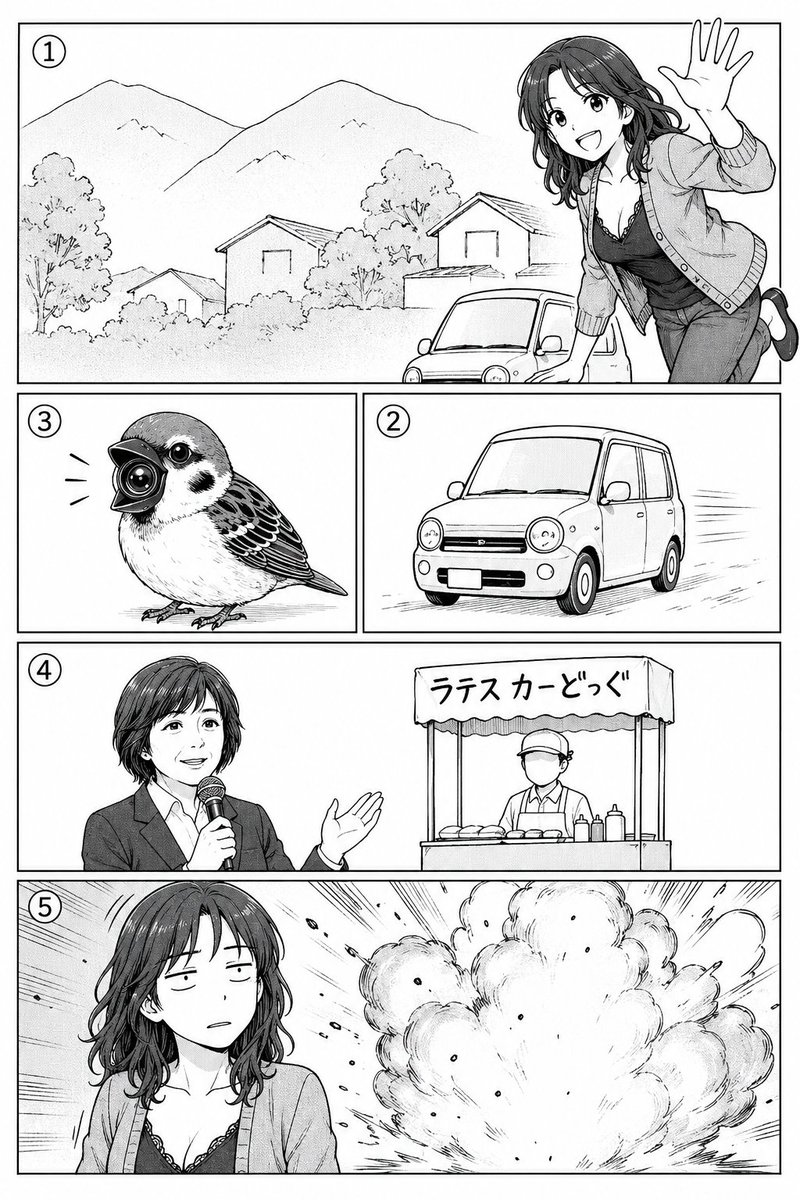
Comic Panel Sketch to Inked Page — Sora 2 Prompt
Transform rough storyboards into polished black-and-white manga pages with screentone shading, sharp panel borders, and dynamic action effects.
1 / 3
提示词 · EN
以 REFERENCE_0 作为漫画分镜草图,将其转化为一张清晰的黑白漫画页面,包含精美的线条、网点纸阴影以及利落的矩形分镜框。保持相同的 5 格故事结构和可见的圆形分镜编号:第 1 格为包含山脉、房屋、小型汽车以及一名从右侧探身挥手的开朗女性的风景画面;第 2 格为一辆小型汽车在行驶;第 3 格为一只长着相机状鸟喙的小鸟;第 4 格为一名播音员在街头小吃摊旁手持麦克风;第 5 格为该女性站在一场大爆炸前。保留原始的布局顺序和预期的角色/物体位置,但以成品漫画艺术风格进行渲染。将第 4 格和第 5 格中的面部特意用柔和的灰色矩形模糊处理。在摊位遮阳棚上添加日语文字 argstall sign text: ラテスカーどっぐ。页面需为黑白、高细节、可印刷格式,并根据指示添加动态速度线和爆炸效果。
关于这个提示词
Transform rough storyboards into polished black-and-white manga pages with screentone shading, sharp panel borders, and dynamic action effects. 它更适合作为 GPT Image 2 的概念艺术起点:先保留画面结构、主体关系和风格约束,再替换成你的品牌、人物或场景。
使用时优先替换 stall sign text 等占位符,并保持镜头、构图和材质描述的顺序不变。这样更容易获得稳定的画面结果,也方便继续做多版本对比。
如何使用这个提示词
- Copy the full prompt text into your AI image generator (Sora 2 recommended).
- Replace the
REFERENCE_0field with your own sketch or storyboard image URL. - Customize the
stall sign textvariable if you need different Japanese lettering. - Choose your preferred image model and aspect ratio for a printable page format.
- Generate and iterate — adjust details like speed lines or facial blur intensity as needed.


