
GPT Image 2AI 提示词
Split-Screen E-Commerce Ad: Backpack & Smartwatch — Sora 2
Generate a high-end, photorealistic split-screen ad poster featuring a leather backpack and smartwatch, perfect for e-commerce and social media marketing.
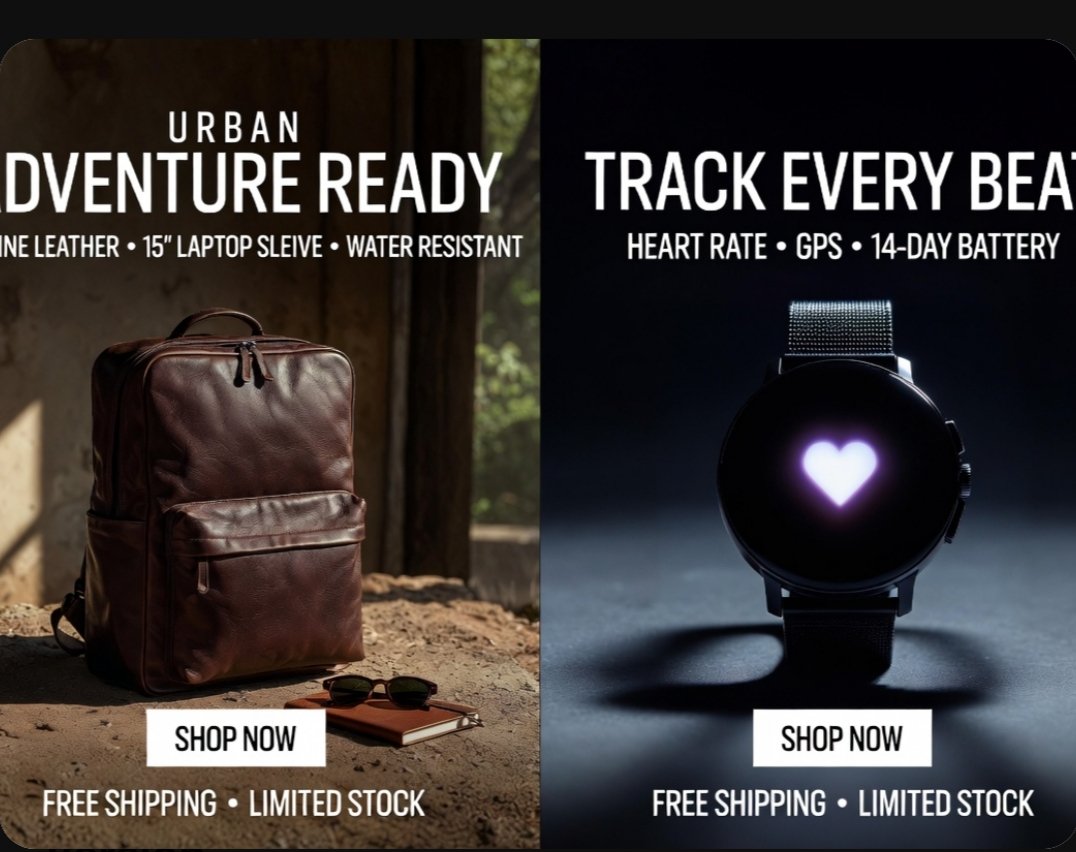
提示词 · EN
type
分屏电商广告海报style
高端照片级真实感零售营销图形,高对比度,精致的商业照明,简洁醒目的排版,现代直接响应式广告设计canvas
aspect_ratio
4:3background
黑色外边框,圆角海报设计layout
orientation
垂直分屏sections
item 1
title
左侧产品广告position
左半部分count
1product
双肩包headline_lines_count
2cta_count
1footer_count
1item 2
title
右侧产品广告position
右半部分count
1product
智能手表headline_lines_count
2cta_count
1footer_count
1divider
居中硬分割线text
left
eyebrow
{argument name="left eyebrow text" default="都市"}headline
{argument name="left headline text" default="蓄势待发"}features
真皮材质 • 15 英寸笔记本电脑隔层 • 防水button
立即购买footer
免运费 • 库存有限right
headline
{argument name="right headline text" default="追踪每一次心跳"}features
心率监测 • GPS • 14 天超长续航button
立即购买footer
免运费 • 库存有限left_panel
scene
质朴的室内环境,温暖的自然光从侧面射入background_details_count
3background_details
item 1
斑驳的墙面或木质室内表面item 2
可以看到窗外柔和绿植的窗户item 3
带有质感的地面product
type
{argument name="left product" default="棕色真皮双肩包"}position
左下中心位置,直立放置于地面material
质感丰富的抛光皮革color
深棕色details_count
5details
item 1
顶部提手item 2
双拉链顶部开口item 3
大型前置拉链袋item 4
左侧可见侧袋item 5
结构化的长方形轮廓supporting_props_count
2supporting_props
item 1
一副深色太阳镜item 2
放置在双肩包旁的一本小棕色笔记本lighting
来自左上方的温暖电影感阳光,营造出柔和的高光和大地色阴影button_style
白色长方形按钮,位于左面板下方中间位置,配有黑色大写文字right_panel
scene
深色摄影棚产品拍摄,带有冷色调的情绪化聚光灯background
深海军蓝至黑色的渐变product
type
圆形黑色智能手表position
右半部分垂直和水平居中details_count
5details
item 1
圆形黑色表盘item 2
屏幕中心显示发光的白紫色心形图标item 3
深色金属表壳item 4
右侧边缘可见两个侧边按钮item 5
精细金属网状表带surface
光滑的摄影棚地面,手表下方有柔和的圆形阴影lighting
来自上方和后侧方的冷色调聚光灯,营造出轮廓光和戏剧性的阴影button_style
白色长方形按钮,位于右面板下方中间位置,配有黑色大写文字typography
font
粗体压缩无衬线大写字体color
白色alignment
在每个面板内居中feature_line_style
较小的全大写副标题,带有项目符号分隔符关于这个提示词
Generate a high-end, photorealistic split-screen ad poster featuring a leather backpack and smartwatch, perfect for e-commerce and social media marketing. 它更适合作为 GPT Image 2 的概念艺术起点:先保留画面结构、主体关系和风格约束,再替换成你的品牌、人物或场景。
这条提示词使用结构化 JSON 组织信息,包含 type、style、canvas、layout、text、left panel、right panel 等字段。保留这种层级能让模型更清楚地区分画面主题、布局、界面元素和细节约束。
使用时建议先小幅修改主体、场景、镜头和色调,再生成多个版本对比构图与细节。这样页面内容对用户有实际帮助,也避免把模型名或标签机械堆在正文里。
如何使用这个提示词
- Copy the full prompt text.
- Paste it into an AI image generator like Sora, Midjourney, or DALL·E.
- Adjust the customizable variables (e.g., backpack color, headline text) as needed.
- Generate the image and refine until you get the desired photorealistic split-screen ad.
- Download and use for e-commerce banners, social media posts, or online store promotions.


