
GPT Image 2AI 提示词
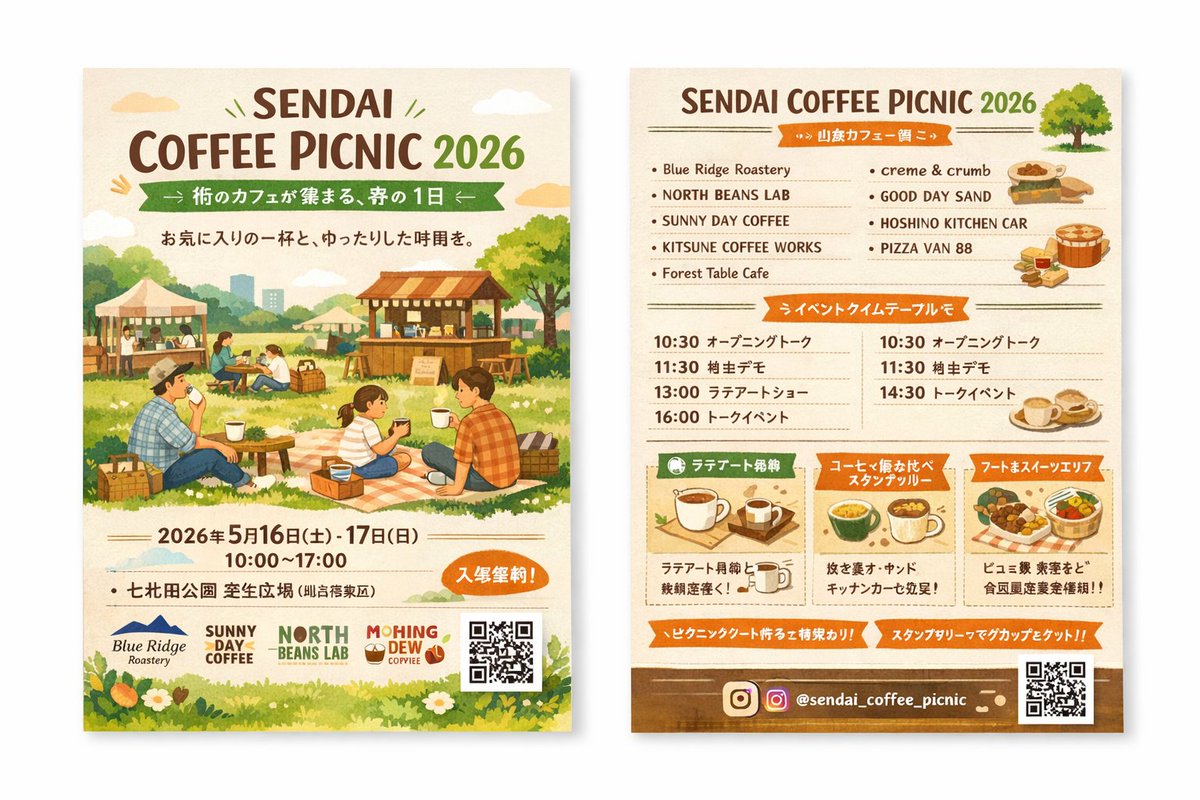
Double-Sided Watercolor Coffee Picnic Flyer Mockup Prompt
Generate a warm, double-sided watercolor coffee picnic flyer with illustrations, vendor list, and schedule—perfect for event marketing.
提示词 · EN
type
双面活动传单样机style
水彩插画,温暖的大地色调,温馨,引人入胜,质朴left_side_front
header
title
{argument name="event name" default="SENDAI COFFEE PICNIC 2026"}subtitle
{argument name="subtitle" default="街のカフェが集まる、春の1日"}tagline
与你心仪的咖啡共度悠闲时光main_illustration
人们在草地上享受野餐。一家人坐在格子野餐垫上喝咖啡。背景为木质咖啡摊位、帐篷、树木以及远处的城市天际线。event_info
date
{argument name="event date" default="2026 年 5 月 16 日(周六) - 17 日(周日)"}time
10:00 - 17:00location
{argument name="location" default="七北田公園 芝生広場"}badge
带有免费入场文字的橙色椭圆形徽章footer
sponsor_logos
4elements
item 1
二维码item 2
草地与小白花边框right_side_back
header
title
{argument name="event name" default="SENDAI COFFEE PICNIC 2026"}illustration
小绿树sections
item 1
title
参展商列表layout
2 列count
9labels
item 1
Blue Ridge Roasteryitem 2
NORTH BEANS LABitem 3
SUNNY DAY COFFEEitem 4
KITSUNE COFFEE WORKSitem 5
Forest Table Cafeitem 6
creme & crumbitem 7
GOOD DAY SANDitem 8
HOSHINO KITCHEN CARitem 9
PIZZA VAN 88illustrations
item 1
三明治item 2
披萨item 3
咖啡杯item 2
title
活动日程表layout
2 列count
7description
包含 10:30、11:30、13:00、14:30、16:00 等时间节点及活动名称的日程安排item 3
title
特色亮点layout
3 个横向方框count
3labels
item 1
拉花体验item 2
咖啡品鉴集章活动item 3
美食与甜点区illustrations
item 1
单只咖啡杯item 2
多只咖啡杯item 3
食物篮footer
social_media
{argument name="social handle" default="@sendai_coffee_picnic"}icons
item 1
Instagram 图标elements
item 1
二维码item 2
棕色背景条关于这个提示词
Generate a warm, double-sided watercolor coffee picnic flyer with illustrations, vendor list, and schedule—perfect for event marketing. 它更适合作为 GPT Image 2 的概念艺术起点:先保留画面结构、主体关系和风格约束,再替换成你的品牌、人物或场景。
这条提示词使用结构化 JSON 组织信息,包含 type、style、left side front、right side back 等字段。保留这种层级能让模型更清楚地区分画面主题、布局、界面元素和细节约束。
使用时建议先小幅修改主体、场景、镜头和色调,再生成多个版本对比构图与细节。这样页面内容对用户有实际帮助,也避免把模型名或标签机械堆在正文里。
如何使用这个提示词
- Copy the prompt from this page.
- Open Sora 2 or a compatible AI image generator.
- Replace the placeholder arguments (e.g., event name, date, location) with your details.
- Paste the prompt and generate the flyer mockup.
- Review and tweak variable values for refined results.


