
GPT Image 2AI 提示词
Bangkok Night Market Street Photography — Sora 2 Prompt
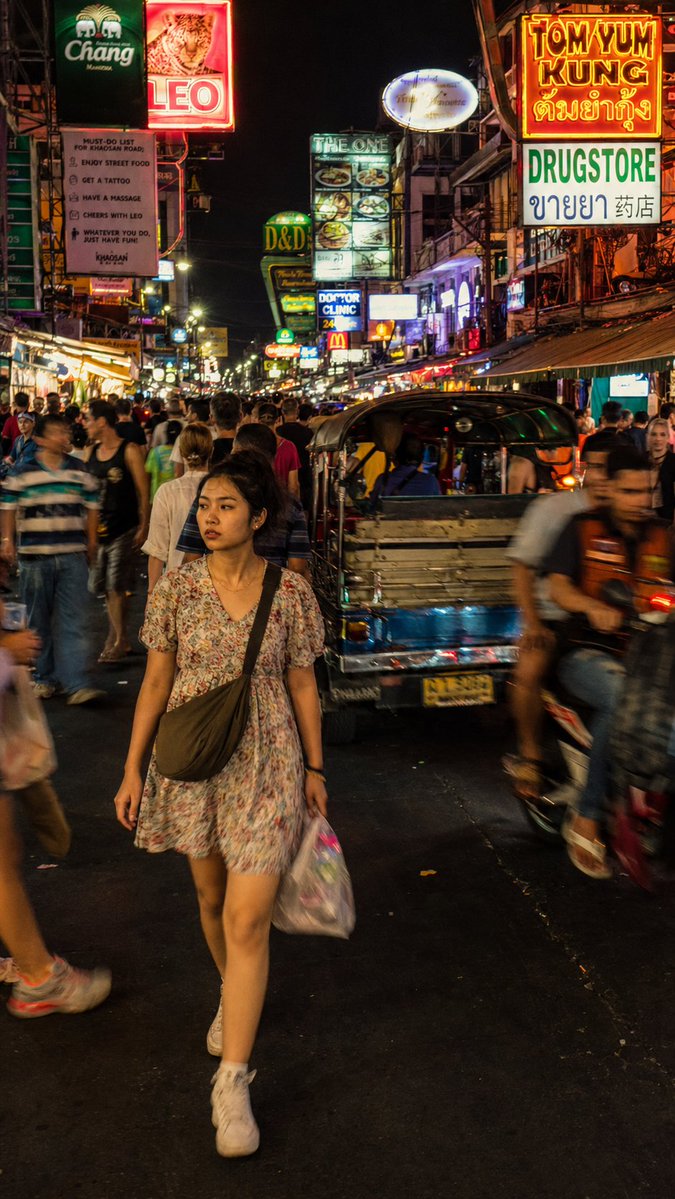
Generate a hyper-realistic documentary street photo of a woman navigating Bangkok's neon-drenched Khao San Road, complete with film grain, dynamic blur, and authentic chaotic atmosphere.
1 / 2
提示词 · EN
一张街头摄影作品,捕捉了一位 argsubject: 年轻泰国女性 穿过 arglocation: 曼谷考山路 拥挤夜市的瞬间。主体正迈步前行,身穿 argclothing: 宽松碎花连衣裙,表情自然且略显分神,并未看向镜头,肩上背着一个小斜挎包。环境密集而混乱:泰语和英语的酒吧招牌垂直堆叠,嘟嘟车和摩托车在人流中穿梭,游客与当地人混杂在移动的人群中。光线杂乱且真实:酒吧荧光灯的不均匀照射、LED 招牌的散射光,以及人群中偶尔反射的闪光,没有单一的干净光源。构图:略高于视角的全身中景,主体位于画面左侧中心并清晰对焦,周围人群呈现自然的动态模糊,霓虹灯招牌在垂直构图中向上延伸。色调:酸性黄、电光粉、深橙色——强烈的霓虹饱和度,符合纪录片真实感,而非风格化处理。渲染要求:摄影级真实感,带有细微的胶片颗粒感,避免过度平滑的 CG 质感。皮肤:具备次表面散射和微纹理。保留背景人群真实的动态模糊,而非人工虚化。照片级渲染,无水印。
关于这个提示词
Generate a hyper-realistic documentary street photo of a woman navigating Bangkok's neon-drenched Khao San Road, complete with film grain, dynamic blur, and authentic chaotic atmosphere. 它更适合作为 GPT Image 2 的概念艺术起点:先保留画面结构、主体关系和风格约束,再替换成你的品牌、人物或场景。
使用时优先替换 subject、location、clothing 等占位符,并保持镜头、构图和材质描述的顺序不变。这样更容易获得稳定的画面结果,也方便继续做多版本对比。
如何使用这个提示词
- Copy the full prompt from the page.
- Select a compatible AI image/video model (e.g., Sora 2, Midjourney, Stable Diffusion).
- Customize the variables
{subject},{location}, and{clothing}within the prompt to fit your creative vision. - Paste the modified prompt into your chosen model's interface and generate.
- Review the output, adjusting settings like aspect ratio or style parameters if needed.


