
GPT Image 2AI 提示词
Desktop Layout Organizer Infographic — Sora 2 Prompt
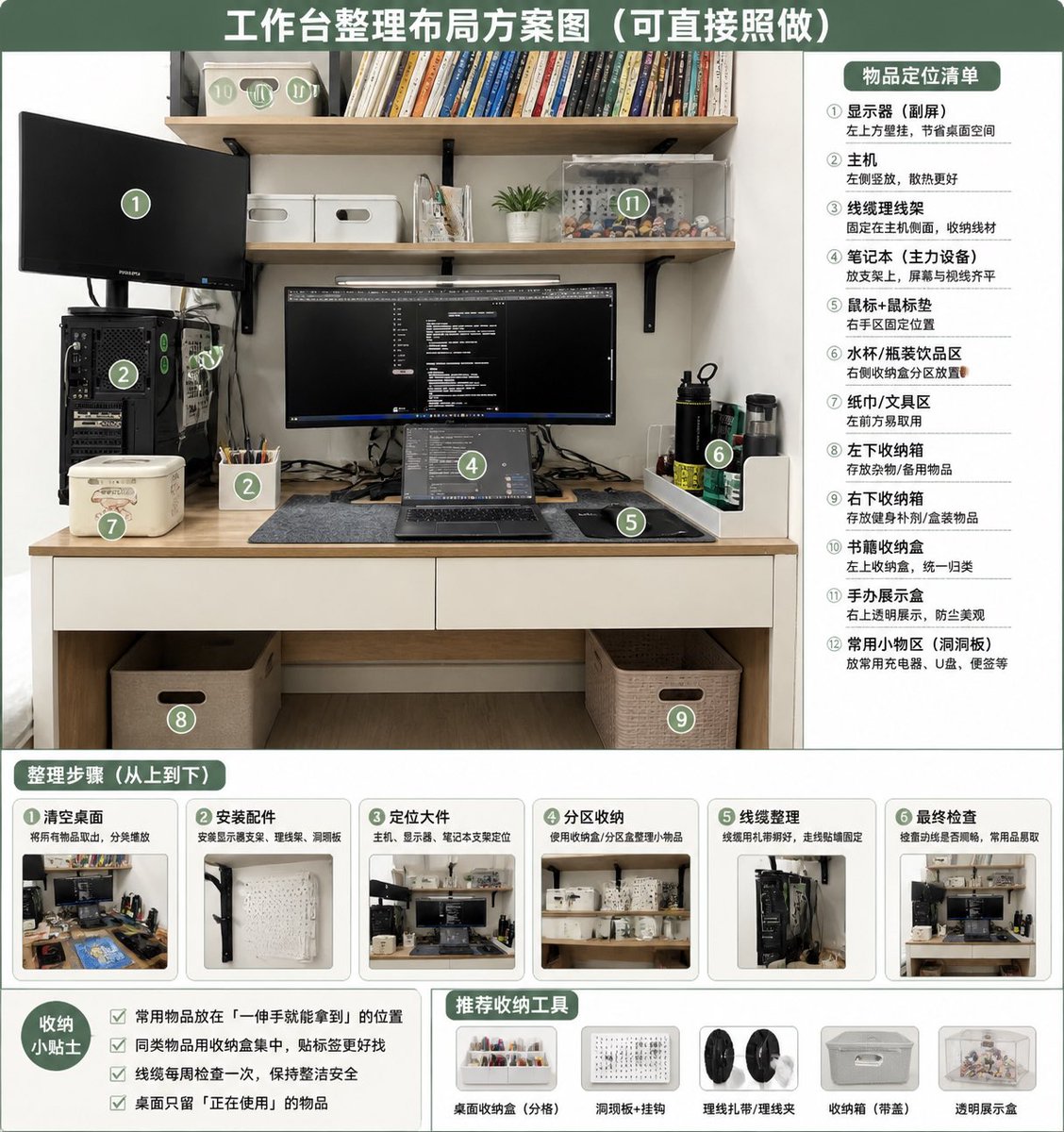
Turn a messy desk photo into a clean, numbered organizational guide with zones, steps, tips, and product icons for a functional workspace.
提示词 · EN
以 REFERENCE_0 作为源照片,制作一张整洁、写实的“整理后”桌面布局方案信息图。保持原有的书桌、搁板、显示器/笔记本电脑设置、主机位置及整体房间视角,但需整理工作区:理顺线缆,清理桌面,将物品放入明确的收纳区,添加配套的收纳盒/篮、洞洞板/配件区、笔筒、书本收纳盒、透明展示盒以及专用的水杯/纸巾/小工具区域。采用绿白配色的教学海报风格,顶部设置大标题:argheadline text: 工作台整理布局方案图(可直接照做)。在整理后的照片上叠加 12 个绿色圆形编号标记,并在右侧面板添加标题 argright panel title: 物品定位清单,列出 12 个明确的区域:① 显示器 / 副屏,② 主机,③ 线缆管理,④ 笔记本电脑工作区,⑤ 鼠标垫 / 鼠标区,⑥ 水杯 / 水瓶区,⑦ 纸巾 / 工具区,⑧ 左侧桌下收纳盒,⑨ 右侧桌下收纳盒,⑩ 书本收纳盒,⑪ 手办展示区,⑫ 常用小物件区 / 洞洞板。底部添加标题为 argsteps title: 整理步骤(从上到下) 的板块,包含 6 张步骤卡片,每张卡片配有小型的整理前后对比缩略图及简短的中文标签:① 清理桌面,② 安装配件,③ 放置大件物品,④ 分区收纳,⑤ 线缆管理,⑥ 最终检查。左下角添加标题为 argtips title: 收纳小贴士 的提示框,包含 4 条复选框建议:将常用物品放在单手可及处、同类物品归类放置、每周检查线缆、桌面上仅保留当前使用的物品。底部中/右侧添加标题为 argtools title: 推荐收纳工具 的推荐栏,包含 5 个产品图标:桌面收纳托盘、洞洞板 + 挂钩、理线带 / 理线夹、带手柄收纳盒、透明展示盒。整体设计需整洁、实用、明亮且具备直接的可操作性,如同基于原照片生成的家庭办公整理指南。
关于这个提示词
Turn a messy desk photo into a clean, numbered organizational guide with zones, steps, tips, and product icons for a functional workspace. 它更适合作为 GPT Image 2 的概念艺术起点:先保留画面结构、主体关系和风格约束,再替换成你的品牌、人物或场景。
使用时优先替换 headline text、right panel title、steps title、tips title 等占位符,并保持镜头、构图和材质描述的顺序不变。这样更容易获得稳定的画面结果,也方便继续做多版本对比。
如何使用这个提示词
- Copy this prompt and paste it into your chosen AI image generator.
- Select a model that supports detailed text and infographic layouts (e.g., Sora 2, DALL-E 3).
- Replace
REFERENCE_0with your actual desk photo URL or upload. - Customize the variable text fields like the headline or panel titles if desired.
- Generate the image and review the 12 numbered zones, steps, and tips for accuracy.


