
GPT Image 2AI 提示词
Surreal Giant Bird Airplane — Cinematic Vintage Prompt
Create a high-angle cinematic photo of a giant bird acting as an airplane at an airport, with passengers boarding via airstairs in a soft, retro Kodak film aesthetic.
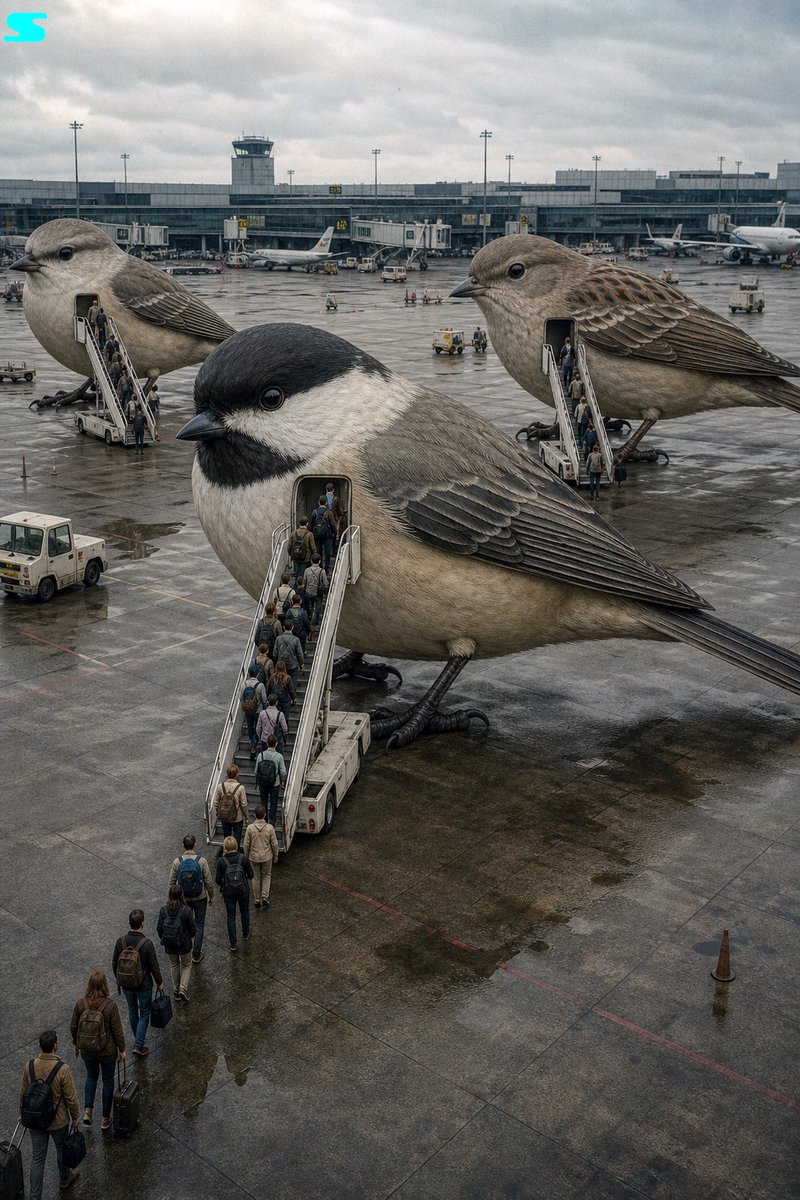
提示词 · EN
[电影剧照], [高角度], [argmain subject: 充当飞机的超现实巨鸟], [穿着商务休闲装和旅行装、背着背包的微型人类乘客], [通过移动式机场登机梯登上巨鸟], [背景是带有航站楼的机场停机坪], [柔和的复古色调,带有去饱和的中性色], [阴天的自然光,氛围既异想天开又平凡], [轻微的胶片颗粒感和深景深], [argcamera settings: Kodak Portra 400 + 35mm 广角镜头]
关于这个提示词
Create a high-angle cinematic photo of a giant bird acting as an airplane at an airport, with passengers boarding via airstairs in a soft, retro Kodak film aesthetic. 它更适合作为 GPT Image 2 的概念艺术起点:先保留画面结构、主体关系和风格约束,再替换成你的品牌、人物或场景。
使用时优先替换 main subject、camera settings 等占位符,并保持镜头、构图和材质描述的顺序不变。这样更容易获得稳定的画面结果,也方便继续做多版本对比。
如何使用这个提示词
- Copy the full prompt text from the page.
- Choose an AI image generator that supports Sora 2 or similar long-form prompts (e.g., Sora, Runway Gen-3).
- Tweak the
{main subject}and{camera settings}variables to customize the bird species or film stock. - Paste the prompt into the model's input field and generate.
- Experiment with aspect ratios—wider formats enhance the cinematic airport scene.


