
GPT Image 2AI 提示词
Surrealist Optical Illusion Portrait — Cubist Realism Prompt
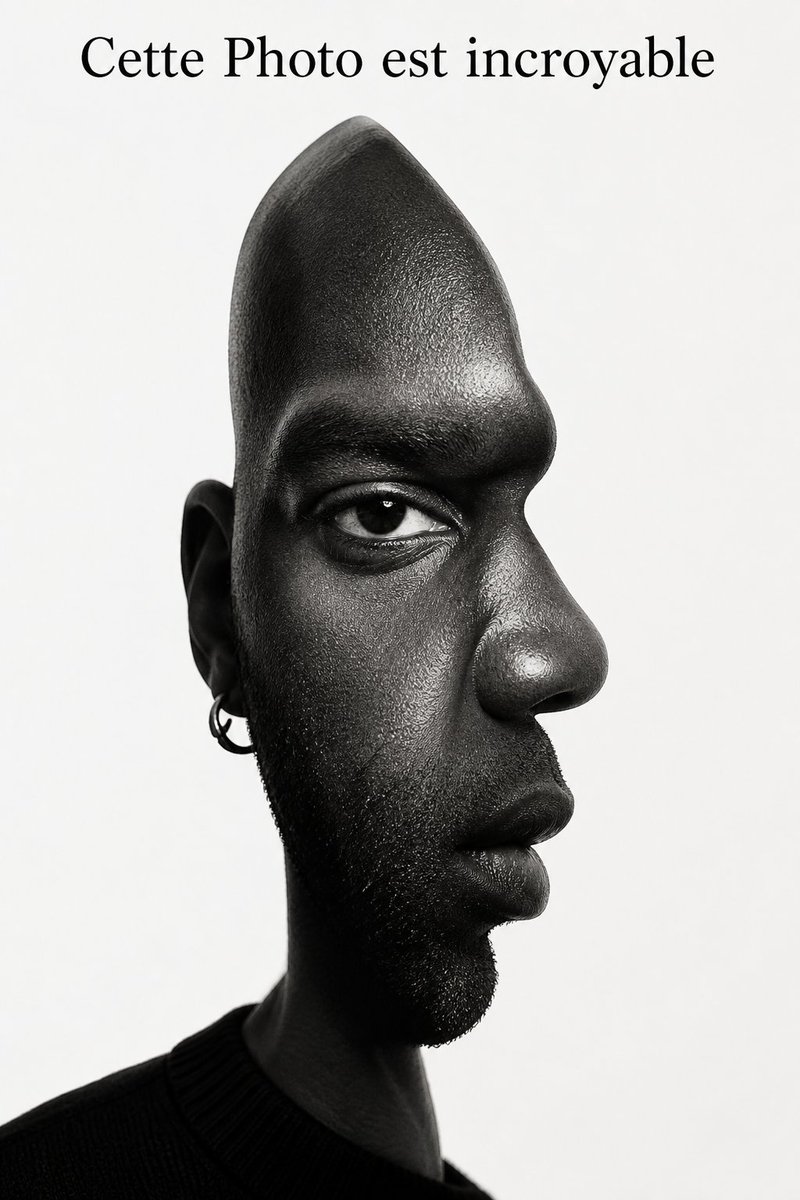
Generate a striking black-and-white portrait merging front and side views with hyper-realistic skin textures and dramatic studio lighting.
提示词 · EN
image_prompt
subject
description
一幅超现实视觉错觉肖像,将两种视角融合在同一张脸孔上。demographics
男性,非洲裔。hair
光头(剃光),下巴和下颌线处有短而有质感的胡茬。expression
表情冷静克制,目光深邃直视前方,嘴部表情中性。optical_illusion_structure
concept
正面和侧面视角同时存在(以立体主义概念呈现,但采用写实摄影级渲染)。morphology
脸部右侧(鼻子、嘴唇、额头、下巴)在背景中形成清晰锐利的侧面轮廓;左侧(耳朵、脸颊)呈现正面视角。头部顶部拉长并逐渐变窄,呈圆锥状,以适应视角转换。eye_placement
正面平面上仅有一只写实的眼睛直视观众,而下方的鼻子和嘴巴旋转了 90 度,呈侧向。details_and_texture
skin
超写实皮肤纹理,可见毛孔、皮肤纹理以及眼周和嘴周的细微皱纹。facial_hair
下巴和鬓角区域有高度细腻的胡茬纹理。accessories
可见的左耳佩戴着一枚银色小圆环耳环。clothing
outfit
简约的深色圆领上衣或毛衣,在左下角隐约可见,为颈部提供深色基底。color
黑色或深灰色。style_and_medium
art_style
超现实主义摄影,写实数字图像处理,心理视觉错觉。color_palette
黑白单色(灰度)。aesthetic
高对比度,锐利且前卫,让人联想到毕加索的双视角构图,但具备真实的摄影质感。lighting_and_environment
lighting_setup
摄影棚级高对比度布光(明暗对照法)。额头、颧骨和鼻梁处有明亮的高光;脸部侧面和颈部融入深沉浓重的阴影中,以增强结构塑造感。background
纯白或极浅的灰色背景,营造强烈的负空间,以突出侧面轮廓。composition
framing
特写肖像构图,整体居中,但由于错觉结构呈现非对称性。头部与肩部肖像。text_overlay_reference
顶部留白。(注:原图顶部边缘有文字“Cette Photo est incroyable”)。technical_specs
camera
人像镜头(例如 85mm),精准对焦于眼睛。quality
8K 分辨率,极致细节,大师级锐度品质。关于这个提示词
Generate a striking black-and-white portrait merging front and side views with hyper-realistic skin textures and dramatic studio lighting. 它更适合作为 GPT Image 2 的概念艺术起点:先保留画面结构、主体关系和风格约束,再替换成你的品牌、人物或场景。
这条提示词使用结构化 JSON 组织信息,包含 image prompt 等字段。保留这种层级能让模型更清楚地区分画面主题、布局、界面元素和细节约束。
使用时建议先小幅修改主体、场景、镜头和色调,再生成多个版本对比构图与细节。这样页面内容对用户有实际帮助,也避免把模型名或标签机械堆在正文里。
如何使用这个提示词
- Copy the Prompt — Click the copy button to save the full JSON prompt to your clipboard. 2. Choose Your Model — Use Sora 2, Runway Gen-3, or similar AI image generators that support detailed prompt structures. 3. Customize Variables — Adjust demographics, skin tone, accessories, or background color in the JSON to personalize the portrait. 4. Set Resolution — Select the highest available output quality (8K or max) to capture fine details like pores and stubble. 5. Generate & Refine — Run the prompt and regenerate with slight lighting or composition tweaks if needed.


