Sora2 Hub
Sora2 Hub
  • 提示词库
  • 定价
  • 案例展示
Sora2 Hub
Sora2 Hub
Sora2 Hub

Sora2 Hub

由 Sora 2、Veo 3.1 和 Nano Banana Pro 驱动的专业 AI 创作平台。提供高级控制、高清画质和无水印的视频与工作室级图像创作。

Email:support@sora2hub.org

AI 视频生成

  • 文生视频
  • 图生视频
  • Veo 3.1
  • Sora 2
  • Kling 3.0
  • Kling 2.6
  • Kling 2.5
  • Runway
  • Wan 2.6
  • Seedance 2.0
  • Hailuo 2.3
  • Grok Imagine
  • HappyHorse-1.0
  • HappyHorse 1.1
  • Kling 3.0 Turbo
  • Volcengine Video-to-Video Lip Sync
  • OmniHuman 1.5
  • Grok Imagine Video 1.5
  • Gemini Omni
  • Wan 2.7 Video
  • Seedance 2.0 Mini

AI 图像生成

  • 文生图
  • 图生图
  • Nano Banana Pro
  • Nano Banana
  • 4o Image
  • Flux Kontext
  • Z Image
  • Seedream 4.5
  • Seedream 5.0 Lite
  • Nano Banana 2
  • GPT Image 2
  • AI 图片增强
  • Seedream 5.0 Pro
  • Nano Banana 2 Lite
  • Qwen Image 2.0

AI 特效

  • AI 年龄滤镜
  • AI 性别转换
  • AI 亲吻
  • AI 拥抱
  • 吉卜力图片
  • AI 美人鱼滤镜
  • AI 身体摇摆
  • 微笑滤镜
  • AI 变胖
  • 动作人偶

产品

  • 功能特点
  • 案例展示
  • 定价

公司

  • 关于我们
  • 联系我们

© 2025 • Sora2 Hub ORG 保留所有权利。

  • 隐私政策
  • 服务条款
  • 退款政策
  1. 首页
  2. /
  3. 提示词
  4. /
  5. GPT Image 2
  6. /
  7. Futuristic Sunglasses Ad — Sora 2 Prompt
GPT Image 2AI 提示词

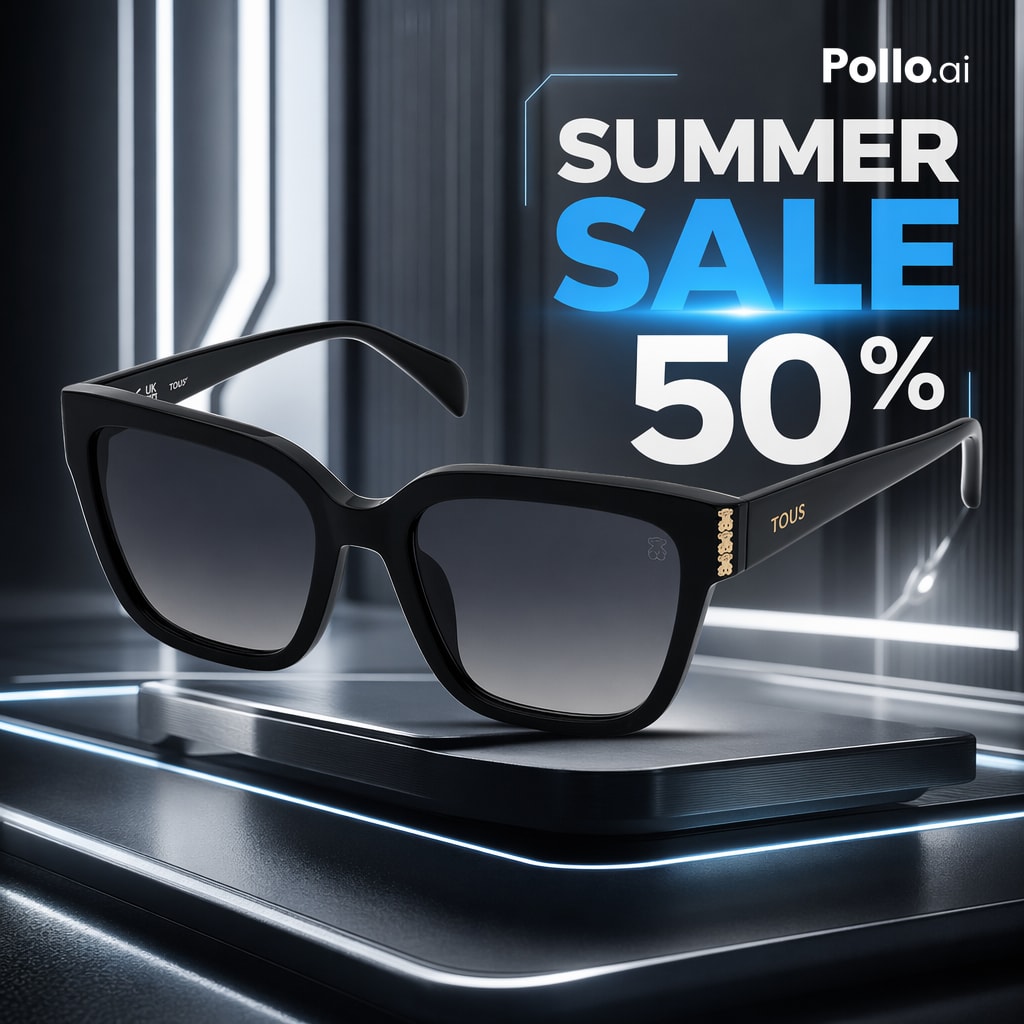
Futuristic Sunglasses Ad — Sora 2 Prompt

Generate a high-end e-commerce product ad featuring luxury sunglasses with futuristic neon lighting and promotional text.
Futuristic Sunglasses Ad — Sora 2 Prompt
提示词 · EN
一张时尚的高端电商产品广告,展示了一副光泽感十足的黑色设计师太阳镜,置于一个带有圆角和蓝白色边缘发光效果的未来感金属底座中央。太阳镜以四分之三正面视角呈现,略微倾斜,采用厚实的超大方形猫眼镜框,配有深灰色渐变镜片,镜腿上有精致的金色 TOUS 品牌标识,铰链附近还有一个小巧的金色熊形标志。背景是一个深色科幻摄影棚,具有反光的黑色和枪灰色表面、垂直建筑灯带、柔和的体积光以及冷色调霓虹灯点缀。在右上角添加醒目的促销文本布局,将品牌名称 argbrand name: Pollo.ai 置于巨大的堆叠标题 argheadline text: SUMMER SALE 上方,其中 SUMMER 为白色,SALE 为明亮的电光蓝,随后是巨大的白色折扣数字 argdiscount: 50%。在标题区域的部分周围加入细细的未来感蓝色边框线条。采用戏剧性的商业照明、锐利的反光、奢华的产品摄影风格、浅景深、超简洁的构图、高级在线商店广告美学、照片级渲染、高对比度以及清晰的细节。

关于这个提示词

Generate a high-end e-commerce product ad featuring luxury sunglasses with futuristic neon lighting and promotional text. 它更适合作为 GPT Image 2 的概念艺术起点:先保留画面结构、主体关系和风格约束,再替换成你的品牌、人物或场景。

使用时优先替换 brand name、headline text、discount 等占位符,并保持镜头、构图和材质描述的顺序不变。这样更容易获得稳定的画面结果,也方便继续做多版本对比。

如何使用这个提示词

  1. Copy the prompt template and replace variables like {brand name}, {headline text}, and {discount} with your campaign details.
  2. Choose an AI image generator such as Midjourney, DALL-E 3, or Stable Diffusion.
  3. Paste the prompt into the model and generate. For models supporting negative prompts, add “distorted text, low quality” to avoid flawed outputs.
  4. Review the result and regenerate if needed to achieve the perfect luxury ad aesthetic.
常见问题

Miguel Ángel | Educador en IA

@MiguelMaestroIA→

发布时间
2026年4月25日
原始语言
EN
模型
GPT Image 2
分类
概念艺术
GPT Image 2概念艺术gpt-image-2twitter
浏览
162
复制
23
点赞
7

分享

更多来自 GPT Image 2

浏览全部
Minimalist Mother's Day Wallpaper — Sora 2 Prompt with Calligraphy & Carnations

Minimalist Mother's Day Wallpaper — Sora 2 Prompt with Calligraphy & Carnations

@EdimakorJP
Anime Idol Profile Page — Lavender Art Style Prompt

Anime Idol Profile Page — Lavender Art Style Prompt

@uzuyanurp
Cyberpunk AI Launch Banner — Cinematic Neon Poster Prompt

Cyberpunk AI Launch Banner — Cinematic Neon Poster Prompt

@ObieriI

用 Sora2Hub 提示词更快创作。

把精选提示词页面作为可搜索入口,然后带着模型上下文直接进入生成流程。

探索更多提示词