
GPT Image 2AI 提示词
Cozy Café Vocabulary Log — Sora 2 Prompt
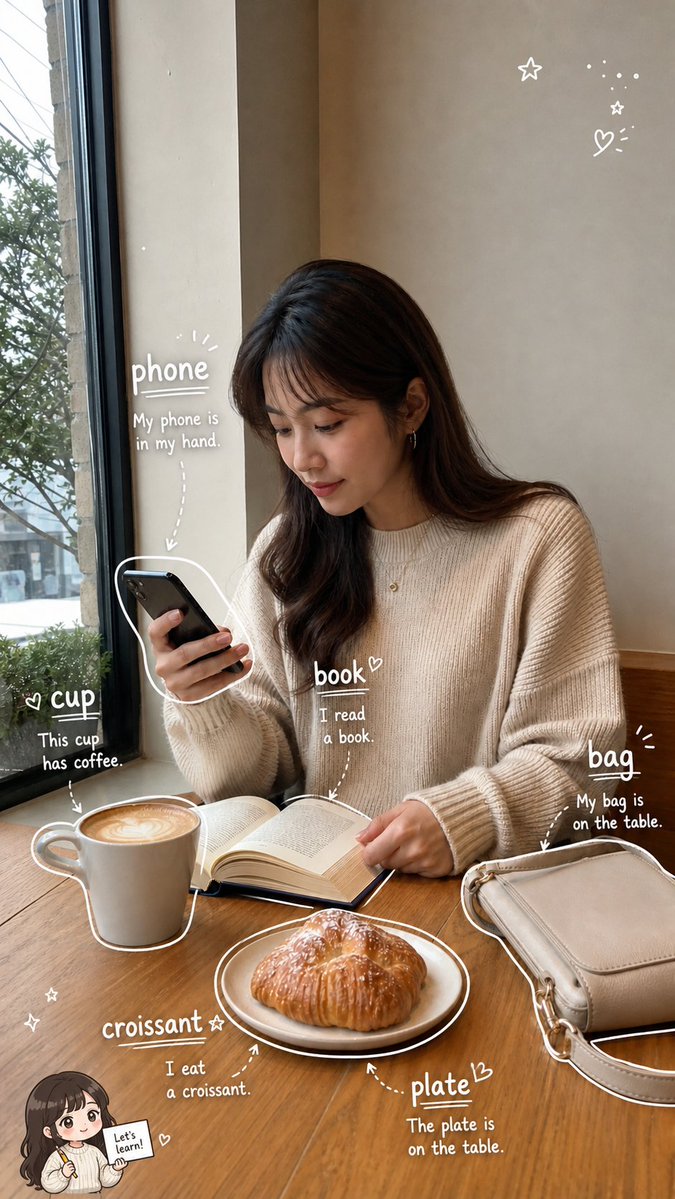
Turn a warm café photo into a hand-drawn English vocabulary journal with labeled objects and example sentences for social media sharing.
提示词 · EN
type
基于照片的英语词汇学习日志页面format
9:16 竖版社交媒体图片base_scene
一张写实的咖啡馆抓拍照片,一位年轻女性坐在大窗户旁的木桌前,一手拿着黑色智能手机,低头温婉地看着。她穿着米色罗纹毛衣,留着深棕色长发和柔和的刘海。她面前放着一本打开的书,左侧有一个带有拉花图案的白色咖啡杯,前景中有一个放在白色盘子里的羊角面包,右侧有一个米色单肩包。自然光从窗户射入,窗外隐约可见树木和街道。温暖舒适的色调,生活化摄影,浅景深,构图简洁。overlay_style
description
添加可爱的白色手绘涂鸦注释,营造语言学习笔记本的风格,使用粉笔/马克笔风格的字体、下划线、箭头、物体轮廓、小爱心、星星、圆点和闪光标记。注释应与真实照片融为一体,既俏皮又具有教育意义,且不会显得过于杂乱。language
带有简单例句的英语词汇vocabulary_items
count
6items
item 1
word
phoneposition
女性左侧,靠近智能手机处target
她手中的黑色智能手机example
My phone is in my hand.decoration
手机周围有白色轮廓,单词下方有下划线,虚线箭头指向手机item 2
word
cupposition
左下方,靠近咖啡处target
白色咖啡杯example
This cup has coffee.decoration
杯子周围有白色轮廓,旁边有小爱心,箭头指向杯子item 3
word
bookposition
中心,在打开的书上方target
桌上打开的书example
I read a book.decoration
单词旁边有小爱心,箭头向下指向书本item 4
word
bagposition
右侧,在米色包上方target
桌上的米色单肩包example
My bag is on the table.decoration
下划线,强调光线,箭头指向包,包周围有部分白色轮廓item 5
word
croissantposition
左下方,靠近糕点处target
盘子里的羊角面包example
I eat a croissant.decoration
下划线,小星星,虚线箭头指向羊角面包item 6
word
plateposition
右下方,靠近餐具处target
羊角面包下方的白色盘子example
The plate is on the table.decoration
下划线,小爱心,箭头指向盘子,盘子周围有白色轮廓decorative_elements
count
7items
item 1
右上角附近的小涂鸦星星item 2
右上角附近的微小虚线闪光簇item 3
右上角附近的小涂鸦星星item 4
右上角附近带有放射线的爱心item 5
左下角附近的两颗微小星星item 6
左下角拿着标语牌的 Q 版女孩贴纸item 7
贴纸上的对话/标语文字:Let's learn!customization
main subject
{argument name="main subject" default="在咖啡馆学习的年轻女性"}setting
{argument name="setting" default="大窗户旁的温馨咖啡馆"}vocabulary theme
{argument name="vocabulary theme" default="日常咖啡馆物品"}annotation color
{argument name="annotation color" default="白色"}sticker text
{argument name="sticker text" default="Let's learn!"}quality
照片级真实感底图,搭配整洁的手绘教育注释,温暖的自然光,高分辨率,手机壁纸比例,迷人的学习日志美学关于这个提示词
Turn a warm café photo into a hand-drawn English vocabulary journal with labeled objects and example sentences for social media sharing. 它更适合作为 GPT Image 2 的概念艺术起点:先保留画面结构、主体关系和风格约束,再替换成你的品牌、人物或场景。
这条提示词使用结构化 JSON 组织信息,包含 type、format、base scene、overlay style、vocabulary items、decorative elements、customization 等字段。保留这种层级能让模型更清楚地区分画面主题、布局、界面元素和细节约束。
使用时建议先小幅修改主体、场景、镜头和色调,再生成多个版本对比构图与细节。这样页面内容对用户有实际帮助,也避免把模型名或标签机械堆在正文里。
如何使用这个提示词
- Copy the Prompt — Copy the full JSON prompt body above.
- Choose an AI Model — Paste it into Sora 2 or any compatible image-generation model that supports detailed scene and overlay instructions.
- Tweak Variables — Adjust the
main subjectargument to change the person or setting, swap vocabulary items for different objects, or modify the overlay language. - Generate & Download — Run the prompt to produce a 9:16 vertical image ready for Instagram Stories, TikTok, or Pinterest.


