
GPT Image 2AI 提示词
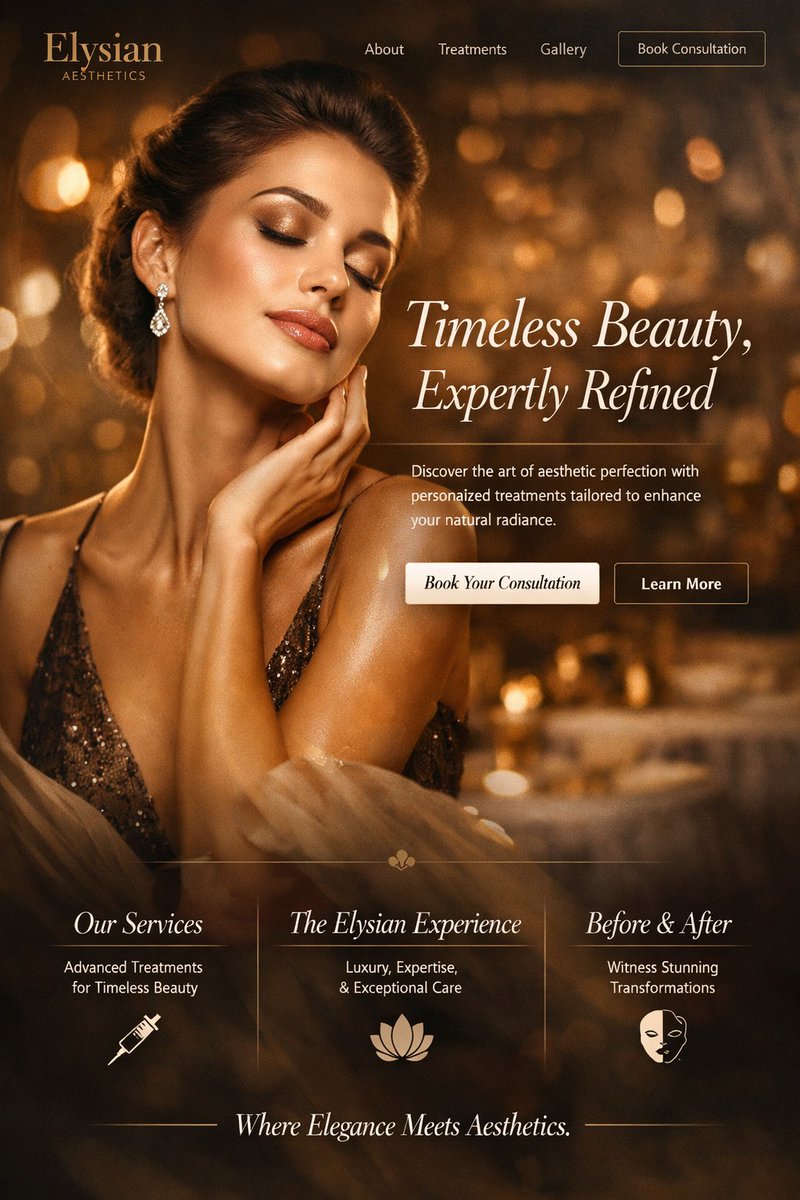
Luxurious Med Spa Website Mockup — Sora 2 Prompt
Generate an elegant, high-end medical aesthetics clinic homepage design with warm bronze tones and cinematic visuals using this structured AI prompt.
提示词 · EN
type
网站首页样稿theme
高端医美诊所color_palette
{argument name="primary color theme" default="暖金色与古铜色"},搭配深棕色背景和柔和的散景光效header
logo
{argument name="brand name" default="Elysian"} AESTHETICSnavigation_links
item 1
关于我们item 2
治疗项目item 3
案例展示cta_button
预约咨询hero_section
background_image
{argument name="hero subject" default="一位皮肤光泽、闭着双眼、手触颈部的绝美女性"},身穿闪亮的古铜色礼服,佩戴钻石吊坠耳环,柔和的电影级灯光typography
headline
{argument name="hero headline" default="永恒之美,精雕细琢"}subheadline
探索医美艺术,通过量身定制的方案提升您的自然光彩。buttons
item 1
style
实心浅色text
预约您的咨询item 2
style
轮廓线text
了解更多features_section
divider
带有小型中央花卉装饰的细金线columns_count
3columns
item 1
title
我们的服务description
助力永恒之美的先进疗法icon
注射器item 2
title
Elysian 体验description
奢华、专业与卓越的护理icon
莲花item 3
title
蜕变案例description
见证惊艳的改变icon
半脸面具footer
text
优雅与医美的完美邂逅。关于这个提示词
Generate an elegant, high-end medical aesthetics clinic homepage design with warm bronze tones and cinematic visuals using this structured AI prompt. 它更适合作为 GPT Image 2 的概念艺术起点:先保留画面结构、主体关系和风格约束,再替换成你的品牌、人物或场景。
这条提示词使用结构化 JSON 组织信息,包含 type、theme、color palette、header、hero section、features section、footer 等字段。保留这种层级能让模型更清楚地区分画面主题、布局、界面元素和细节约束。
使用时建议先小幅修改主体、场景、镜头和色调,再生成多个版本对比构图与细节。这样页面内容对用户有实际帮助,也避免把模型名或标签机械堆在正文里。
如何使用这个提示词
- Copy the JSON prompt from the page.
- Paste it into your AI generation tool (optimized for Sora 2).
- Customize the variables like brand name, hero image, and color palette to fit your clinic.
- Run the prompt to generate a stunning homepage mockup.
- Refine by tweaking variables or regenerating as needed.


