
GPT Image 2AI 提示词
Dreamy Eastern Portrait — Sora 2 Photorealistic Prompt
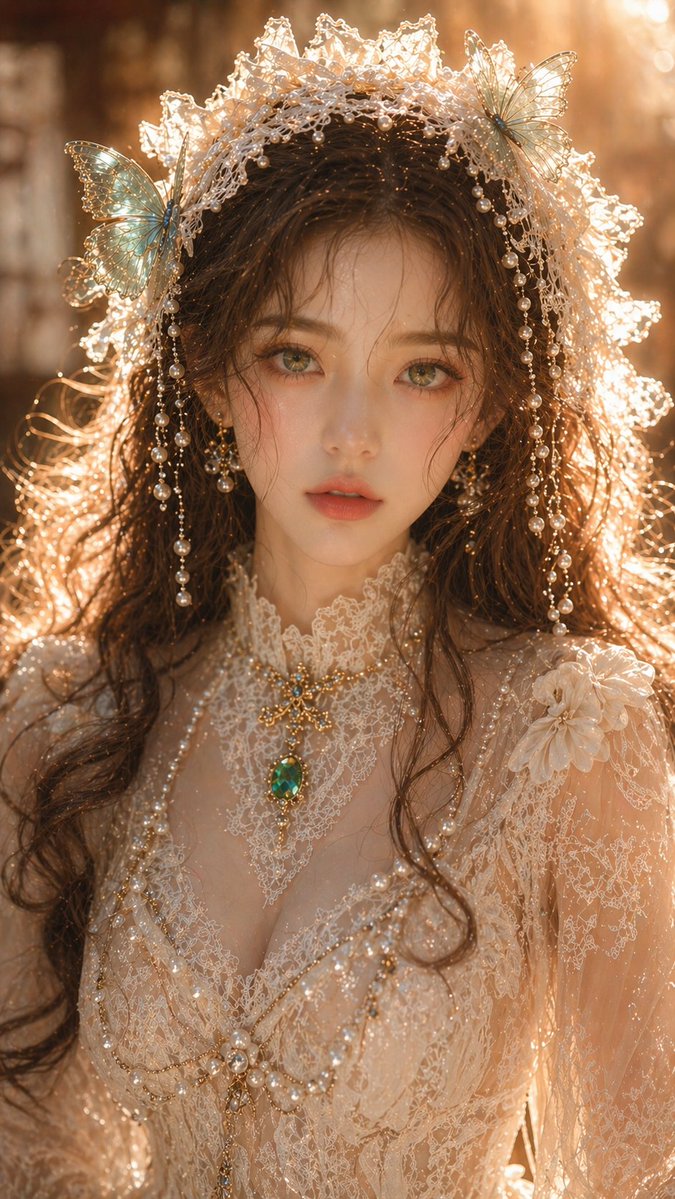
Generate a stunning, high-resolution female portrait with perfect skin texture, elegant accessories, and cinematic warm lighting for commercial use.
提示词 · EN
argsubject: 梦幻东方女性肖像, 成年女性,特写肖像,精致的五官,白皙透亮的皮肤,细腻而干净的皮肤纹理,翡翠绿色的双眼,柔和迷人的目光,棕色波浪卷发自然垂落;argaccessories: 米白色蕾丝头饰,点缀着绿松石蝴蝶和珍珠装饰;身着精致的蕾丝礼服,结构清晰,纹理简洁而不繁复,搭配翡翠首饰;光影采用柔和的暖金色侧逆光,轮廓光清晰但不曝光过度,皮肤带有微弱高光但无过度反光,整体光感通透干净,背景柔焦虚化,浅景深效果;高端肖像摄影品质,细节清晰且内敛,无颗粒感,无噪点,真实物理光影,8K,商业级画质。长宽比:9:16
关于这个提示词
Generate a stunning, high-resolution female portrait with perfect skin texture, elegant accessories, and cinematic warm lighting for commercial use. 它更适合作为 GPT Image 2 的概念艺术起点:先保留画面结构、主体关系和风格约束,再替换成你的品牌、人物或场景。
使用时优先替换 subject、accessories 等占位符,并保持镜头、构图和材质描述的顺序不变。这样更容易获得稳定的画面结果,也方便继续做多版本对比。
如何使用这个提示词
- Copy the prompt from sora2hub.com and paste it into your AI image generator (like Sora 2 or Midjourney).
- Select a model capable of photorealistic output. Sora 2 is recommended for the best 8K results.
- Customize the variables in the curly brackets, such as
{subject}and{accessories}, to change the portrait style. - Adjust the aspect ratio in your model's settings to 9:16 for vertical portrait orientation.
- Generate the image and review the output. Refine the prompt by specifying more detailed lighting or jewelry if needed.


