
GPT Image 2AI 提示词
Strawberry Ad Banner Suite — Anime Illustration Prompt
Create a complete promotional banner set featuring a cute anime character and fresh strawberries, perfect for ad campaigns and social media kits.
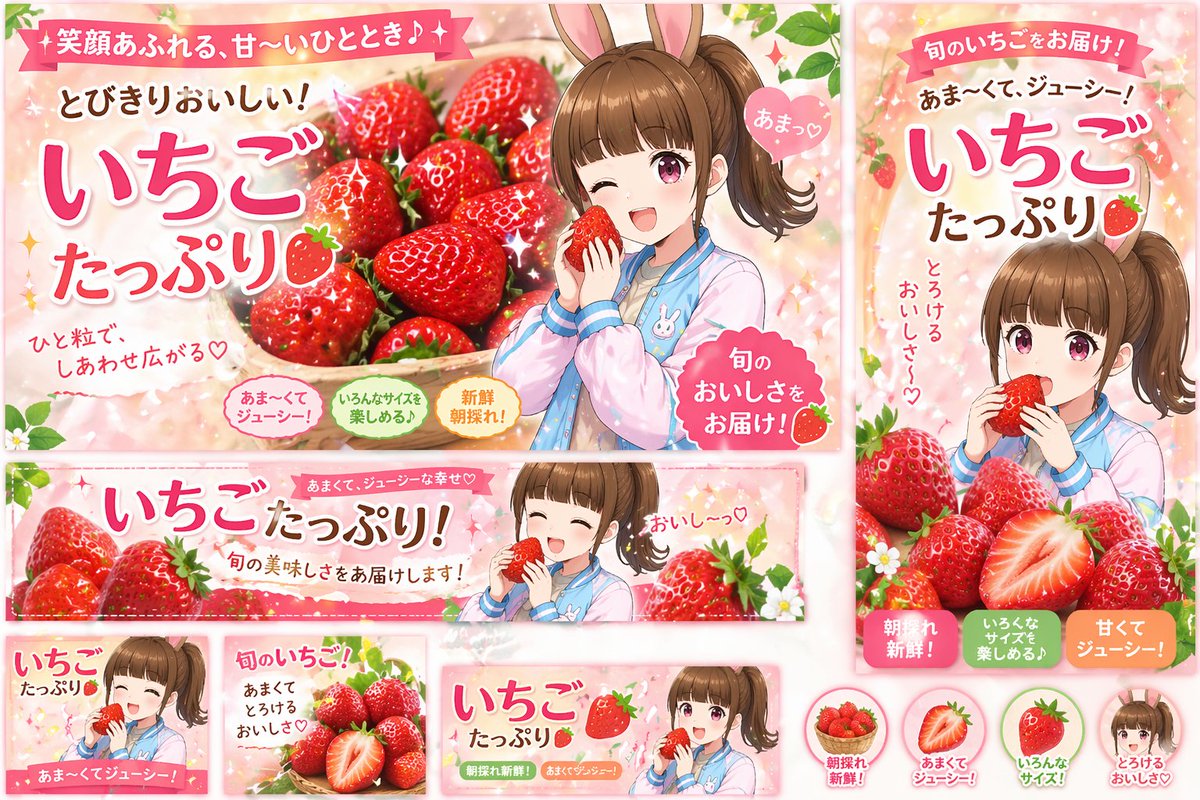
提示词 · EN
type
宣传横幅设计套装theme
草莓广告活动style
动漫插画,明亮,欢快,商业平面设计color_palette
{argument name="primary color theme" default="柔和粉色与鲜艳红色"}character
{argument name="character description" default="扎着棕色侧马尾、戴着兔耳朵的动漫少女,身穿柔和蓝粉色外套"}product
{argument name="product" default="新鲜红草莓"}layout
sections
item 1
type
大型横向横幅position
左上visuals
角色眨眼并拿着一颗草莓,旁边是一大篮草莓main_text
{argument name="main headline" default="满满的草莓"}sub_text
item 1
充满笑容的甜蜜时光♪item 2
超级美味!item 3
一颗草莓,满心幸福♡item 4
好甜♡item 5
为您送上当季美味!badges
count
3labels
item 1
超甜多汁!item 2
多种尺寸可选♪item 3
清晨新鲜采摘!item 2
type
竖向横幅position
右侧visuals
角色正在吃草莓,下方堆放着草莓main_text
满满的草莓sub_text
item 1
为您送上当季草莓!item 2
{argument name="secondary headline" default="超甜、多汁!"}item 3
融化般的美味〜♡badges
count
3labels
item 1
清晨新鲜采摘!item 2
多种尺寸可选♪item 3
香甜多汁!item 3
type
宽横向横幅position
中间visuals
角色闭眼吃草莓,两侧环绕着草莓main_text
满满的草莓!sub_text
item 1
香甜多汁的幸福♡item 2
为您送上当季美味!item 3
太好吃了〜♡item 4
type
小型方形横幅position
左下visuals
角色微笑着拿着草莓text
item 1
满满的草莓item 2
超甜多汁!item 5
type
小型方形横幅position
中左下visuals
一堆草莓,其中一颗切成两半text
item 1
当季草莓!item 2
香甜融化的美味♡item 6
type
小型横向横幅position
中右下visuals
角色拿着草莓text
item 1
满满的草莓item 2
清晨新鲜采摘!item 3
香甜多汁!item 7
type
圆形图标position
右下count
4items
item 1
visual
草莓篮label
清晨新鲜采摘!item 2
visual
半颗草莓label
香甜多汁!item 3
visual
整颗草莓label
多种尺寸!item 4
visual
角色脸部label
融化般的美味♡关于这个提示词
Create a complete promotional banner set featuring a cute anime character and fresh strawberries, perfect for ad campaigns and social media kits. 它更适合作为 GPT Image 2 的概念艺术起点:先保留画面结构、主体关系和风格约束,再替换成你的品牌、人物或场景。
这条提示词使用结构化 JSON 组织信息,包含 type、theme、style、color palette、character、product、layout 等字段。保留这种层级能让模型更清楚地区分画面主题、布局、界面元素和细节约束。
使用时建议先小幅修改主体、场景、镜头和色调,再生成多个版本对比构图与细节。这样页面内容对用户有实际帮助,也避免把模型名或标签机械堆在正文里。
如何使用这个提示词
- Copy the entire prompt JSON from the page.
- Select an AI image model that supports detailed prompts (e.g., Sora 2, Midjourney).
- Tweak the variables inside the curly brackets
{}to change the character, product, colors, or headlines to fit your brand. - Generate the image and review the output, re-running or adjusting variables as needed for best results.


