Sora2 Hub
Sora2 Hub
  • 提示词库
  • 定价
  • 案例展示
Sora2 Hub
Sora2 Hub
Sora2 Hub

Sora2 Hub

由 Sora 2、Veo 3.1 和 Nano Banana Pro 驱动的专业 AI 创作平台。提供高级控制、高清画质和无水印的视频与工作室级图像创作。

Email:support@sora2hub.org

AI 视频生成

  • 文生视频
  • 图生视频
  • Veo 3.1
  • Sora 2
  • Kling 3.0
  • Kling 2.6
  • Kling 2.5
  • Runway
  • Wan 2.6
  • Seedance 2.0
  • Hailuo 2.3
  • Grok Imagine
  • HappyHorse-1.0
  • HappyHorse 1.1
  • Kling 3.0 Turbo
  • Volcengine Video-to-Video Lip Sync
  • OmniHuman 1.5
  • Grok Imagine Video 1.5
  • Gemini Omni
  • Wan 2.7 Video
  • Seedance 2.0 Mini

AI 图像生成

  • 文生图
  • 图生图
  • Nano Banana Pro
  • Nano Banana
  • 4o Image
  • Flux Kontext
  • Z Image
  • Seedream 4.5
  • Seedream 5.0 Lite
  • Nano Banana 2
  • GPT Image 2
  • AI 图片增强
  • Seedream 5.0 Pro
  • Nano Banana 2 Lite
  • Qwen Image 2.0

AI 特效

  • AI 年龄滤镜
  • AI 性别转换
  • AI 亲吻
  • AI 拥抱
  • 吉卜力图片
  • AI 美人鱼滤镜
  • AI 身体摇摆
  • 微笑滤镜
  • AI 变胖
  • 动作人偶

产品

  • 功能特点
  • 案例展示
  • 定价

公司

  • 关于我们
  • 联系我们

© 2025 • Sora2 Hub ORG 保留所有权利。

  • 隐私政策
  • 服务条款
  • 退款政策
  1. 首页
  2. /
  3. 提示词
  4. /
  5. GPT Image 2
  6. /
  7. Anonymous Face-Blocked Portrait — Sora 2 Prompt
GPT Image 2AI 提示词

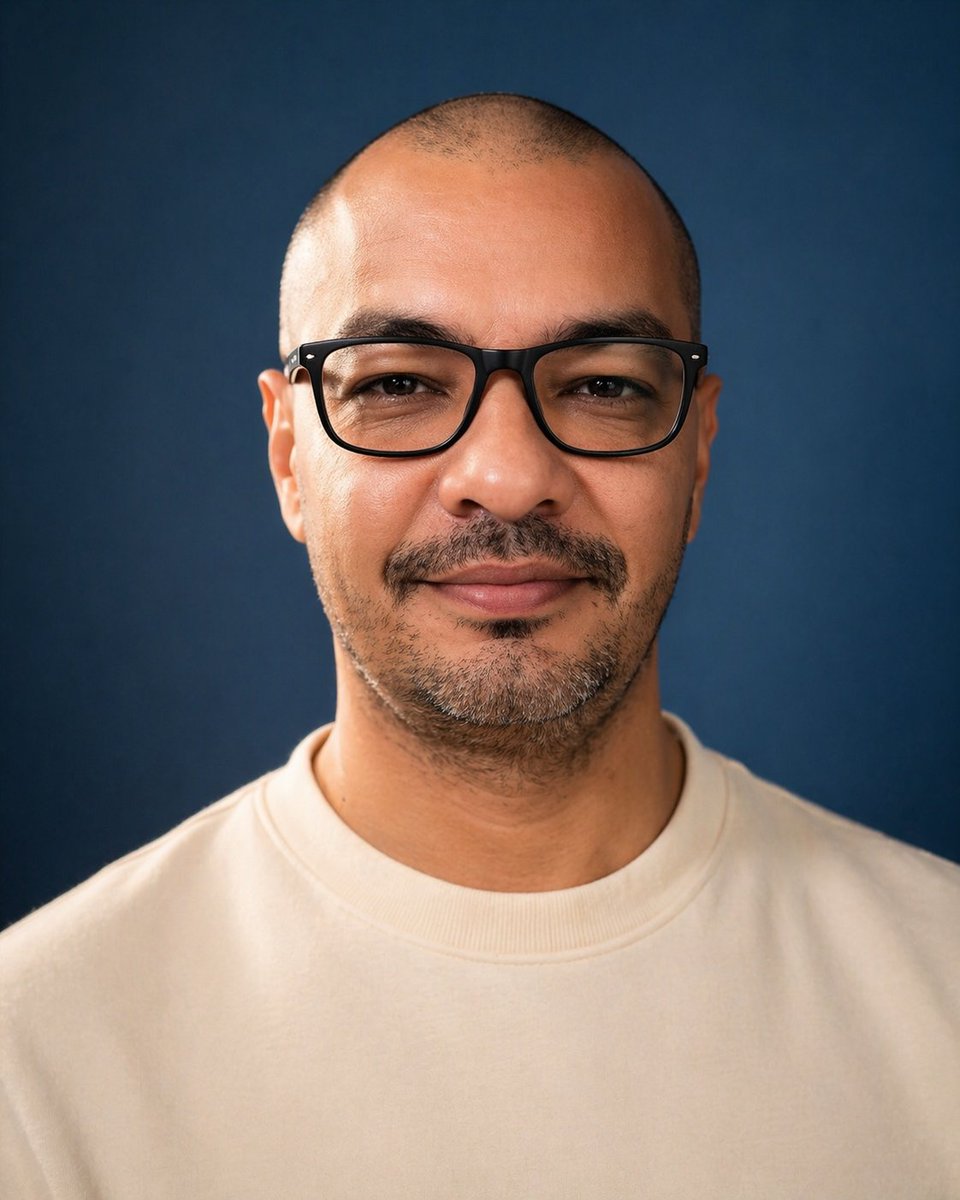
Anonymous Face-Blocked Portrait — Sora 2 Prompt

This prompt creates a realistic studio headshot with a large opaque block hiding the face, ideal for privacy visuals and anonymous avatars.
Anonymous Face-Blocked Portrait — Sora 2 Prompt
提示词 · EN
一张居中的摄影棚肖像照,拍摄对象为一名成年男性,取景范围从胸部上方至头顶,正对镜头,背景为平滑的深海军蓝色。他留着极短的寸头,双耳清晰可见,肤色为中等棕褐色,下巴和下颌线处有短促的深色胡茬,并带有淡淡的八字胡。让他穿着一件纯色米白色或奶油色圆领卫衣,无任何标志。采用柔和的专业摄影棚灯光,在头皮、耳朵、颈部和卫衣上形成柔和的高光,呈现逼真的皮肤纹理、浅景深以及干净的摄影质感。采用对称构图,头部靠近画面顶部,宽阔的肩膀填充下半部分,呈垂直肖像方向。在面部中心覆盖一个巨大的不透明矩形遮挡块,覆盖范围从前额到鼻部下方,横跨大部分面部宽度;将遮挡块设为平坦的柔和棕色调,边缘略微柔化,使面部特征完全被隐藏。

关于这个提示词

This prompt creates a realistic studio headshot with a large opaque block hiding the face, ideal for privacy visuals and anonymous avatars. 它更适合作为 GPT Image 2 的概念艺术起点:先保留画面结构、主体关系和风格约束,再替换成你的品牌、人物或场景。

使用时建议先小幅修改主体、场景、镜头和色调,再生成多个版本对比构图与细节。这样页面内容对用户有实际帮助,也避免把模型名或标签机械堆在正文里。

如何使用这个提示词

  1. Copy the prompt to your clipboard.
  2. Paste it into Sora 2 or any AI image generator supporting text-to-image.
  3. (Optional) Modify details like clothing color, background, or block color if the model allows.
  4. Set aspect ratio to vertical portrait (e.g., 2:3 or 3:4) for best results.
  5. Generate and download your anonymous portrait.
常见问题

Freddy Montes

@fmontes→

发布时间
2026年4月25日
原始语言
EN
模型
GPT Image 2
分类
概念艺术
GPT Image 2概念艺术gpt-image-2twitter
浏览
330
复制
39
点赞
19

分享

更多来自 GPT Image 2

浏览全部
Anime Schoolgirls Sharing Transparent Umbrella — Sora 2 Prompt

Anime Schoolgirls Sharing Transparent Umbrella — Sora 2 Prompt

@yB7CqdfoDmrbhgD
Futuristic Google Search Ad — AI Prompt

Futuristic Google Search Ad — AI Prompt

@AiWithTariq
Guangzhou 2026 Poster: Silk Ribbon Cityscape — Sora 2 Prompt

Guangzhou 2026 Poster: Silk Ribbon Cityscape — Sora 2 Prompt

@alanlovelq

用 Sora2Hub 提示词更快创作。

把精选提示词页面作为可搜索入口,然后带着模型上下文直接进入生成流程。

探索更多提示词