
GPT Image 2AI 提示词
3D Social Media Shatter Poster — Sora 2 Prompt
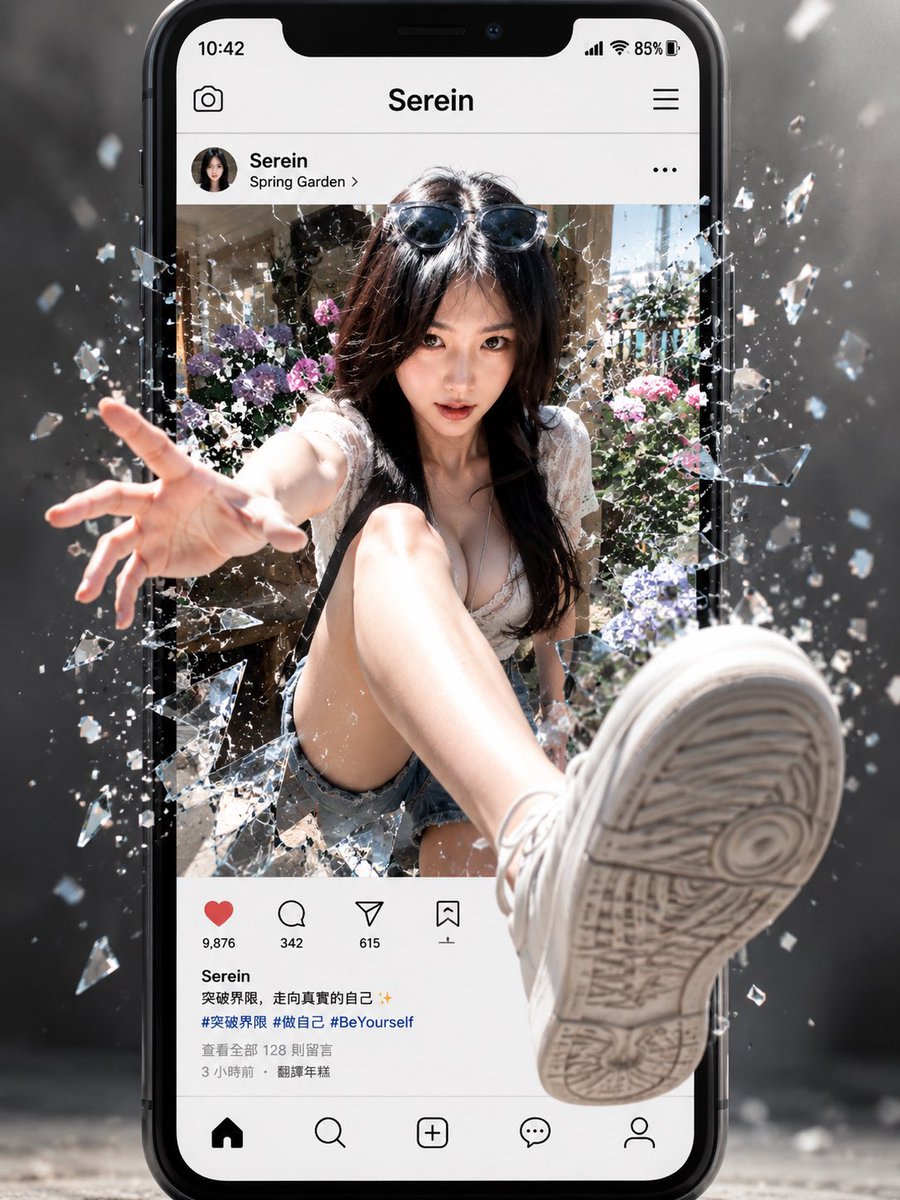
Create cinematic 3D posters of a model bursting through a shattered smartphone screen with extreme depth and photorealistic glass effects.
提示词 · EN
type
电影级 3D 社交媒体破壁海报concept
一位超写实的年轻女性从智能手机社交媒体帖子中冲出,击碎屏幕玻璃,呈现出极具深度的动态效果。main subject
description
时尚的年轻女性坐在照片帖子中,留着黑色长发,头顶架着太阳镜,身穿白色蕾丝夏装上衣、牛仔短裤和白色运动鞋pose
一只手用力穿过碎玻璃伸向观众,一条腿向前伸出,使运动鞋底在前景中显得巨大,采用极端的广角透视face
故意用柔和的矩形模糊遮挡块覆盖customizable identity
{argument name="character name" default="Serein"}device and interface
device
竖立的大型黑色现代智能手机,具有类似 iPhone 的圆角边框和刘海屏top status bar
时间 10:42,信号图标,Wi-Fi,电量 85%app header
居中标题 {argument name="profile name" default="Serein"},左侧相机图标,右侧汉堡菜单post header
圆形头像,用户名 Serein,位置 Spring Garden,三点菜单visible UI components count
9visible UI components
item 1
状态栏item 2
相机图标item 3
应用标题item 4
汉堡菜单item 5
帖子个人资料行item 6
三点菜单item 7
互动按钮行item 8
标题和标签块item 9
底部导航栏engagement buttons count
4engagement buttons
item 1
带有 9,876 个赞的红色爱心item 2
带有 342 条评论的对话气泡item 3
带有 615 次分享的纸飞机item 4
带有 1 个收藏的标签图标bottom navigation icons count
5bottom navigation icons
item 1
首页item 2
搜索item 3
创建加号item 4
消息气泡item 5
个人资料轮廓caption text
{argument name="caption text" default="Serein\n突破界限,走向真实的自己 ✨\n#突破界限 #做自己 #BeYourself\n查看更多 128 则留言\n3 小时前 · 翻译年糕"}environment inside post
阳光明媚的庭院,有花卉、绿植、浅色石墙,明亮的户外夏季氛围glass effect
description
当主体离开帖子时,手机屏幕在主体周围呈现出剧烈破碎的效果shards
许多透明的玻璃碎片和闪烁的碎屑向四面八方飞溅,尤其是左右边缘motion
定格在爆炸瞬间,碎片悬浮在空中camera and composition
framing
竖向 4:5 海报构图,智能手机居中并占据画面大部分空间perspective
极端的 3D 深度,左侧前景中伸出的手臂和右下角前景中巨大的运动鞋底形成透视缩短效果focus
手机和主体清晰,背景略带烟雾感并虚化lighting
{argument name="lighting style" default="电影级高对比度阳光,玻璃碎片上有轮廓光"}style
超写实广告合成,光泽感智能手机样机,社交媒体 UI 真实感,大片动作能量,戏剧性的碎屏传送门效果,高细节,景深,动态冲击力background
带有雾气、焦外成像、浮尘和玻璃颗粒的深灰色摄影棚环境,位于手机后方negative instructions
没有多余的肢体,没有变形的手机边框,没有无法辨认的主要 UI 标题,没有卡通风格,没有低分辨率纹理关于这个提示词
Create cinematic 3D posters of a model bursting through a shattered smartphone screen with extreme depth and photorealistic glass effects. 它更适合作为 GPT Image 2 的概念艺术起点:先保留画面结构、主体关系和风格约束,再替换成你的品牌、人物或场景。
这条提示词使用结构化 JSON 组织信息,包含 type、concept、main subject、device and interface、environment inside post、glass effect、camera and composition 等字段。保留这种层级能让模型更清楚地区分画面主题、布局、界面元素和细节约束。
使用时建议先小幅修改主体、场景、镜头和色调,再生成多个版本对比构图与细节。这样页面内容对用户有实际帮助,也避免把模型名或标签机械堆在正文里。
如何使用这个提示词
- Copy the full prompt from the page and paste it into your Sora 2 or compatible AI video/image generator.
- Customize the variables like
character name,profile name,caption text, andlighting styleto match your brand or vision. - Choose the appropriate aspect ratio (4:5 vertical is recommended for social media posters).
- Generate the image and review the output — adjust lighting or perspective arguments if needed for better results.


